Talking Character Generator: Make Any Character Speak
AI Talking Character generator
Tell the agent what your character should say, pick who says it (or make a new character from a photo), and get a lip-synced talking video in any of 140+ voices and 30+ languages.
How to make an AI character talk in 3 steps
One box, one character, one lip-synced video.
Type a topic or paste the exact lines into the box at the top of this page.
The agent asks who speaks: one of your saved characters, or a new one made from a photo or a description.
You see the script and the credit cost first, then the video renders with the face lip-synced to the voice.
Use Cases
From social media to education to brand marketing: see how creators use AI talking characters.
Create engaging talking characters for TikTok, Instagram Reels, and YouTube Shorts that capture audience attention and drive engagement.
Turn static educational content into interactive lessons with talking historical figures or animated characters explaining complex concepts.
Develop unique brand mascots and spokespeople that deliver consistent messaging across all your marketing channels.
Create virtual assistants and help guides with personalized characters that explain products, answer FAQs, and enhance customer experience.
Bring game characters to life with realistic speech and expressions, or create fun talking pets and toys for entertainment content.
Enhance your business presentations with professional talking avatars that can deliver key points in a polished, consistent manner.
Talking character, speaking character, or chatting with one?
Three different searches land here. Here's which one this tool actually serves.
A talking character
A character (mascot, cartoon, historical figure, product with a face) delivering lines you wrote, lip-synced to a real voice. That's exactly what the generator above makes: pick or create the character, write the script, render the video.
A speaking character
Same thing, different word. Whether you call it a speaking character, a character that talks, or an animated spokesperson, the pipeline is identical: script, face, voice, lip-sync, with 140+ voices in 30+ languages, so your character can speak languages you don't.
Talking to a character
A live back-and-forth conversation or a video call with an AI character is a chat app's job. ClipTalk doesn't do that, and this page won't pretend it does. But if you want the content version (a character answering questions or reacting on camera), script the exchange here and render it as a finished video instead.
Everything you need to bring your characters to life
Fully customizable video creation
Add styles, Change voice actors, Choose from 140+ voices in 30+ languages, Add Music and more...
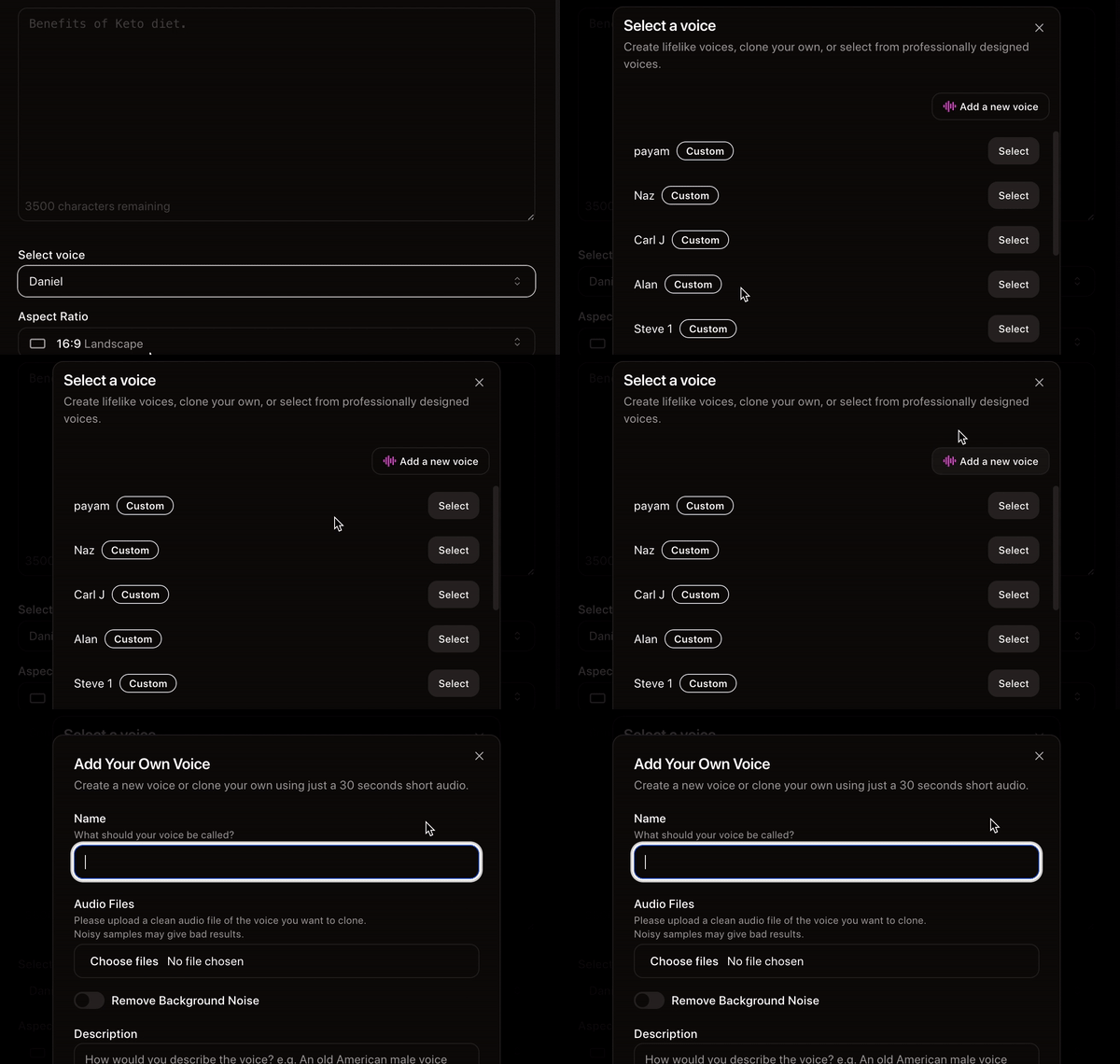
Clone any voice in seconds
Clone a voice with high accuracy using just a short, 30-second speech sample. and use it in your videos.
A simple yet powerful video editor
add your own images, videos, and audio or generate them using the latest AI. have full creative control over your creations.
AI talking character videos generated by ClipTalk
Finished, voiced, lip-synced videos. Your character renders through the same pipeline.
Started my faceless YT channel tuesday and im already at 20k views, only posted shorts from Cliptalk Pro
lyraTV
Youtube Creator
I have been saving hours of time with Cliptalk, before it I had to create short videos manualy doing borinng copy and paste from different AIs now everything is provided so I can just make my videos easily in minutes
Leon
Digital Marketer
The customer service I received was exceptional. The support team went above and beyond to address my concerns. they implemented a new feature in a day just to address my needs.
Marieta Kostova
Marketing coach
I'm running 3 Faceless channels on different niches alone, I could never do it withour help of Cliptalk AI, it's really fast with high quality output
Lantos sar
Content Marketer
Say goodbye to the struggle of creating short form videos for platforms like TikTok, YouTube Shorts, Instagram Reels, because Cliptalk has got you covered.
Tim Timothy
Content Creator
We just discovered @CliptalkAI and honestly I was blown away! I have started turning all of our ideas into videos and posting across all of our social medias and we are getting tons of new traffic to our website now
Younan.edu
Entrepreneur
Frequently asked questions
Related Free AI Tools
All free AI tools →AI Influencer Video Generator
Generate UGC-style influencer videos with a consistent AI persona.
Talking Pet AI
Make your pet talk — upload a photo and give it a voice.
AI YouTube Script Generator
Turn any topic into a ready-to-record YouTube script in seconds.
YouTube Name Generator
Get unique YouTube channel name ideas for any niche — free, no signup.