10 Best AI Video Generators for TikTok, Tested in 2026
· 12 min read
The best AI video generator for TikTok depends on what you need at the end: a finished, captioned vertical video ready to post, or a raw generated clip that you will edit yourself. For most creators, faceless channel operators, and marketers, I recommend Cliptalk, because it turns a prompt, script, or article into a fully edited short with captions, B-roll, and an AI voiceover in one pass, so nothing is left to assemble.
I have used every tool below to make TikToks, and they are not all the same kind of product. Some are generative models that render brand-new footage from a sentence. Others are assemblers that take your script and build an edit from voice, visuals, and captions. A few do one narrow trick very well. Knowing which kind you are using saves you hours of frustration.
Quick comparison
| # | Tool | What it does best | Best for | Main drawback |
|---|---|---|---|---|
| 1 | Cliptalk | Script, prompt, or article to a fully edited short with captions, B-roll, voiceover | Faceless channels, daily posters, marketers | Not a cinematic clip generator |
| 2 | CapCut | AI tools inside a full editor, long-to-short clipping, one-click TikTok sharing | People who already film and edit | You still bring footage or rely on templates |
| 3 | Creatify | Product URL to avatar ad, batch variations | Ecommerce and paid social | Built for ads, not storytelling |
| 4 | Fliki | Huge voice library, multilingual, content series planning | Voice-first and multilingual creators | Stock-driven visuals can feel generic |
| 5 | Viggle | Photo to full-body dance or meme motion | Trend and character accounts | Very narrow use case |
| 6 | Kling | High-quality generated clips from text or images | Hero shots and custom B-roll | Gives you clips, not a finished TikTok |
| 7 | Pixlr | Access to Veo, Kling, and Seedance in one place | Testing several models cheaply | Single clips only |
| 8 | Renderforest | Template animations plus stock and AI images | Small business promos | Looks more like an ad than native TikTok |
| 9 | Steve AI | Animated vector characters and explainers | Animated explainer content | Style suits few niches |
| 10 | Visla | Text to stock-based video with team workspaces | Marketing teams | Watermark unless you pay |
The 10 best AI video generators for TikTok
1. Cliptalk
This is the tool I use most for TikTok because it covers the full workflow. You give it a text prompt, a full script, or even an article, and it returns an edited vertical video with captions, AI-chosen B-roll, an AI voiceover, and optional AI characters. If the result is close but not perfect, a built-in video editor lets you swap a scene or adjust timing without exporting to another app.
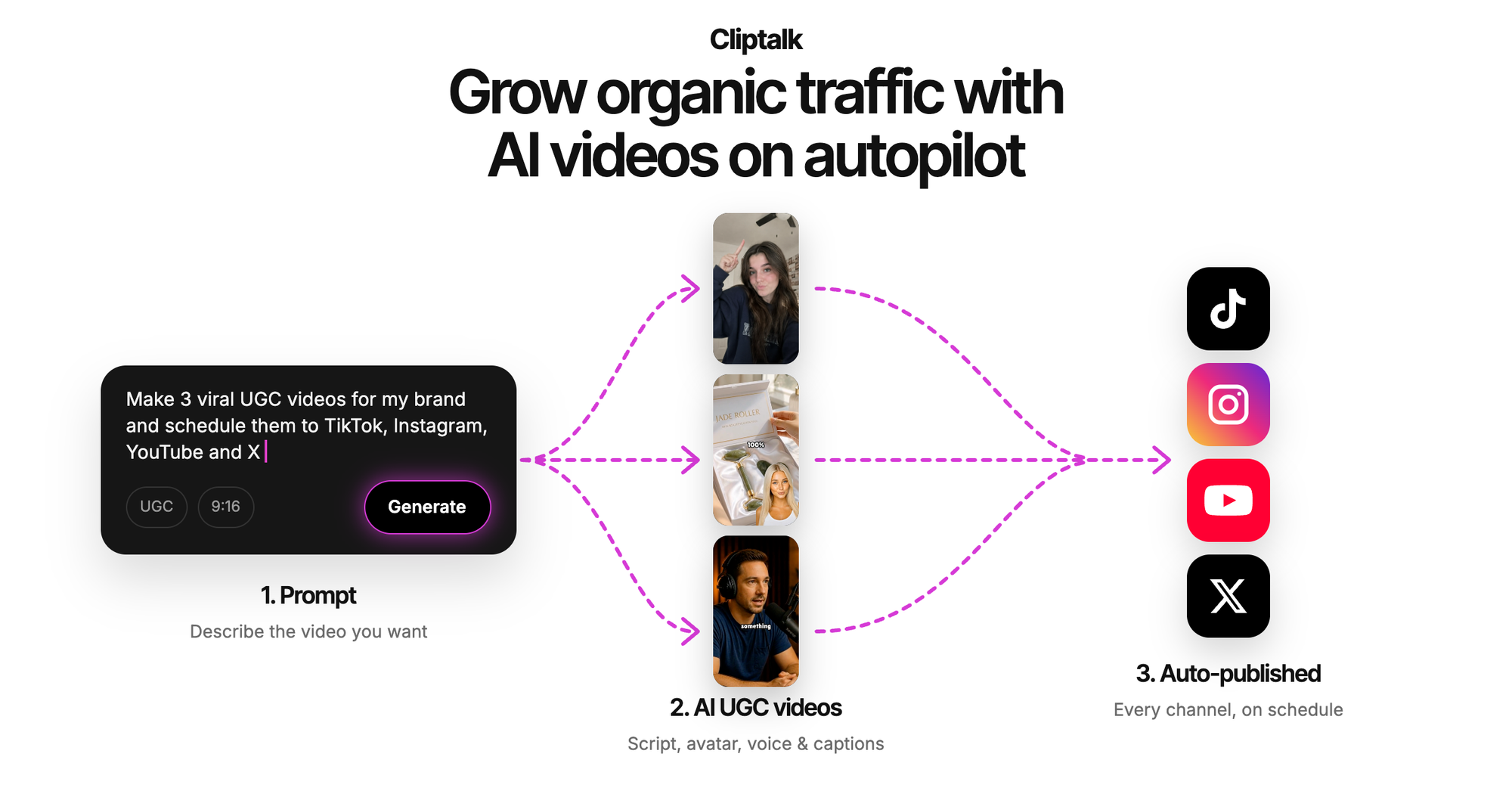
The feature that changed my routine is voice cloning. On a faceless channel, a consistent voice is your brand, and cloning means every video sounds like the same narrator without you recording each one. The free script generator also helps: you describe an idea and get a word-for-word spoken script, from hook to call to action, with no signup, and then you render it as a video. You can try the free AI video tools with starter credits before you commit to anything.
Pros
- One input becomes a finished, captioned, narrated short, so you have nothing left to stitch together
- Voice cloning and AI characters keep a faceless channel consistent
- Accepts prompts, scripts, or whole articles, which makes repurposing blog content fast
- Built-in editor for fixes, so you are not forced into a second tool
Cons
- It assembles and edits videos. It is not the tool for rendering a photoreal, physics-heavy fantasy shot from scratch. Kling or Veo do that better
- On niche or technical topics, review the automatic B-roll picks, because a literal match is not always the right one
- Free credits get you started, but daily posting at volume means a paid plan
Best for: faceless channel operators, creators posting every day, and marketers who want to turn existing text into Shorts, Reels, and TikToks without editing skills.
2. CapCut
CapCut ranks near the top of Google for this search, and with good reason. It is a capable editor with AI layered on top. You can paste a script and get a video, pick template styles like realistic film, cartoon 3D, or cinematic, choose from AI voices and avatars, and share directly to TikTok in one click. Its strongest AI feature for me is clipping: it can analyze one long video and cut it into ten or more short clips.
Pros
- Turning one long video into many shorts is excellent for podcasters and streamers
- One-click posting to TikTok
- A full manual editor when you want frame-level control
Cons
- At heart it is still an editor. The best results come when you supply your own footage
- Popular templates get recognizable fast on the For You page
- It pushes you toward the desktop download
Best for: creators who already film and want AI to speed up editing, not replace it. I compared the two workflows in detail in AI video editor vs CapCut for short-form editing.
3. Creatify
Creatify is built for selling. Paste a product URL, script, or image and it produces a UGC-style ad with an AI avatar, with a claimed 1,500+ avatars and 140+ voices to choose from and finished videos in under three minutes. Batch mode creates dozens of variations, which is what you want for A/B testing ads. It supports 75+ languages and publishes directly to TikTok.
Pros
- Product URL to ad is a real time-saver for ecommerce
- Batch variations make creative testing practical
- No credit card required to start
Cons
- Everything leans toward ads, so storytelling or educational channels will fight the format
- Avatar presenters can read as synthetic to viewers who scroll TikTok all day
Best for: ecommerce brands and performance marketers running paid TikTok campaigns.
4. Fliki
Fliki's strength is voice. It advertises 2,000+ AI voices across 80+ languages, plus voice cloning from a short sample. Its Series feature plans upcoming videos from your topic, style, and posting schedule, and a digital twin feature creates an AI presenter version of you. It also offers one-click publishing to TikTok, Instagram, and YouTube.
Pros
- The widest voice and language range on this list
- Series planning helps if staying consistent is your problem
- Faceless templates designed for TikTok, Reels, and Shorts
Cons
- The visuals are often stock-driven and can look generic next to the voice quality
- The tool covers training, podcasts, and explainers, so TikTok is one use among many
Best for: multilingual creators and anyone whose content lives or dies on the narration.
5. Viggle
Viggle does one thing: it takes a single photo and animates it with full-body motion. You pick from 10,000+ motion templates (trending dances, meme clips, lip sync challenges), upload a selfie, pet photo, or character drawing, and get a vertical video in under a minute. Signed-in users get up to five free videos per day.
Pros
- The fastest way to join a dance or meme trend before the sound fades
- Real character motion, not a filter
- A usable free daily allowance
Cons
- Very narrow. No scripts, no narration, no informational content
- Results depend heavily on the source photo showing a clear, full body
Best for: meme pages, character accounts, and anyone chasing trend formats.
6. Kling
Kling is a true generative model. It creates footage from text prompts or still images, supports start and end frames to control how a shot begins and ends, uses reference images or video to guide output, and some models generate dialogue and sound effects along with the visuals. When I need a shot that does not exist in any stock library, this is where I go.
Pros
- Original footage you cannot get anywhere else
- Image-to-video keeps your subject and composition intact
- Strong control through frames and references
Cons
- You get clips, not a TikTok. Captions, pacing, voiceover, and the edit are still your job
- Temporal consistency is the core challenge of generative video: a single frame can look perfect while the motion drifts. Text, logos, and product details also distort
- Every clip needs human review before posting
Best for: hero shots, custom B-roll, and visual hooks that you then drop into a fuller edit.
7. Pixlr
Pixlr's video generator is a front end to several models. You choose a tier: Fast (Seedance Lite) for cheap iterations, Pro (Kling V2) for smooth everyday motion, or Ultra (Google Veo) for the most cinematic results. It works from text or images, exports HD MP4 without watermarks, and supports 9:16 for TikTok. Generations finish in under a minute.
Pros
- Try several leading models without separate accounts
- No watermark on exports
- Portrait output built in
Cons
- Same limitation as Kling: single clips with no narration, captions, or structure
- Picking the right tier for a shot takes some trial and error
Best for: creators who want to sample different generative models for B-roll on a budget.
8. Renderforest
Renderforest turns an idea or short script into a video by matching it to its template library. It can also pull stock footage for a realistic look or generate custom AI images for a more unique style. I like that you can review a storyboard step by step and describe changes in plain text. Everything runs in the browser.
Pros
- Storyboard review gives you control before rendering
- Plain-text editing is quick
- Works in the browser with no software to install
Cons
- Template animation reads as a brand promo, which TikTok audiences tend to scroll past
- Less suited to a personality-driven or faceless storytelling channel
Best for: small businesses making product demos and brand clips.
9. Steve AI
Steve AI focuses on animation. It offers 5+ video styles and 300+ vector-based avatars, and claims script to video in under five minutes. It suits faceless marketing content like explainers, news briefs, and product demos.
Pros
- A distinctive animated look if that matches your brand
- Fast script-to-video turnaround
- Works well for explainers
Cons
- The vector style only suits a few niches on TikTok
- Larger plans steer you toward a sales call
Best for: brands and educators who want animated explainers.
10. Visla
Visla takes pasted text, rewrites it into a video script, and pairs it with stock footage, an AI voiceover, and music. Scene-based editing lets you swap clips, fix voiceovers, and update branding, and team workspaces support comments and shared edits.
Pros
- Automatic script rewriting from rough text
- Collaboration features that most tools here lack
- Clear scene-by-scene editing
Cons
- Watermarks are only removed for Premium users
- Built for business teams more than solo creators
Best for: marketing teams producing TikToks together.
Canva and InVideo also rank well for this search. Both are worth a look if you already work inside them, but in my testing neither beat the tools above for TikTok specifically.
Generators vs assemblers: why it matters
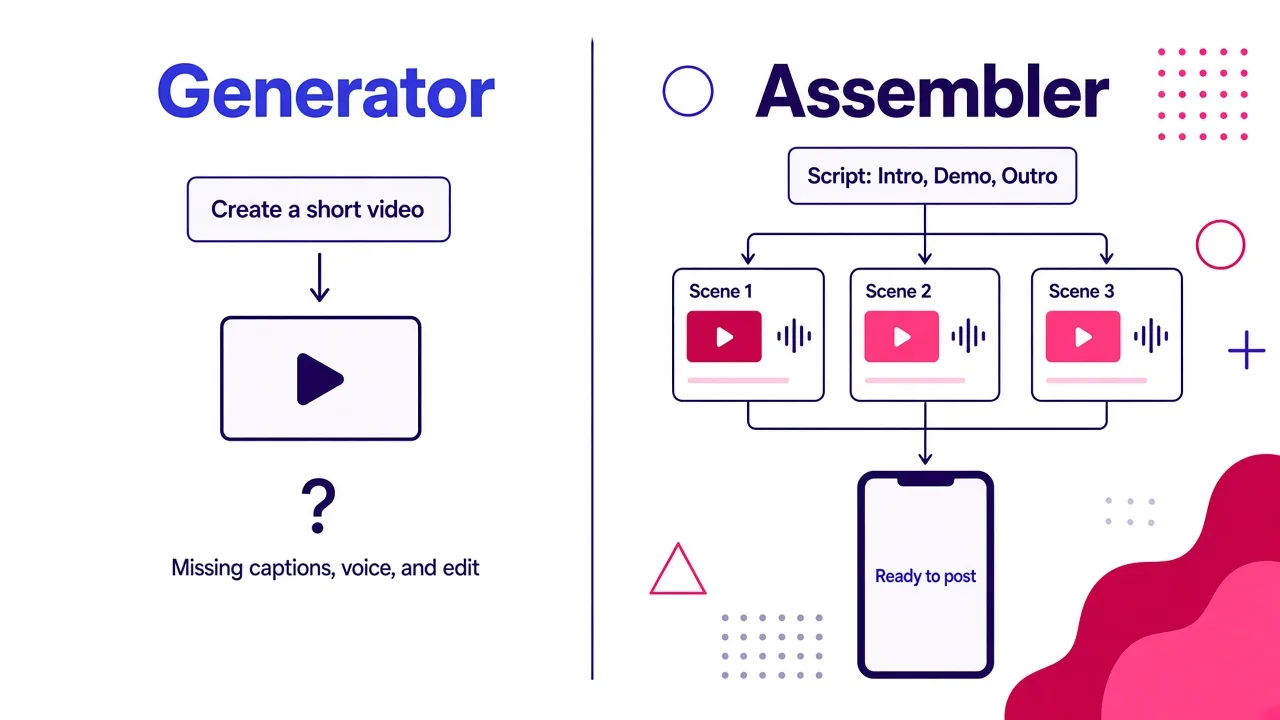
Most disappointment with "AI TikTok tools" comes from expecting one kind of tool to behave like the other. Generative models like Kling, Veo, and Seedance learn patterns from huge amounts of visual and language data, then render a sequence of new frames that has to stay coherent over time. Assemblers work differently. They use language processing to break your script into scenes, then pair each scene with visuals, a synthesized voice, music, and captions, and sync it all into one edit.
This video is the clearest explanation I have found of how the generative side works under the hood:
In practice, my workflow mixes both. I write the script, let an assembler build the full edit with voice and captions, and only reach for a generative model when one scene needs a shot no library has. That combination gets you most of the quality for a fraction of the time.
Tips for better AI TikToks
These habits made the biggest difference in my results, whichever tool you choose.
Write the script before anything else. A weak script cannot be rescued by good visuals. The hook in the first seconds decides whether anyone sees the rest. If you are stuck, a free script generator that writes the full spoken script word for word gets you a hook-to-CTA draft in seconds, and you can edit from there.
Give each clip one purpose. With generative tools especially, one subject and one action per shot produces far cleaner motion than a prompt describing three things happening at once.
Run a short test first. Generate a 10 to 15 second version before committing credits to a full video. Check voice pacing, caption timing, and whether the visuals match your words.
Review it like any production asset. Read every caption, because one wrong auto-caption word gets screenshotted. Check that B-roll fits the context and not just the keyword. Never trust AI-rendered text, logos, or product details without checking.
Be careful with likeness and voices. Only clone voices and use faces you have the rights to. If a clip looks realistic enough to be mistaken for real footage, label it as AI-generated.
For a quick, vertical-format overview of how AI video generation works, this short is worth a minute:
FAQ
Is there a free AI video generator for TikTok? Several tools on this list have free entry points: Viggle offers up to five free videos a day, Pixlr exports without watermarks, Creatify needs no credit card to start, and my top pick offers a no-signup script generator plus free starter credits. For regular posting, expect to pay for a plan. Check whether free exports carry a watermark, because Visla's do unless you upgrade.
Can I use my own voice? Yes. Voice cloning from a short sample is available in my number one pick and in Fliki. It is the single best upgrade for a faceless channel, because viewers recognize a consistent narrator.
Do I need editing skills? Not with an assembler. Script-to-video tools handle captions, visuals, and voice for you. Generative models and CapCut reward editing skills much more.
Which tool gives the most realistic footage? Generative models. Kling and Google Veo (available inside Pixlr's Ultra tier) produce the most cinematic clips, but you will still need to edit those clips into a TikTok.
The verdict
If you want to go from an idea to a finished, captioned, narrated TikTok with the least work, Cliptalk is the strongest all-round choice, especially for faceless channels and anyone repurposing written content. Choose CapCut if you already film and edit, Creatify if you run product ads, Fliki if multilingual voice is the priority, Viggle for dance and meme trends, and Kling or Pixlr when you need custom shots that no stock library has. Whichever you pick, the script and the review step matter more than the tool.
Tags: tiktok, ai video, short-form video, faceless channels, video editing tools