Can Text to Video AI Build a Full Video From One Prompt?
· 13 min read
Yes, text to video AI can build a full video from one prompt. What "full" means depends on the tool. Cinematic generators turn a prompt into a short clip, often around 10 seconds, with no script, voiceover, or edit. Full-video tools take that same prompt and return a finished short with a script, voiceover, B-roll, captions, and music. For TikTok, YouTube Shorts, and Instagram Reels, I recommend Cliptalk. One prompt gives you a captioned, voiced, B-roll-edited vertical video, and you can still change any scene, line, or voice afterward instead of starting over.
That's the quick answer. The rest of this article covers what happens between your prompt and the export, where one-prompt videos still fall short, and how I write prompts so the first draft is close to publishable.
What "one prompt" actually produces
Two people can type the same sentence into two different text to video AI tools and get very different results. That gap is why the topic is confusing.
Here's how I think about the outputs:
- A clip. A few seconds of generated footage, sometimes with synced ambient audio. Useful as a shot. Not a video you can post on its own.
- A sequence. Several clips stitched together around a theme, often with music but no narration or captions.
- A finished short. A hook, a spoken script, matched visuals for each line, burned-in captions, background music, and a vertical export. This is what most creators mean by "a full video."
- A long-form video. Several minutes or more, built from many scenes. Several YouTube tutorials claim 30-minute videos from a single prompt. Possible, but only with stitching and real review time.
When someone asks if AI can make a full video from one prompt, they usually mean the third option. That's achievable today. The tool just has to do much more than generate pixels.
Two very different kinds of text to video AI
Most confusion comes from lumping two product categories together. One group generates footage. The other group produces videos. They solve different problems.
| Type of tool | What one prompt gives you | Typical example from the market | Best for |
|---|---|---|---|
| Full short-form video assembler | Script, voiceover, B-roll per scene, captions, music, vertical export | Cliptalk | Faceless channels, creators and marketers posting daily to TikTok, Shorts, Reels |
| Storyboard-first workplace video tools | Suggested scenes, scripts, and voiceovers you then refine in an editor | Google Vids (prompt plus a Doc from Drive) | Internal training, team updates, sales and support videos |
| Avatar and text-to-speech video makers | A talking presenter reading your text in many languages | Vmaker AI (120+ languages) | Explainers and multilingual presenter videos |
| Cinematic clip generators | One generated shot, often around 10 seconds, sometimes with synced audio | LTX-2.5 style models, Veo-based tools | Concept shots, B-roll, visual prototypes |
| Article-to-video converters | A slideshow-style video built from a blog post or URL | Wave.video, Pictory, Lumen5 | Repurposing long written content |
Here's a concrete example of the clip-generator side. One published LTX-2.5 example rendered a mountain trekker shot at 832×480, about 10 seconds long, with stereo wind and footstep audio. It looks impressive. It's still one shot. You'd need 6 to 10 of those, plus a script, voice, captions, and an edit, before you had a 45-second short.
Full-video assemblers do the opposite. They start from structure and fill each slot with visuals, which can be stock, AI-generated, or uploaded. That's why they reliably produce something postable from one prompt.
What happens between your prompt and the finished video
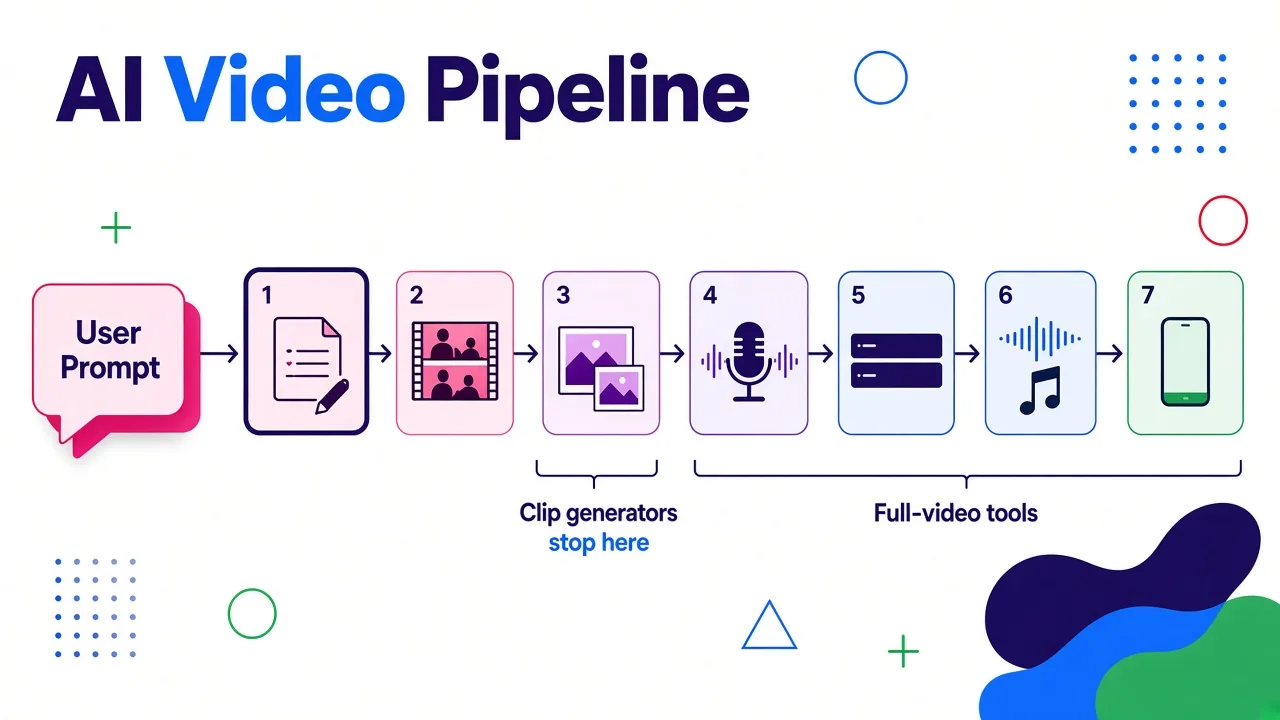
Knowing the pipeline makes you better at prompting, because you can see which step your words actually control. Every serious prompt-to-video tool I've used runs some version of this:
- Script generation. The tool expands your prompt into a spoken script: a hook, a body, and usually a call to action. Script quality decides whether the video works at all.
- Scene splitting. The script gets cut into scenes, usually one sentence or idea per scene. Vadoo describes this step as automatically dividing your text into scenes for a natural flow, and most tools work the same way.
- Visual matching. For each scene, the tool picks or generates B-roll that fits the words. This is where most quality differences appear. I covered how this decision gets made in how an AI video generator from text picks visuals.
- Voiceover. An AI voice, or your own cloned voice, reads the script. Pacing here sets the timing for everything else.
- Captions. Word-level captions are generated from the voiceover and styled for mobile viewing.
- Music and pacing. Background music is added and ducked under the voice. Cuts are timed to the narration.
- Export. Usually 9:16 for short-form, sometimes 16:9 or 1:1.
A clip generator only does a version of step 3. A full-video tool does all seven. When people say "AI made this entire video from one sentence," they're describing all seven steps running automatically.
Watching the one-prompt claim in action
If you want to see the full pipeline run end to end before trying it yourself, this walkthrough shows a tool going from a single prompt to a complete video:
Pay attention to which parts the creator touches after generation. In my experience, that tells you more about a tool than the first render does. A good one-prompt tool gets you 80 to 90 percent of the way there and makes the last stretch quick.
What about long videos from one prompt?
Several of the most-cited YouTube tutorials on this topic promise 30-minute videos or "full films" from one prompt. They're not lying. They're just describing a different workflow from short-form.
Long one-prompt videos usually work like this:
- The prompt gets expanded into a long script or an outline of chapters.
- Each chapter is broken into dozens of scenes.
- Each scene gets a generated clip or stock footage, often from models like Veo.
- Everything is stitched together with narration over the top.
This tutorial shows that approach with Invideo and Veo:
From testing this myself, here's my honest view: long one-prompt videos are good for first drafts and bad for finished uploads. The longer the video, the more you notice:
- Character drift. A person in scene 4 doesn't look like the same person in scene 40.
- Repeated visuals. The same kinds of shots keep coming back because the script keeps saying similar things.
- Flat pacing. A 30-minute narration with no human editing tends to sag in the middle.
- Factual errors. The longer the script, the more chances the AI has to state something wrong with total confidence.
For short-form, these problems mostly go away. A 30 to 60 second video has 6 to 12 scenes. You can review every one of them in a couple of minutes. That's why I think "one prompt to finished video" is a solved problem for Shorts and Reels and still a draft tool for long YouTube videos.
Where one prompt still falls short
Even for short videos, a single prompt can't read your mind. These are the weak spots I keep running into across tools:
- Generic hooks. If your prompt is vague, the script opens with a vague line. The first two seconds matter most on short-form, and AI defaults to safe openers.
- Literal visual matching. A line like "money is draining from your account" can produce footage of literal water draining. Abstract ideas get literal B-roll unless you guide it.
- Audio that needs a human ear. Even Giz, which sells generation, notes in its examples that generated performance audio is illustrative and timing still needs human review. The same goes for AI voices pronouncing brand names, acronyms, or non-English words.
- Model-guided timing. If you don't specify pacing, the model decides. Giz points out that when a prompt doesn't direct camera speed, the model sets the timing itself. For full videos, that means narration speed and cut rhythm default to whatever the tool prefers.
- Facts and claims. AI scripts will happily invent a statistic. If your niche involves health, finance, or history, check every claim.
- Brand consistency. Fonts, caption style, colors, and voice need to be set once as defaults. Otherwise every video looks a little different.
None of these are reasons to skip one-prompt generation. They're reasons to pick a tool where fixing them takes seconds, not a full re-render.
How I write a prompt that gets a usable video on the first try
Most people type a topic and hope for the best. The quality jump from a topic to a real prompt is big. Here's the structure I use for short-form:
1. State the format and length. "A 45-second vertical video for TikTok." This controls script length and scene count.
2. Name the audience. "For beginner home cooks" produces a very different script than "for professional chefs."
3. Write or dictate the hook. Give the exact first line if you have one. If not, describe the angle: "Open with the mistake most people make."
4. List the beats. Three to five points the video must cover, in order. This is the single biggest quality lever.
5. Set the tone and voice. "Fast, confident, a little funny" or "calm and authoritative." Say whether you want a male or female voice, or your cloned voice.
6. Describe the visual style. "Real-world stock footage, close-ups, warm lighting" or "AI-generated cinematic scenes." For clip generators, the Giz approach of naming subject, action, camera, lighting, and sound is exactly right. For full-video tools, a style line per video is usually enough.
7. End with the CTA. "End by telling viewers to follow for part two."
Here's a real example of the kind of prompt I'd use:
A 40-second vertical video for YouTube Shorts aimed at new freelancers. Hook: "You're undercharging, and here's the math that proves it." Beats: 1) most freelancers price by the hour, 2) clients pay for outcomes, 3) how to quote a project price instead, 4) one sentence to say when a client pushes back. Tone: direct and confident, male voice. Visuals: real stock footage of laptops, invoices, coffee shops, close-ups. End with "Follow for the pricing template."
That one prompt carries enough detail for a tool to write a strong script, split it into the right scenes, and pick visuals that fit. A topic like "freelance pricing tips" doesn't.
If you'd rather start from a finished script than a prompt, a free YouTube script generator will write the full spoken script from hook to CTA, word for word, which you can then render as a video.
My workflow for a finished short from one prompt
This is the process I use day to day with Cliptalk, because it covers all seven pipeline steps in one place and keeps every part editable.
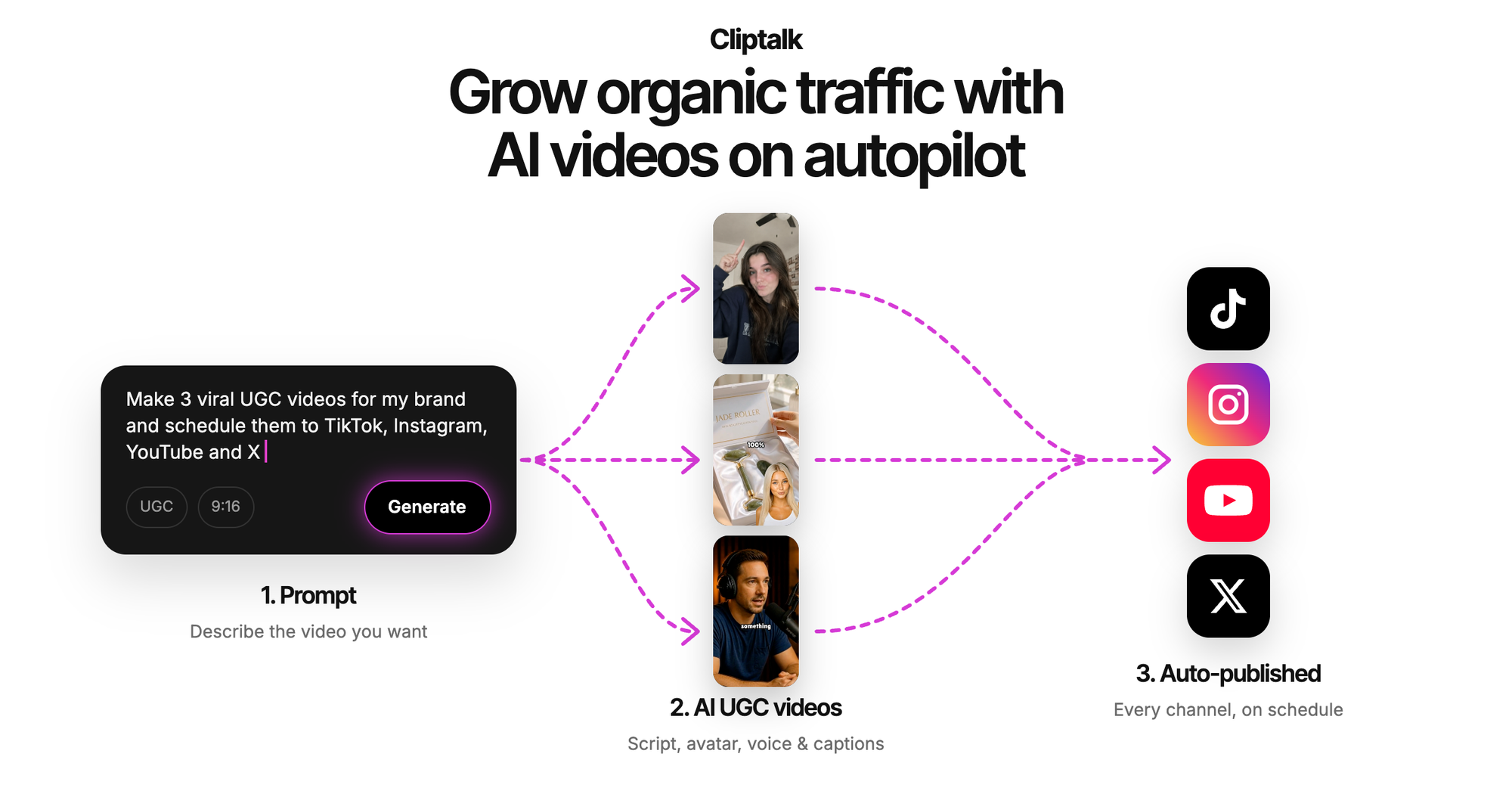
Step 1: Prompt. I paste a structured prompt like the one above, or a script, or a full article if I'm repurposing a blog post.
Step 2: Review the script before anything else. I read the generated script first. If the hook is weak, I rewrite that one line. Fixing a sentence takes ten seconds. Fixing a rendered video that's built on a weak sentence takes much longer.
Step 3: Scan the scenes. Each scene shows its line of narration and its B-roll. I swap any clip that's too literal, too generic, or repeated. This usually means two or three swaps on a 40-second short.
Step 4: Pick the voice. For faceless channels, I use one consistent AI voice so the channel has a recognizable sound. For personal brand content, I use voice cloning so the narration sounds like me without recording every video.
Step 5: Add a character if the format needs one. Some niches perform better with an on-screen presenter. AI characters fill that role without a camera.
Step 6: Style the captions once. I set font, size, color, and highlight style, then reuse them. Captions do a lot of the work on muted autoplay feeds, so they're worth getting right.
Step 7: Export vertical and post. 9:16, then straight to TikTok, Shorts, or Reels.
Total hands-on time for a 40-second short is usually a few minutes, most of it spent on step 2. If you want to know how this kind of auto-editing compares to doing the same short manually, the comparison of AI video editors against CapCut on our blog walks through the tradeoffs.
One prompt, a script, or an article: which input wins?
Most full-video tools accept all three. They don't produce the same quality.
- A one-line prompt is fastest. Good for testing ideas and for formats you post often, like daily facts or quick tips. Expect to edit the hook.
- A structured prompt (format, audience, hook, beats, tone, visuals, CTA) is my default. It gives the best ratio of effort to quality.
- A finished script gives you the most control. Use it when wording matters: product launches, sponsored content, or anything with claims that need to be exact.
- An article or URL works well for repurposing. The tool condenses the piece into a short script. Check that it kept your best point and didn't open with your intro paragraph, which is usually the weakest part of any article.
When I want consistent output across a whole series, I write one structured prompt as a template and change only the topic and beats each time. The videos come out with the same rhythm, length, and style, which helps a channel feel deliberate.
How to judge a text to video AI tool before you commit
Every tool's landing page says it turns text into professional video in minutes. Here's the checklist I use to cut through that:
- Does one prompt produce a postable video, or just footage? Test with a real prompt from your niche, not the demo.
- Can you edit one scene without regenerating everything? This matters more than first-render quality.
- Can you rewrite the script after generation? And does the voiceover update automatically when you do?
- How are the captions? Word-level timing, readable on a phone, styleable.
- Is voice cloning available? Essential if you want a consistent personal sound.
- Are there watermarks on the free tier? Fine for testing, but know before you build a workflow around it.
- Does it export 9:16 natively? Cropping a 16:9 render into vertical rarely looks right.
- What's the real cost per video? Divide the plan price by the number of finished videos you'd actually publish, not by the credit count.
If you're comparing specific products, our side-by-side tool comparisons lay out what each one does best and who should pick which.
Who gets the most out of one-prompt video
From what I've seen, these groups benefit most:
- Faceless channel operators posting daily, where volume and consistency matter more than handcrafted edits.
- Solo creators who want to turn ideas into videos without learning a timeline editor.
- Marketers repurposing blog posts, product updates, and announcements into short-form clips.
- Educators and explainers breaking a topic into 30 to 60 second lessons.
The groups who'll find it least satisfying are filmmakers who need exact shot control and anyone producing long documentaries in one pass. For them, clip generators make better raw material and a human editor still runs the show.
So, can text to video AI build a full video from one prompt?
For short-form, yes. A good text to video AI tool can take one prompt and return a complete video with a script, voiceover, matched B-roll, captions, and music, ready to post on TikTok, Shorts, or Reels. The catch is that "full video" only happens when the tool handles every step of production, not just footage generation. Cinematic generators make beautiful 10-second shots. Full-video assemblers make posts.
For long-form, one prompt gets you a solid draft, not a finished upload. Expect to review scenes, fix drift, and check facts.
My advice: write a structured prompt, review the script before anything else, and pick a tool where you can fix one scene without redoing the whole video. That's the workflow I use with Cliptalk, and it's why one prompt reliably turns into a video I'm happy to publish.
Tags: text to video, ai video generator, short-form video, faceless channels, video prompts