7 Best AI Video Generators for YouTube Shorts
· 13 min read
If you want to publish YouTube Shorts without filming, editing, or hiring anyone, the fastest route today is a text-to-video generator: you give it a prompt, a script, or even a blog post, and it returns a finished vertical video with captions, B-roll, and a voiceover. After running the same three Short ideas through every tool on this list, my pick for most people is Cliptalk, because it goes from a raw idea to a 9:16 file with captions, AI voiceover, B-roll, and characters already assembled, instead of handing you a half-built timeline to finish yourself.
That said, "best" depends entirely on what you're starting with. If you already have a podcast or a 40-minute YouTube upload sitting in your library, a clipping tool will beat a generator every time. If you're on camera and just need captions and cleanup, a browser editor is the cheaper answer. Below are the seven I keep coming back to, ranked by how well they solve the specific problem of feeding a Shorts channel consistently, with the honest trade-offs for each.
What actually matters for YouTube Shorts (and what doesn't)
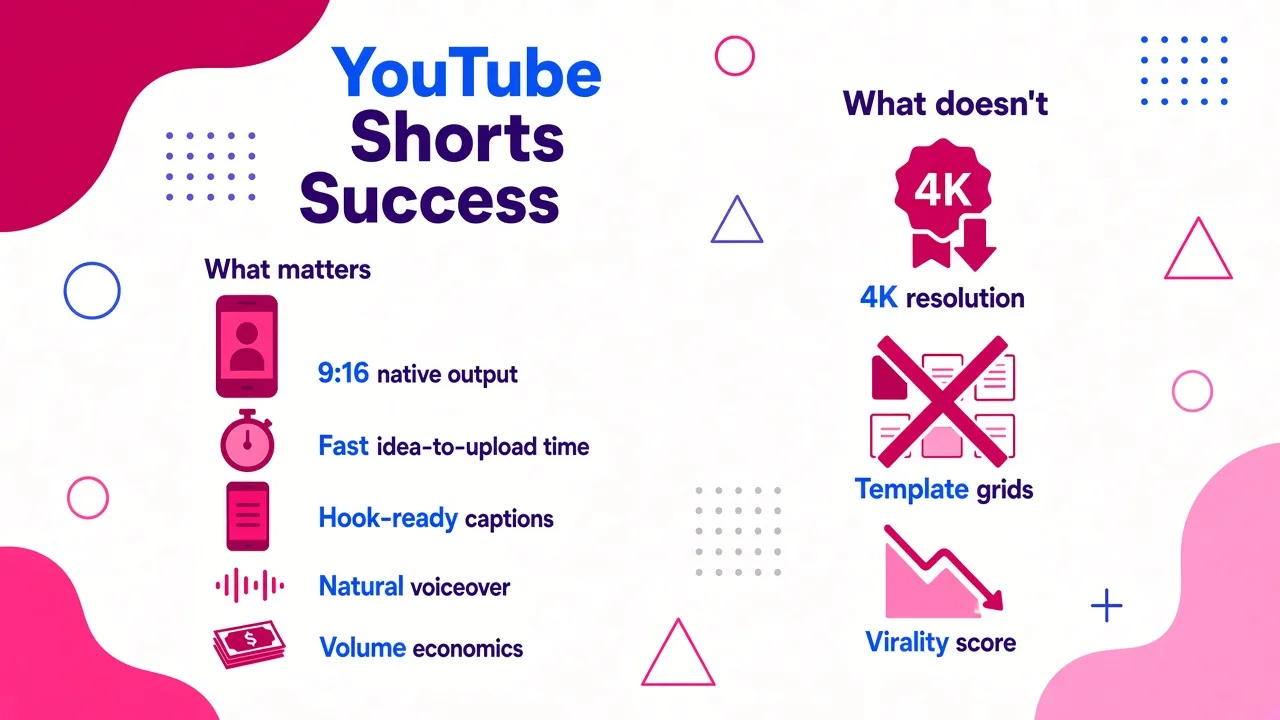
Before the list, here's the grading rubric I use. It's narrower than a general "best AI video tool" list, because Shorts has its own physics.
Native 9:16 output. A lot of generators still render 16:9 and crop down, which means your subject drifts out of the vertical safe zone and you lose resolution. Tools built natively for 1080x1920 keep framing and fidelity intact. This is the single biggest quality gap between tools that look "made for Shorts" and tools that look like a repurposed widescreen ad.
Time from idea to upload. Not render time, total time. A tool that generates in 40 seconds but needs 25 minutes of manual scene fixing is slower than one that takes three minutes and needs two tweaks.
Caption quality and hook control. Shorts lives and dies in the first second or two. Auto-captions are table stakes now; what separates tools is whether the caption styling is animated, readable at phone size, and editable without rebuilding the video.
Voiceover that doesn't sound like a GPS. Faceless channels are carried entirely by narration. Flat, robotic delivery kills retention faster than bad visuals.
Volume economics. If you're posting five to seven times a week, per-video cost and credit limits matter more than any single feature. A tool that's brilliant but gives you eight renders a month is not a channel strategy.
What doesn't matter as much as vendors claim: cinematic 4K generative footage, hundreds of templates, and "virality scores." Shorts viewers are watching at 1080p on a phone, thumb hovering. Clarity, pacing, and a strong first line beat visual polish almost every time.
Quick comparison
| Tool | Best for | Main input | Free option | Pricing note |
|---|---|---|---|---|
| Cliptalk | End-to-end faceless Shorts from text | Prompt, script, article | Free credits to start | Plans for individuals, creators, and businesses |
| InVideo AI | Prompt-to-video with a huge stock library | Prompt, script, media | Yes, limited credits | Paid plans run on monthly AI credits |
| OpusClip | Turning long videos into many Shorts | Long-form video | Yes | Starter $15/mo, Pro $29/mo |
| CapCut | Hands-on editing with AI assists | Footage, images, templates | Yes | Pro pricing varies by region and device |
| HeyGen | Avatar and presenter-style Shorts | Script, prompt, link, audio | Yes | Creator $29/mo, Pro $49/mo |
| VEED | Talking-head cleanup and captions | Footage, prompt, script | Yes, no card required | Paid tiers for export and AI models |
| Canva | Branded, template-driven Shorts | Templates, footage, text | Yes | Varies by market and plan |
1. Cliptalk, best overall for faceless Shorts built from text
This is the tool I use for my own channels, so treat this entry as a practitioner's account rather than a neutral review.
The core workflow is simple: you paste a prompt, a script, or even an article URL, and it returns a finished short-form video with scene-matched B-roll, an AI voiceover, burned-in captions, and optional AI characters. The difference I noticed compared to most generators is that the output is genuinely publish-ready rather than a rough assembly. Captions are already timed and styled, the voiceover is already ducked under the music, and the scenes are already cut to the rhythm of the script rather than to arbitrary five-second blocks.
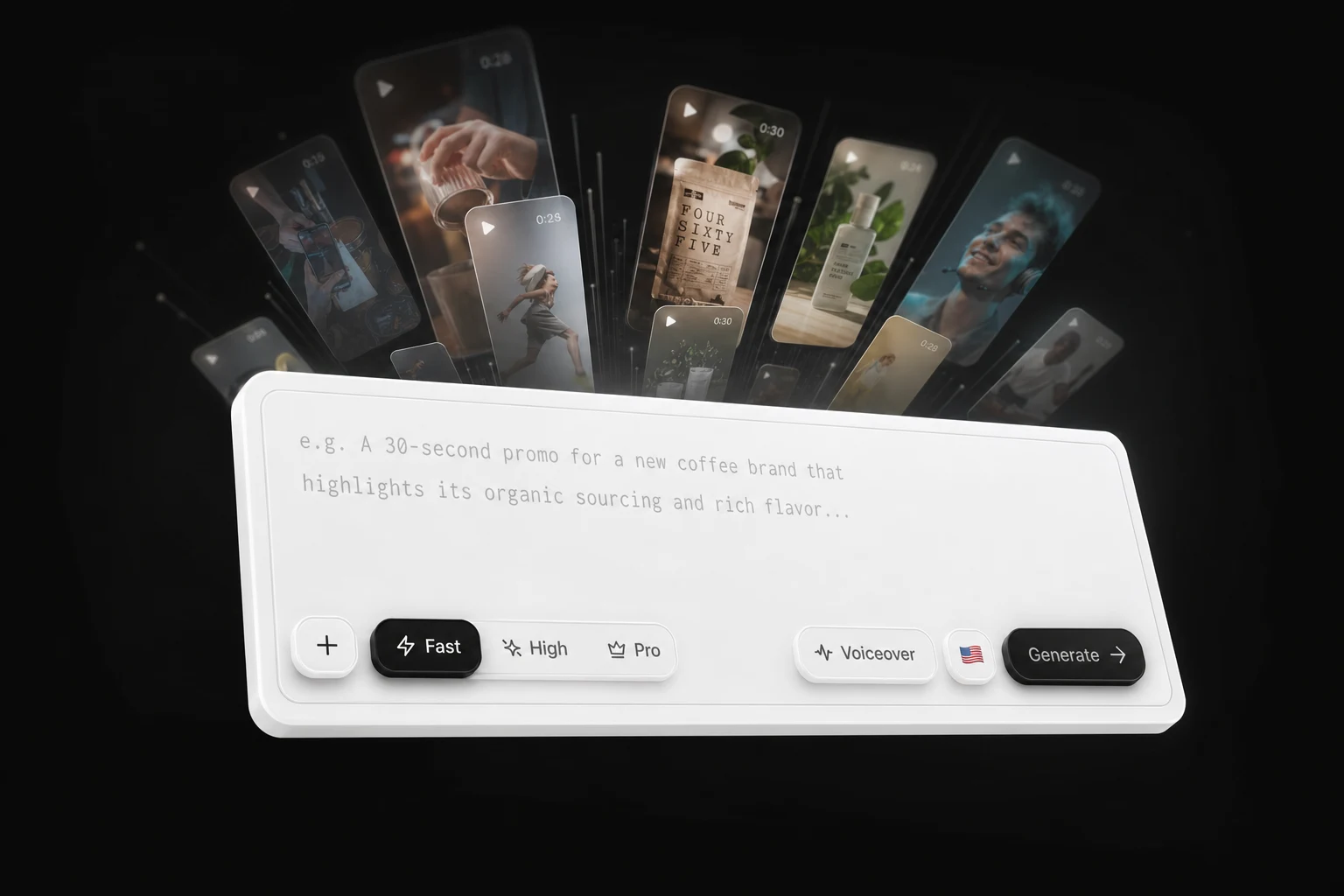
A few things that matter in daily use. Voice cloning means your whole channel can carry one consistent narrator voice instead of a different stock voice each week, which is more important for subscriber retention than most creators expect. AI characters let you run a presenter-led format without ever appearing on camera or licensing a stock avatar. And the built-in editor means you can fix the one scene that misses without exporting to a separate app, which in practice is where most "fast" AI tools quietly lose their speed advantage.
Pros
- Prompt, script, or article in; finished 9:16 video out, with captions, B-roll, and voiceover already assembled
- Voice cloning keeps narration consistent across an entire channel
- AI characters cover presenter-style formats without filming
- Editor is built in, so scene fixes don't require a second tool
- Free to try without a demo call, which is rarer in this category than it should be
Cons
- It's a generator, not a clipper: if your raw material is a two-hour podcast, a dedicated long-to-short tool will serve you better
- The automated B-roll selection is strong but not psychic; niche or highly technical topics still need a manual swap or two
- Not the right pick if you want frame-level timeline control over every transition, the way a desktop NLE gives you
Who it fits: faceless channel operators, marketers repurposing written content, and creators who need to ship several Shorts a week from ideas rather than footage.
Who should skip it: anyone whose entire content library is existing long-form video, and anyone whose Shorts are essentially raw phone footage that just needs captions.
2. InVideo AI, best prompt-to-video with a deep stock library
InVideo is the tool most people find first for this query, and it earns the position. You describe a Short, and it writes the script, assembles scenes from a stock library of more than 16 million photos and videos, adds a voiceover, subtitles, and sound effects, then lets you revise through a text command box: "delete scene three," "change the accent," and so on. The platform reports more than 25 million users across 190 countries, which shows in how mature the workflow feels.
The text-command editing is genuinely clever and lowers the skill floor to near zero. The weakness is the one every stock-driven generator shares: the footage pool is shared by everyone else using the tool, so your Short can end up looking like a hundred other AI marketing videos. My rule when I use it is to generate the first draft with AI, then replace the three most generic clips and rewrite the hook by hand.
Pros
- Very fast idea-to-draft for faceless Shorts on almost any topic
- Enormous stock library reduces the "no relevant footage" problem
- Conversational edit commands instead of a timeline
- Multilingual voiceovers with reasonable emotional range
Cons
- Generic stock look unless you actively intervene
- Credit-based pricing means heavy weeks burn through allowance quickly
- Less control over precise caption timing than a real editor
Who it fits: creators who want maximum topic range and don't mind doing a manual pass on visuals.
3. OpusClip, best if you already have long videos
OpusClip solves a completely different problem, and it's the one I recommend the moment someone tells me they have a podcast, webinar, interview, or a back catalogue of long YouTube uploads. You feed it the long video; its AI finds the moments worth clipping, reframes them vertically while keeping the speaker centered, adds animated captions with speaker identification, and scores clips for likely performance.
Its ClipAnything mode can find relevant moments beyond simple transcript keyword matches, which is what separates it from the first generation of clipping tools that just cut around whatever word you searched for. Realistically, you still review and reject a meaningful share of suggested clips, because context and pacing don't always survive the cut. Budget ten minutes of human review per batch and you'll be fine. If you're setting up this kind of pipeline, I wrote a longer walkthrough on turning long videos into vertical clips with AI that covers the review step in detail.
Pros
- Turns one long video into a week of Shorts with very little effort
- Vertical reframing keeps speakers in frame reliably
- Animated captions with speaker labels, no manual styling needed
- Transparent pricing: Starter at $15/month, Pro at $29/month
Cons
- Useless without long-form source footage
- Suggested clips need human review; the virality score is directional at best
- Timeline editing is shallow compared with a real editor
Who it fits: podcasters, interviewers, webinar hosts, and anyone with an existing YouTube library they've never repurposed.
4. CapCut, best free option when you want manual control
CapCut is still the default for a huge share of short-form creators, and for good reason: it's free at the core, mobile-first, and combines templates, auto-captions, effects, music, Auto Reframe, and conventional timeline editing without forcing you into a fully automated pipeline.
That last part is the whole argument for it. AI can draft, but I usually want to control the final two seconds, the exact caption timing, and the frame where the visual changes. CapCut gives you that. Auto Reframe converts horizontal footage to vertical while trying to keep the subject visible, though you should always eyeball the result rather than trusting it blind. Note that Pro pricing varies by region, device, and current promotions, so check the price inside your own account rather than trusting any single figure you read online.
Pros
- Free tier is genuinely usable, not crippled
- Real timeline control alongside AI assists
- Excellent on mobile, which is where a lot of Shorts editing actually happens
- Huge template library for trend-driven formats
Cons
- Not a text-to-video generator; you need footage to start
- Some AI and premium features sit behind Pro
- Templates make it easy to look exactly like everyone else
Who it fits: creators with footage, trend-chasers, and anyone on zero budget who's willing to trade time for money.
5. HeyGen, best for avatar-led, presenter-style Shorts
If your format needs a face talking to camera but you don't want that face to be yours, HeyGen is the strongest option I've used. You give it a script, a prompt, a link, or audio, and it produces an avatar delivering the message with matched lip sync, captions, and vertical framing.
Avatar realism has improved to the point where a five-second talking-head opener no longer triggers the uncanny-valley reflex in most viewers, though longer holds on the face still do. My practical advice: use the avatar for the hook and CTA, and cut to B-roll for the middle. Pricing sits at $29/month for Creator and $49/month for Pro.
Pros
- Best-in-class avatar quality and lip sync
- Multiple input types, including turning a URL into a script
- Strong multilingual support for the same script across markets
- Works well for repeatable, presenter-led channel formats
Cons
- More expensive than most tools here once you scale
- Avatars still read as synthetic on long, uninterrupted shots
- B-roll and scene assembly are weaker than dedicated generators
Who it fits: educational channels, explainers, and brands that want a consistent on-screen presenter without production days.
6. VEED, best hybrid of AI generation and real editing
VEED sits deliberately between a generator and a browser-based editor. Its AI can build a video from an idea, generate narration, pick footage, and produce captions, and then you can swap clips, change voices, restyle captions, and add brand assets manually. It also gives access to multiple underlying video models, including Veo, Kling, and PixVerse-class generators, so you can pick the trade-off between cinematic quality and cost per render.
Where it wins for Shorts specifically is cleanup. If you already have a decent talking-head recording or a webinar clip, VEED turns it into something publishable faster than a fully generative tool would, and its caption engine is among the most accurate I've tested. No credit card is required to start, which makes it easy to evaluate honestly.
Pros
- Genuine editing control after AI generation, not instead of it
- Model switching lets you balance quality against cost
- Very good subtitles, plus voice cloning and custom avatars
- Browser-based, nothing to install
Cons
- Fully automated output is less polished than purpose-built Shorts generators
- Export quality and premium models are gated behind paid tiers
- More clicking than tools that just hand you a finished video
Who it fits: creators who film themselves sometimes and generate sometimes, and want one workspace for both.
7. Canva, best for branded, on-template Shorts
Canva is the answer when the Short has to look like it belongs to an existing brand. Its Shorts maker combines templates, AI video generation, Beat Sync for music-matched cuts, animation, and a drag-and-drop editor most teams already know. You can also resize a single design across Shorts, Reels, and TikTok without rebuilding it.
I would not choose Canva for generative video quality, and I would not choose it for speed on faceless content. I would choose it when brand consistency matters more than either, which for a lot of small businesses it does. Pricing varies by market and plan.
Pros
- Brand kits keep colors, fonts, and logos consistent across every Short
- Familiar interface for teams who already use Canva
- One design, multiple platform aspect ratios
- Large, genuinely well-designed template library
Cons
- AI video generation is the weakest of the seven
- Template-heavy output can feel corporate on a Shorts feed
- Not built for high-volume publishing
Who it fits: small businesses, social media teams, and anyone already living inside Canva.
The workflow that actually sustains a Shorts channel
Tool choice matters less than process. Here's the loop I run, and it holds regardless of which tool from this list you pick.
Write the script before you touch a generator. Almost every weak AI Short I've seen failed at the script stage, not the render stage. Decide your hook sentence, the one idea, and the closing line first. If you want a shortcut, our free YouTube script generator drafts the full spoken script word for word with title options and no signup, and you can paste that straight into whichever generator you're using.
Batch, don't drip. Generating five Shorts in one sitting is dramatically faster than five separate sessions, because you stay in the same mental context and reuse the same voice, caption style, and pacing decisions.
Fix one thing per video, then ship. The temptation with AI output is to keep polishing. Pick the single weakest scene, replace it, and publish. Shorts rewards volume and consistency far more than per-video perfection.
Watch your own retention graph, not the tool's score. Virality predictions from any tool are guesses. YouTube's retention curve tells you exactly where viewers left. Two weeks of reading that graph will teach you more about your hooks than any AI feature.
Mistakes I see constantly
Cropping 16:9 to 9:16 and calling it a Short. You lose roughly half the frame and often the subject with it. Generate natively vertical, or use a tool with proper subject-tracking reframe.
Captions that are too small or too slow. Phone screens are unforgiving. Big, high-contrast, word-by-word or short-phrase captions outperform full-sentence subtitles in almost every test I've run.
One stock voice for every video. Viewers recognise the default voices from the popular tools instantly, and it reads as low effort. Clone a voice or at least pick a less-used one and stick with it.
Publishing without a reason to keep watching at second three. The hook isn't just the first line; it's the promise that something specific is coming. "Three things" works. "Let me tell you about" does not.
So which one should you pick?
If you're building a faceless Shorts channel from ideas, scripts, or articles and you need several videos a week without touching a timeline, start with Cliptalk; it's the only tool here that hands you captions, B-roll, voiceover, and characters already assembled in one pass, and there are plans for both solo creators and teams.
If you have a library of long videos gathering dust, use OpusClip and you'll have a month of content by tomorrow. If you're on camera and just need captions and cleanup, VEED or CapCut will cost you less. If you want an avatar presenter, HeyGen is the quality leader. If brand consistency outranks everything, Canva. And if you want the widest topic range from a single prompt and you're willing to swap out generic footage yourself, InVideo.
Most creators end up using two: one generator for original ideas and one clipper for their back catalogue. That combination, run consistently for ninety days, beats any single tool used sporadically.
Tags: ai video generator, youtube shorts, video creation tools, short-form video, faceless channels, content automation