How to Turn a Script Into a TikTok Video, Step by Step
· 12 min read
The fastest way to turn a script into a TikTok video is to paste it, word for word, into an AI video maker that builds the vertical video for you. The tool splits the script into scenes, generates visuals for each line, adds a voiceover and word-by-word captions, and exports a 9:16 file. My recommendation is Cliptalk, because one script becomes a finished 9:16 clip with AI visuals, narration from 140+ voices, captions and music, so you never touch a timeline. The tool is only half the job, though. How you write and format the script decides whether the video holds attention. Below is the full process I use, step by step.
What "script to TikTok video" actually means in 2026
When people search for this, they usually mean one of three workflows. They produce very different videos, so choose deliberately.
- Generated scenes. The AI reads each line of your script and creates a matching visual (image or video clip), then narrates it with an AI voice. This is the faceless channel format: history facts, storytime, listicles, product explainers.
- Stock footage matching. The tool pulls keywords from your script and searches a stock library for clips. It's fast, but the same clips show up across thousands of channels, and viewers notice.
- Avatar presenter. A digital human reads your script on camera. It suits training and corporate content but rarely feels native on TikTok.
For TikTok, I've had the best results with the first approach. Generated scenes look original, they follow your script closely, and the vertical format is designed in from the start. Stock-based tools work for quick drafts. Avatars are a niche choice.
Step 1: Write the script for the ear and the scroll
Most "AI video looks bad" problems are script problems. A script that reads well on a page often sounds stiff out loud and loses viewers in the first seconds. Before you paste anything into a tool, run your script through these checks.
Lead with the hook, not the setup. The first line has to earn the second. Skip "Today I want to talk about..." Open with the most surprising claim, the question, or the payoff you're promising. "The man who hijacked a plane in 1971 and vanished with the money" is a hook. "Let's look at an interesting crime story" is not.
Write one idea per sentence. Each sentence will usually become its own scene. A long sentence with three clauses gets one visual stretched over too many seconds, and the video feels slow.
Keep it short. At a normal speaking pace, people say roughly 2 to 3 words per second. A 45-second TikTok holds around 100 to 130 spoken words. If your draft is 300 words, either cut it or split it into a two-part series. Part 2 videos are a great way to build follow-through anyway.
End with a reason to act. A question for the comments, a "follow for part 2," or a pointer to your link. Keep it to one line.
Read it out loud. This is the most underrated step. If you stumble on a phrase, the AI voice will deliver it awkwardly too.
If you're starting from an idea rather than a finished script, a script generator saves a lot of time. I use the free YouTube script generator to get a full spoken draft from hook to call to action, along with title options. It needs no signup, and the output works for Shorts and TikTok once you trim it to length.
Step 2: Format the script so the tool reads it correctly
This is where most people silently lose control of their video. AI video tools interpret formatting as instructions, and each tool has its own rules. Here's what I've learned across them.
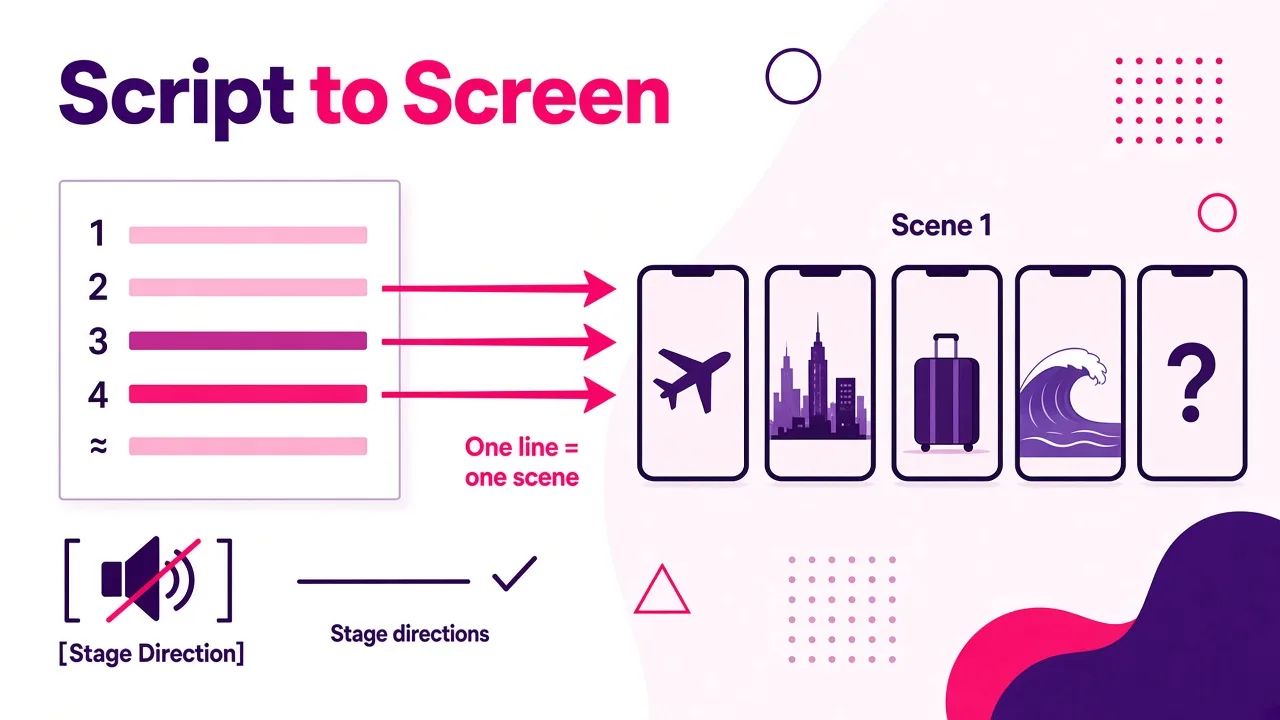
Line breaks usually mean scene breaks. In most generators, a new line starts a new shot. Use that on purpose: put each beat of your story on its own line. Two sentences that share one visual can sit on the same line.
Paste, don't upload, if you want your exact words. Some tools treat an uploaded document as source material and write a new script from it, even if the file already reads like a script. Synthesia's own documentation says this directly: importing a file makes it write a new script, while pasting a script keeps your wording exactly. I now paste by default in every tool unless I want a rewrite.
Check the scene separator rules. Even within one product, the rules can differ. In Synthesia, the newer script import needs two soft returns (Shift+Enter twice) between scenes, while the legacy flow needs only one. Getting it wrong doesn't show an error. It just merges or splits scenes, and you only notice when reviewing the storyboard.
Strip or bracket stage directions. Labels like "Scene 1" or "[cut to]" will get read aloud by some tools. Others treat bracketed text as visual direction that is never spoken. Find out which convention your tool uses before you paste a screenplay-style draft.
Mind the length limits. Some tools only read the first chunk of a long document (ClipNova, for example, uses the first 5,000 characters of an uploaded file). For TikTok, you'll rarely hit this, but it matters if you paste a full article.
For a deeper look at tools that preserve your wording, see my breakdown of script to video AI that keeps your original wording.
Step 3: Pick the right tool for the job
I've used most of the script-to-video tools that come up in this space. Here's how they compare for one specific job: turning a script into a TikTok. Prices are the published starting prices.
| Rank | Tool | What your script becomes | Best for | Starting price |
|---|---|---|---|---|
| 1 | Cliptalk | 9:16 clip with AI visuals per scene, narration from 140+ voices, word-by-word captions, music | Faceless TikTok, Shorts and Reels from a script or idea | Free to script and start |
| 2 | Kapwing | Editable storyboard, B-roll, voice, captions | Reviewing a storyboard before generating | $16/mo yearly ($24 monthly) |
| 3 | InVideo AI | Edited video mixing stock and several AI models | Agent-style edits | $9/seat/mo yearly |
| 4 | Pictory | Stock-footage video, AI voice, captions | Long scripts and articles | $25/mo yearly ($29 monthly) |
| 5 | CapCut | Stock-footage draft inside a multi-track editor | Short ad scripts you'll hand-edit | $19.99/mo |
| 6 | HeyGen | Talking-head avatar video | Presenter-style content | $24/mo yearly ($29 monthly) |
| 7 | Synthesia | Avatar video; pasted scripts kept word for word | Corporate and training videos | $29/mo ($18/mo yearly); script import needs a paid plan |
My reasoning for the ranking: TikTok rewards original visuals, fast pacing and readable captions. Tools that generate scenes per line and output vertical by default need the least cleanup. Stock-footage tools are serviceable but look generic. Avatar tools are the furthest from what performs natively on the platform.
Step 4: Generate the first draft
Here's my exact workflow in Cliptalk, which is where I make most of my TikToks now.
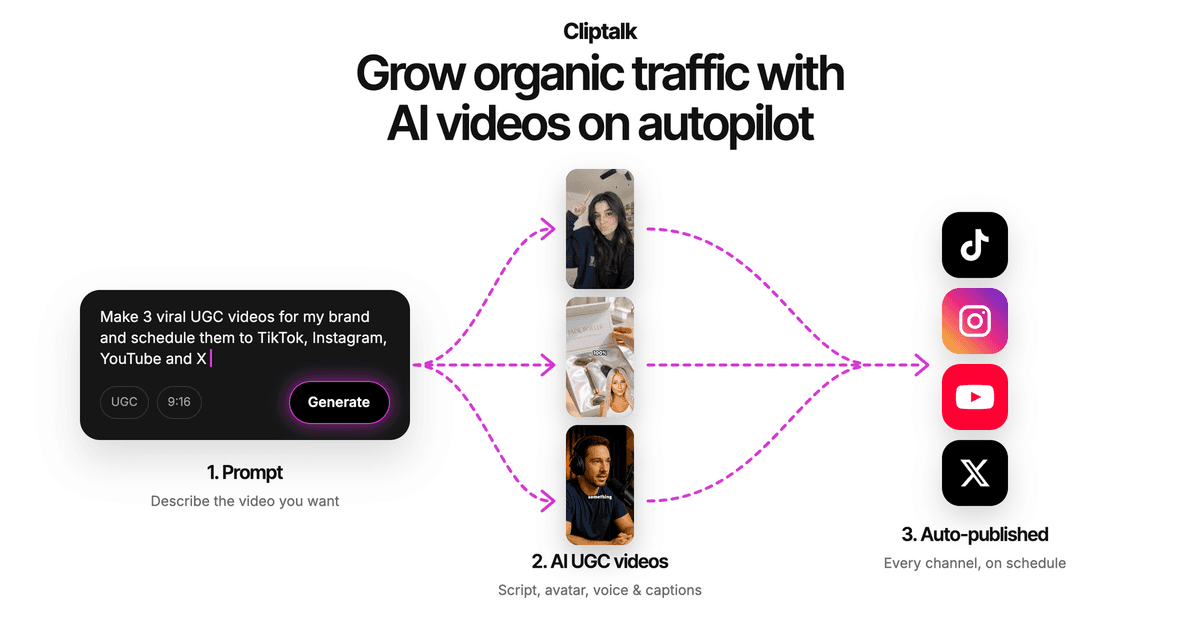
- Open the AI TikTok video maker and choose the video type. Story videos, listicles and product showcases each shape the pacing a little differently.
- Paste your script. If you only have an idea, let the AI write the script first, review it, then continue.
- Pick a visual style. Pick one style and keep it for the whole channel. A consistent look is part of what makes viewers recognize your videos in the feed.
- Choose a voice from the 140+ available (more on this in Step 5).
- Render. You get a finished 9:16 video with AI visuals, narration, word-by-word captions and music.
The point of this workflow is that the first render is already postable. My editing time goes into improving a good draft, not assembling raw pieces. With timeline-first tools, I'd still be dragging clips around at this stage.
One habit I recommend: render two versions of your hook. Change only the first line and keep the rest of the script identical. Post both a few days apart, and the hook that wins tells you more about your audience than any amount of guessing.
Step 5: Choose a voice that fits the content
The voice carries most of the emotion in a faceless video, so don't just keep the default.
- Storytime, true crime, history: a lower, slower voice with some warmth. Suspense needs room to breathe.
- Listicles and facts: a brighter, faster voice. Energy matters more than gravitas.
- Product showcases: a clear, confident voice that sounds like a real person recommending something, not an announcer.
Preview each voice by reading your hook line, not a sample sentence. The hook is where a voice either lands or loses people. If you publish in more than one language, test how the voice handles names and loanwords before committing a whole series to it. I compared options in detail in which AI voice generator sounds most human, and the same rules apply here.
Tip: if a word comes out mispronounced, spell it phonetically in the script. The captions will show the phonetic spelling too, so either fix the caption by hand or swap the word for a synonym.
Step 6: Review the visuals scene by scene
Even good generators produce one or two scenes that miss. Go through the draft with these questions:
- Does each visual match the sentence being spoken right now? A mismatch, like talking about the ocean while showing a city, breaks attention immediately.
- Is the first scene the strongest image in the video? The opening frame does the same job as a thumbnail. If scene one is weak, regenerate it or move a stronger visual up.
- Do characters stay consistent? If your story follows one person, they should look like the same person across scenes. Regenerate any scene where they drift.
- Is anything static for too long? If one visual sits on screen for more than about 4 seconds, split the line in your script so a new scene starts.
Regenerate only the scenes that fail. Re-rendering the whole video to fix one shot wastes time and can lose scenes you liked.
Step 7: Get the captions right
Most people watch TikTok with sound on, but a big share scroll with it off or barely listen. Captions do the heavy lifting either way.
- Word-by-word captions that highlight each word as it's spoken hold attention better than full-sentence subtitles. They pull the eye along with the voice.
- Keep captions in the safe zone. TikTok's right-side buttons and bottom caption area cover part of the frame. Center your captions a bit above the lower third so nothing hides behind the UI.
- Proofread names, numbers and brand terms. Auto-captions follow the voiceover, so any pronunciation workaround shows up on screen.
- Use one caption style per channel. Like the visual style, consistency builds recognition.
Step 8: Tighten pacing, music and the hook
This is the polish pass that separates "AI video" from a video people actually finish.
Cut dead air at the start. The voice should begin on the first frame. Even half a second of silence before the hook costs you viewers.
Use pauses on purpose. Some tools let you insert a timed pause in the script (one generator I've tested uses a <break time="1s" /> tag). A one-second beat before a reveal works far better than steady, unbroken narration.
Keep music under the voice. Music should set mood, not compete. If you can't hear every word clearly on phone speakers, turn it down. Some tools lower the music under narration automatically. Check by listening on your phone, not on headphones.
Make the hook visually fast. Quick cuts in the first few seconds and slightly longer scenes later is a reliable rhythm. If your opening line is long, split it into two lines so it gets two visuals.
Watch the whole thing once with sound off, once with sound on. If either version confuses you, fix it before posting.
Step 9: Export and post
- Export 9:16 vertical at 1080p. That's the native TikTok format. The same file works for YouTube Shorts and Instagram Reels, so one script gives you three posts.
- Write the TikTok caption separately. Don't paste your script into the post caption. Use one line that adds to the video (a question, a teaser for part 2), plus a few relevant hashtags.
- Pick a cover frame that's readable at small size. Your strongest visual with a short text overlay usually wins.
- Post consistently. Faceless channels grow on volume and consistency. Once the script-to-video pipeline takes minutes instead of hours, daily posting becomes realistic.
If you also want to edit longer YouTube videos alongside your short-form work, I've reviewed free online YouTube video editors separately. For pure script-to-TikTok, though, a dedicated generator beats a general editor every time.
Common mistakes that kill script-based TikToks
After making a lot of these, these are the mistakes I see most often, including my own early ones:
- Writing for reading instead of listening. Long sentences, parentheticals and jargon sound terrible in a voiceover. Write like you talk.
- Uploading a document when you meant to paste a script. Some tools rewrite uploaded files from scratch. Paste if your wording matters.
- Ignoring scene-break formatting. One missing line break merges two scenes; one extra splits a thought in half.
- Burying the hook. If the interesting part is in sentence three, move it to sentence one.
- Going too long. A tight 40-second video that people finish beats a 90-second one they abandon halfway.
- Using stock footage that everyone else uses. Viewers recognize recycled clips, and it signals low effort. Generated visuals avoid this.
- Skipping the final watch-through. Every video I've regretted posting had a problem I'd have caught by watching it once on my phone.
Quick FAQ
Can AI turn a script into a TikTok video for free? Yes, at least for getting started. Several tools offer free tiers or free scripting. Some limit script import to paid plans, though. Synthesia, for example, requires a paid plan for its script import.
Will the AI change my words? It depends on the tool and how you give it the script. Pasting usually keeps your wording; uploading a file sometimes triggers a rewrite. Always check the first draft against your original.
How long should a TikTok script be? For most niches, about 100 to 130 words for a 40 to 50 second video. Shorter is often better, especially when you're testing new formats.
Do I need to show my face? No. Generated visuals plus an AI voiceover and captions is the standard faceless format, and it works across story, fact, list and product niches.
Can I reuse the same video on Shorts and Reels? Yes. A 9:16 export works on all three platforms. Tweak the post caption and hashtags for each.
The short version
To turn a script into a TikTok video: write a hook-first script of around 100 to 130 words with one idea per line, format it so line breaks match your scene breaks, paste it (don't upload it) into a generator that outputs vertical video, pick a voice that fits the niche, fix any weak scenes, check that captions sit in the safe zone, tighten the first few seconds, and export at 9:16. The script decides whether people watch; the tool decides how long it takes you to get there. For me, Cliptalk is the shortest path from a finished script to a postable TikTok, and that time saving is what makes daily posting sustainable.
Tags: tiktok videos, script to video, faceless channels, ai video tools, short-form video