Best AI Voice Over Generator for Multilingual Videos
· 14 min read
The best AI voice over generator for multilingual videos depends on what you need at the end: an audio file, or a finished video. If you publish short-form videos to TikTok, YouTube Shorts, and Instagram Reels in more than one language, my pick is Cliptalk. It generates the voiceover, captions, and B-roll in one pass, so a translated script becomes a publish-ready video instead of an audio track you still have to edit. If you only need raw audio and want the widest language range with the most expressive delivery, ElevenLabs is the strongest standalone voice engine, and its v3 model covers 70+ languages.
I've run the same scripts through most of the tools below in English, Spanish, German, Hindi, and Portuguese. This guide covers what separates a good multilingual voiceover from one that sounds machine-read. Then it gives you a ranked comparison and the workflow I use to ship one video in several languages.
The short answer by use case
- Finished short-form videos in several languages: an all-in-one video generator with built-in AI voiceovers, captions, and B-roll.
- Most expressive raw voice audio: ElevenLabs.
- Your own cloned voice speaking other languages on camera: HeyGen.
- Corporate training and marketing narration: Murf.
- Multi-speaker dialogue in one file: PlayHT.
- Completely free with commercial use: TTSMaker.
- Developers adding speech to an app: Google Cloud Text-to-Speech or Amazon Polly.
What actually matters in a multilingual AI voice over generator
Most "best of" lists rank voice generators on English quality. That's a mistake if you publish in other languages. A tool can sound flawless in English and flat in Polish. Here is what I check before committing a channel or client to a tool.
Language count is not the same as language quality
A tool advertising 100+ languages often has a few excellent voices in the big markets and thinner coverage elsewhere. ElevenLabs is open about this in its own documentation. Its Eleven v3 model supports 70+ languages. Its Multilingual v2 model, which the company describes as its most life-like option for voiceovers and content creation, supports 29. Its low-latency Flash v2.5 supports 32, adding Hungarian, Norwegian, and Vietnamese.
So "supported" means different things depending on which model you pick. Generate a test paragraph in every language you plan to publish before you pay for anything.
Regional variants matter more than you think
Spanish for Mexico and Spanish for Spain are different products to a viewer. So are Brazilian and European Portuguese, and Canadian and French French. ElevenLabs' Multilingual v2 lists these variants explicitly, along with English for the USA, UK, Australia, and Canada, and Arabic for Saudi Arabia and the UAE. If a tool only lists "Spanish" with no regional variant, test it with your actual audience in mind. Accent mismatches are the fastest way to lose comments-section trust.
Voice consistency across languages
If your channel has a recognizable narrator, you want that voice to carry into every language. That's where voice cloning comes in. HeyGen, for example, lets you clone from a 30-second recording for an instant clone. A Professional Voice Clone trained on 20+ minutes of audio gives studio-grade output, and the clone can then speak across its 175+ supported languages. Stock voices are fine for faceless content. For a personal brand, consistent identity across languages is worth paying for.
Pronunciation control
Brand names, product names, and creator handles get mangled constantly in non-English voiceovers. PlayHT lets you define custom pronunciations and save them for reuse. CapCut and others support SSML-style adjustments for pauses and emphasis. If your scripts are full of English brand terms inside a Spanish sentence, this feature saves hours of re-generating.
Commercial rights on the free tier
This catches people out. Several free tiers don't allow commercial use. Speechify Studio's 600 free credits come without commercial rights, and so do WellSaid's three monthly download minutes. ElevenLabs' free 10,000 monthly credits are for personal use. TTSMaker is the exception: its free 20,000 characters per week include commercial use. If your videos are monetized or promote a product, that's commercial use.
What happens after the audio is generated
For video creators, this is the factor that matters most and gets mentioned least. A voiceover file is maybe 30% of a finished short. You still need captions timed to the speech, visuals that match each line, and pacing that fits a 30 to 60 second format. Multiply that by four languages and editing becomes the bottleneck, not voice generation.
This walkthrough from a creator publishing multilingual content shows the testing process well:
Best AI voice over generators for multilingual videos at a glance
Pricing and allowances below reflect each vendor's published figures as of autumn 2026. Usage-based and promotional plans change often, so confirm before you buy.
| Rank | Tool | Best for | Languages (published) | Free tier | Starting price |
|---|---|---|---|---|---|
| 1 | Cliptalk | Finished multilingual short-form videos | Multilingual AI voices plus voice cloning | 50 free credits on signup, no card | Free credits to start |
| 2 | ElevenLabs | Most expressive raw voiceover audio | 70+ (v3), 29 (Multilingual v2) | 10,000 credits/month, personal use | Starter $6/month |
| 3 | HeyGen | Your cloned voice in other languages, with avatar | 175+ | Free to start | Varies by plan |
| 4 | Murf | Business, training, marketing narration | 35+ languages, 200+ voices | 10 minutes and two projects | Creator $19/month (annual) |
| 5 | PlayHT | Multi-speaker dialogue | 40+ languages | Free studio to try | See site |
| 6 | TTSMaker | Fully free with commercial use | 100+ languages, 600+ voices | 20,000 characters/week, commercial OK | Lite $13.99/month |
| 7 | CapCut | Voiceover synced to an editing timeline | Multilingual library | Free | Free to start |
| 8 | Google Cloud TTS | Developers, broad language coverage | Dozens, hundreds of voices | Free allowance on some models | From $4 per million characters (some models) |
| 9 | Amazon Polly | AWS developers | 40+ language variants | For eligible accounts | Standard voices from $4 per million characters |
| 10 | Descript | Voiceover inside an edit-by-text workflow | 20+ | Limited AI Speech | Hobbyist $16/month (annual) |
| 11 | Speechify Studio | Long-form narration | 20+ languages, 1,000+ voices | 600 credits, no commercial rights | Starter $100/year |
| 12 | WellSaid | Polished English-first narration | More languages on Enterprise only | 3 download minutes, no commercial rights | Starter $10/month (annual) |
The tools, ranked for multilingual video work
1. Cliptalk: best for finished multilingual short-form videos
This is the tool I use day to day, so I'll be specific about why it sits at the top for this use case and where it doesn't.
The core advantage is that the voiceover isn't a separate step. I paste a script, pick a voice, and get back an edited vertical video with captions generated from the narration, B-roll matched to the lines, and an AI character if the format calls for one. When I localize a video, I swap in the translated script and render again. I don't re-time captions by hand or hunt for new stock clips. Across four languages, that is the difference between an afternoon and a week.
Voice cloning is built in. If a channel has an established narrator, I clone the voice once and keep it consistent across language versions. For faceless channels, the stock AI voices work well, and auto-captions do the heavy lifting since most short-form viewers watch on mute.
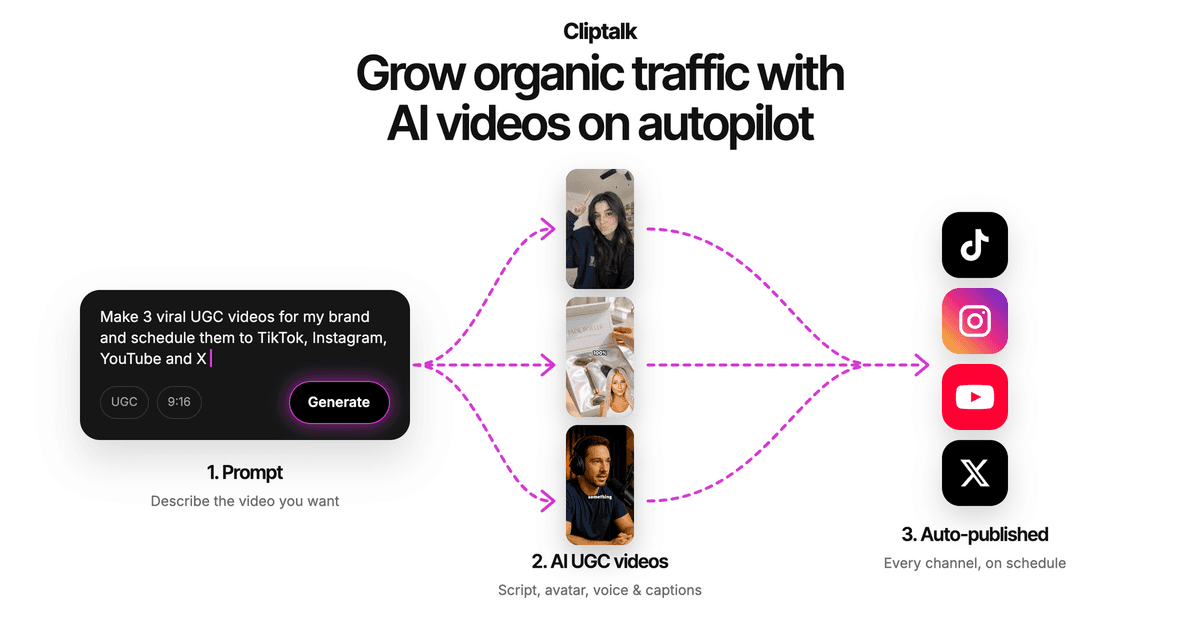
Where it's not the right pick: if you need a standalone audio file for a podcast, an audiobook, or an IVR system, use a dedicated voice engine. I also always confirm that the specific language and accent I need is in the voice list before planning a localized series. That's my rule for every tool on this list, not only this one. You can start with free credits on the AI video creation tool and test your target languages before spending anything.
2. ElevenLabs: best standalone multilingual voice quality
For expressive delivery, ElevenLabs is still the benchmark. The v3 model reads inline audio tags, so you can push a line toward excited or somber without rewriting it, across its 70+ languages. Eleven v4 is now its newest model. For voiceover work specifically, the company points to Multilingual v2 and its 29 languages as the most life-like option.
The practical downside is the credit meter. Higher-quality voices burn credits faster than you'd expect on long or multi-language projects. The free tier gives 10,000 credits a month for personal use. The $6/month Starter plan adds commercial rights and instant cloning with 30,000 credits. For video creators, remember that you're still exporting audio into an editor afterward.
3. HeyGen: best for speaking other languages in your own voice
HeyGen's strength is pairing a voice clone with AI dubbing and an avatar. You clone once, and the same voice carries across 175+ languages. Its consent-first approach is worth noting: it verifies voice ownership before training and says it never uses your voice data to train shared voices. If you're a face-on-camera creator who wants your own persona speaking Japanese or Arabic, this is the most direct route. If you run faceless content, the avatar features are more than you need.
4. Murf: best for business and training content
Murf offers 200+ voices across 35+ languages with detailed delivery controls. It suits recurring corporate content like onboarding videos, product explainers, and course modules. The free tier is tight (10 minutes and two projects), and paid plans start at $19/month billed annually. It's a solid narration tool, not a short-form video tool.
5. PlayHT: best for multi-voice conversations
PlayHT supports 40+ languages and lets you use several voices in the same audio file. That's useful for dialogue-style content, skits, or interview formats. Custom pronunciations you can save and reuse are a real time saver for multilingual scripts with brand names. You also get controls for rate, pitch, emphasis, and pauses.
6. TTSMaker: best fully free option
With 600+ voices, 100+ languages, and 20,000 free characters a week that include commercial use, TTSMaker is the most generous free tier I've used. Quality varies a lot by voice and language. Some are excellent, others sound dated. It's great for testing how a script sounds in an unfamiliar language before committing to a paid tool.
7. CapCut: best if you already edit in CapCut
CapCut's voice reader drops narration straight onto the timeline and aligns it to your subtitles. That solves part of the sync problem. You can adjust speed, pitch, and emotional tone, and preview five seconds before generating. You're still doing the edit yourself, though: visuals, pacing, and B-roll are on you.
8 and 9. Google Cloud Text-to-Speech and Amazon Polly: best for developers
Both are API-first and priced per character, starting around $4 per million characters for standard or select models. Google's Chirp and Gemini models offer more natural output across dozens of languages. Polly covers 40+ language variants. Neither is a creator tool, but both are cheap at scale if you're building a localization pipeline in code.
10 to 12. Descript, Speechify Studio, WellSaid
Descript is excellent if you edit video by editing a transcript, but its AI voices cover a narrower 20+ languages. Speechify Studio has a huge voice library (1,000+) across 20+ languages and suits long-form reading more than short video. WellSaid produces very polished narration but keeps broader language support for Enterprise plans, which makes it a weak fit for multilingual creators on a budget.
How I produce one video in several languages
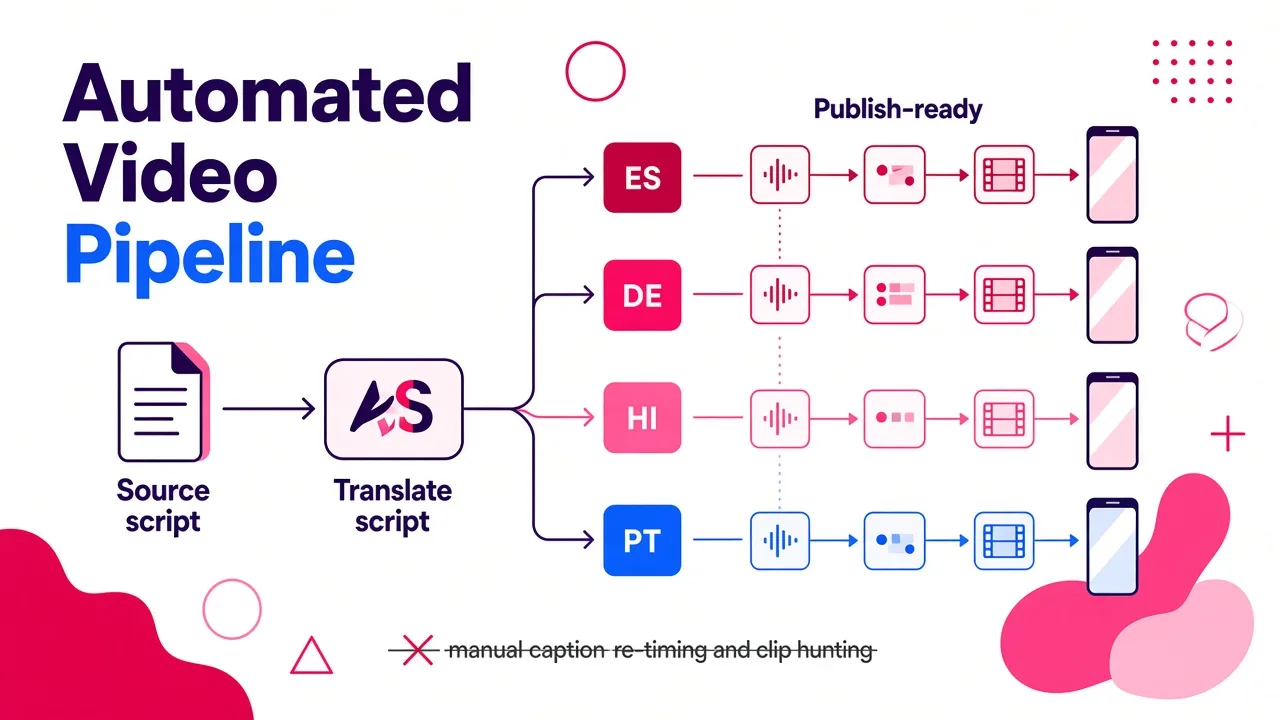
This is the workflow I've settled on after a lot of wasted renders.
- Write the master script in your strongest language. Keep sentences short. Short sentences translate more cleanly and keep the voiceover pacing tight. If you're stuck on structure, a free YouTube script generator gets you from idea to hook-to-CTA draft quickly.
- Translate, then have a native speaker skim it. Machine translation is good, but idioms and humor rarely survive intact. Thirty seconds of native review catches the lines that would read as obviously translated.
- Adjust length per language. German and Spanish typically run longer than English for the same meaning. If your English version is 45 seconds, the translated one may push past a minute. Trim the script rather than speeding up the voice.
- Keep the wording you approved. Some tools rewrite your script during generation, which undoes the native-speaker review. I cover this in detail in a guide to script-to-video AI that keeps your original wording.
- Generate the voiceover with the right regional voice. Match the accent to the market you're targeting, not just the language.
- Check captions against the audio. Auto-captions generated from the voiceover usually match, but proper nouns and numbers deserve a second look.
- Swap culture-specific visuals. A B-roll shot that works for a US audience may not land in Brazil or India. Review visuals per version.
- Post each version natively. Separate accounts per language, or language-specific posts on one account, tend to beat a single upload with translated subtitles only.
This breakdown covers several of these steps in practice:
Tips for natural-sounding non-English voiceovers
These habits made the biggest difference in my output quality.
- Write numbers the way they're spoken. "2,500" can be read several ways depending on language. Spell it out in the script ("two thousand five hundred" in the target language) if the tool misreads it.
- Use punctuation as direction. Commas create breath pauses and periods create full stops. Most engines respect punctuation more consistently than they respect explicit pause tags.
- Test one paragraph before generating the full script. Burning credits on a full render in a voice that turns out wrong for the language is the most common waste I see.
- Pick a voice per language, not one voice for all. Unless you're cloning your own voice, a stock voice that sounds great in English often sounds off in another language. Choose the best native-sounding voice for each market.
- Save pronunciations for recurring terms. Your brand name, product names, and catchphrases should be locked in once, not fixed every video.
- Keep emotional range moderate. Highly expressive settings that work in English can sound exaggerated in languages with different speech rhythms. Start neutral and add energy gradually.
- Listen at 1x on a phone speaker. That's how your viewers hear it. Studio headphones hide problems that phone speakers expose.
Free tiers: what you can actually publish
If you're starting a multilingual channel without budget, here's the honest picture based on the published terms:
- TTSMaker is the only fully free option here that includes commercial use: 20,000 characters a week.
- ElevenLabs gives you 10,000 credits a month, but only for personal use. Commercial rights start at $6/month.
- Speechify Studio and WellSaid free tiers exclude commercial rights.
- Murf gives you 10 minutes across two projects, enough to test but not to run a channel.
- All-in-one video generators often give signup credits so you can render complete videos and judge the full output, not just the voice.
For a broader look at what free tools can realistically handle for short-form content, see what free AI Shorts generators can and can't do. Free tiers are good for testing languages. Once you're publishing several language versions weekly, you'll outgrow them.
Voice cloning across languages: consent and legality
Cloning your own voice and using it in other languages is legal and increasingly common. Cloning someone else's voice without permission is where you get into trouble, both legally and with platform policies. Reputable tools verify consent: HeyGen, for example, checks voice ownership before training a clone.
My rules:
- Only clone voices you own or have written permission to use.
- If you work with a voice actor, get explicit consent for AI cloning and multilingual use in the contract.
- Disclose AI-generated voices where platforms require it. TikTok, YouTube, and Instagram all have AI content labeling policies, and they've been tightening.
- Don't clone public figures, even for parody, unless you're confident about the rules in your jurisdiction.
Frequently asked questions
Which AI voice over generator supports the most languages?
Among the tools covered here, HeyGen lists 175+ languages and TTSMaker lists 100+. ElevenLabs' v3 model supports 70+. Language count alone doesn't tell you quality, though, so always test your specific target languages.
What's the most realistic AI voice generator for non-English content?
For expressive, natural delivery, ElevenLabs is the strongest in my testing, especially with its Multilingual v2 model for voiceover work. Quality still varies by language. Major European and Asian languages sound noticeably better than less widely spoken ones.
Can I use one voice across all my language versions?
Yes, with voice cloning. You clone a voice once (yours or a consenting voice actor's), and the tool generates speech in other languages using that voice. HeyGen and ElevenLabs both support this, and so do some video generators with built-in cloning.
Do I need a separate video editor after generating the voiceover?
With standalone voice tools like ElevenLabs, Murf, or TTSMaker, yes. You'll import the audio into an editor and add captions and visuals yourself. All-in-one generators skip that step by producing the edited video directly. For short-form creators shipping several languages a week, that's where the time savings are.
What's the best option for multilingual TikTok, Shorts, and Reels?
For finished short-form videos, I use Cliptalk because voiceover, captions, B-roll, and voice cloning happen in one render. That makes localizing a video a matter of swapping the script. If you only need the voice track, pair ElevenLabs with your editor of choice.
Tags: ai voiceover, multilingual video, text to speech, voice cloning, short-form video