How to Turn Long Videos Into Reels With AI
· 10 min read

A long video is not a reel, and the distance between them is mostly labor: finding the moment, cutting it, reframing to vertical, burning in captions, fixing the opening line. An AI reel maker from video closes that distance automatically. You upload the recording or paste a YouTube link, the tool transcribes it, scores the segments, cuts the strongest ones into standalone vertical clips, and hands you files that are ready to post. I run this workflow every week. For pulling raw clips out of a recording I use a dedicated clipper, and for the half most people skip, rebuilding those ideas into fresh reels with new visuals, I use Cliptalk, because it takes a transcript or script straight to a finished 9:16 video with word-by-word captions, AI B-roll, music, and a voiceover from 140+ voices, with no timeline to touch. Here is the whole process, step by step, plus the honest limits of each approach.
What an AI reel maker actually does to your footage
It helps to know what is happening under the hood, because that is what tells you when the output will be good and when it will be garbage.
Nearly every "long video to reels" tool follows the same five stages:
- Transcription. The audio becomes a timestamped transcript. Everything downstream depends on this, which is why spoken-word video works and silent footage does not.
- Moment scoring. The model reads the transcript and looks for self-contained segments: a question and its answer, a story with a payoff, a strong claim followed by proof. Some tools also weight segments that resemble patterns already trending on social.
- Cutting. Each selected segment becomes its own clip, usually trimmed so it makes sense with zero context from the rest of the video.
- Reframing. The 16:9 frame is cropped to 9:16. Better tools track the active speaker so the face stays centered when people move, and some can stack two speakers in a split layout.
- Captioning and styling. Subtitles are generated and burned in, then styled with a preset. Logos, emojis, and B-roll get layered on top.
That is the entire job. Understanding it means you stop blaming the AI for things the AI cannot fix, like a source recording with no clear ideas in it.
Start with a source video the AI can read
The single biggest predictor of clip quality is the input. Clipping tools rely on speech to detect highlights, so podcasts, webinars, interviews, tutorials, livestreams with commentary, and talking-head uploads are the sweet spot. Silent recordings, music-only streams, and gameplay footage without narration will return junk, because there is no transcript to score.
Three practical input rules I follow:
- Talk in complete thoughts. If your long video rambles for four minutes before landing a point, the model has nothing clean to cut. Say the point, then explain it.
- Leave small pauses between topics. Clippers cut on sentence boundaries. Pauses give them clean edges.
- Keep the subject away from the frame edges. Anything in the outer thirds of a 16:9 frame is likely to be cropped out of a 9:16 reel. Shoot or record knowing the vertical crop is coming.
Step 1: Upload the file or paste the link
Every serious tool accepts both a local file and a YouTube URL. The link route is faster and saves you an export, but it only works on videos you have the rights to. Use your own uploads.
Set your expectations on volume here. From a 45 minute recording I usually ask for ten to fifteen clips, knowing I will keep four or five. Asking for three clips sounds efficient and almost always leaves the best moment on the cutting room floor, because the model's top three picks are not reliably your top three.
Step 2: Let the model pick the moments, then override it
The scoring step is where these tools earn their money and also where they get overconfident. Treat the first pass as a shortlist, not a verdict.
Most clippers now let you steer the selection instead of accepting whatever comes back. You can pass keywords so it only surfaces segments where you discuss a specific product or topic, or hand it a timeframe when you already know the good part lives around the 12 minute mark. I use keyword steering constantly, because I usually know which three ideas from a recording deserve to be reels before I ever upload it.
Then watch every clip end to end at 1x, on your phone, with the sound on. Two failures show up over and over:
- The orphan clip. It references something said earlier in the long video, so it makes no sense alone. Either extend the in-point or drop it.
- The trailing tail. The point lands at 0:22 and the clip runs to 0:34 because the speaker kept talking. Trim the tail. Watch time per second is what the algorithm measures, and a limp ending costs you.
Step 3: Reframe to 9:16 and check the crop
Vertical output should be a native option, not an afterthought crop. If your tool has an aspect ratio selector, set it to 9:16 before you style anything, because changing it later reflows every text element you placed.
Speaker tracking is the feature that separates usable output from unusable. Predictive tracking keeps the person in frame as they move, and for two-person interviews a split layout showing both faces beats a jumpy auto-cut between them. Whichever you use, scrub the reframed clip once looking for decapitation and for on-screen text from the original video that got sliced in half. Both are common and both look amateurish.
Step 4: Burn in captions and rewrite the first 1.5 seconds
Most short-form video is watched on mute, which makes captions the primary channel, not an accessibility extra. Good caption engines land around 97% accuracy on clean audio, which is excellent and still means a handful of wrong words per reel. Proper nouns, brand names, and numbers are where they fail. Read the caption track, do not just glance at it.
Styling rules that have held up for me:
- Large, bold, high contrast type, centered, well inside the safe area so platform UI does not cover it.
- Two lines maximum on screen at once.
- Word-by-word highlighting rather than static blocks. It pulls the eye along and measurably holds attention longer.
Then rewrite the hook. The first 1.5 seconds decide whether the rest of the reel gets watched. If your clip opens with "so, as I was saying," delete that and start on the claim. Many tools let you stack a text hook over the opening frame. Use it, and make it a promise or a contradiction, not a topic label.
Step 5: Patch the dead air with B-roll, voice, and characters
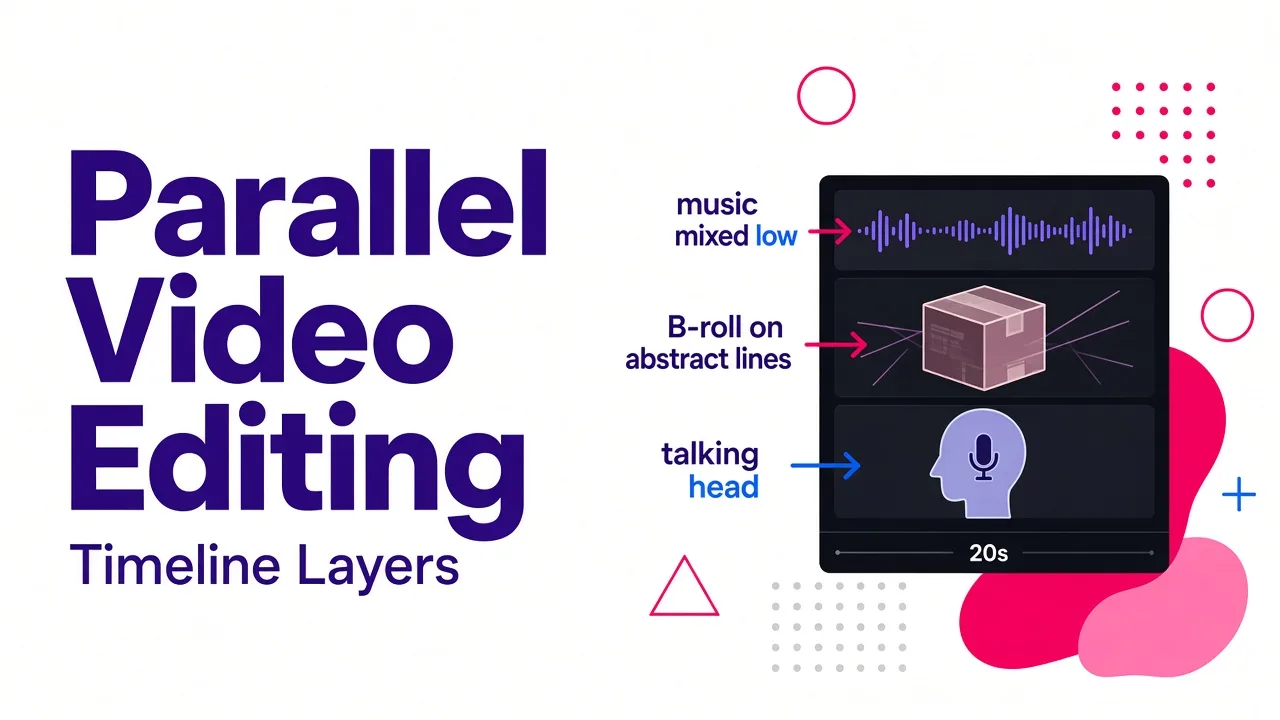
A clipped talking head is fine for twenty seconds. Past that, motionless footage bleeds retention. This is where AI B-roll matters: the tool reads your transcript sentence by sentence and pulls matching footage, either from stock libraries in the millions of clips or generated fresh, so every line has something to look at. The good implementations match meaning rather than keywords, which is the difference between footage that supports your point and footage that just contains the word you said.
Layer three things onto any clip longer than fifteen seconds:
- B-roll on abstract lines. Whenever you say something visual ("the shipment arrived late"), cover it.
- Music under the voice, mixed low enough that narration stays obviously dominant.
- Motion on text. Subtle entrance animation beats static overlays.
When a clipper fails and a generator wins
Here is the thing nobody selling clipping software will tell you: a lot of long videos do not contain five good reels. A 40 minute webinar might hold two genuinely postable moments. Squeezing ten out of it produces filler that drags your account's average watch time down.
When the recording is thin, I stop clipping and start generating. I take the transcript, pull the ideas out of it, and rebuild each idea as a new vertical video with a tighter script, a fresh voiceover, and visuals chosen for the point rather than whatever the camera happened to be pointing at. That is a different tool category, and it is the one I lean on hardest, because it is not limited by what was said on camera.
Practically, the move is: paste the transcript or a rewritten script, pick a voice or your own cloned one, let the system assemble B-roll, captions, and music into a finished 9:16 cut, then fix anything you dislike in the editor. One long video becomes three clipped reels and four generated ones, and the generated ones usually outperform, because they were written for the format instead of salvaged from it. If you want to see how that script-first path compares across tools, I broke it down in our roundup of the best AI short video generators for Reels.
The tools I reach for, compared
Prices and specifics below come from each vendor's current public pages. Verify before you buy, since this category changes monthly.
| Tool | Best for | Standout capability | Free tier |
|---|---|---|---|
| Cliptalk | Rebuilding a long video's ideas as new reels | Script or article to finished 9:16 with AI B-roll, characters, 140+ voices, word-by-word captions | Yes, free tools plus starter credits |
| OpusClip | Clip detection from long recordings | Keyword and timeframe steering, speaker tracking, 1080p, ~97% caption accuracy | Yes |
| Vizard | Conversational re-cutting | Ask an agent for Reels, then tell it what to change and it re-cuts | Free to start |
| Restream | Livestream and podcast repurposing | Auto clips from streams, 99 caption languages, direct publishing | One free upload, then 7-day trial |
| HeyGen | Avatar-led reels and localization | Voice cloning from a 30 second sample, translation into 177+ languages | Yes |
| Pictory | Repurposing with a scene-by-scene editor | Story tab to delete and reorder scenes before export | Trial |
| CapCut | Manual polish and templates | Deep free editor, 9:16 templates, keyframe animation | Yes |
| ElevenLabs | Voice and audio quality | Voice synthesis, lip-sync, 4K upscaling | Yes |
If you only pick one, pick based on your input. If you have hours of spoken footage and want cuts from it, a clipper wins. If you have ideas and want volume, a generator wins.
A weekly workflow: one recording, five reels
Accounts that publish five to seven times a week consistently outperform accounts posting once. That cadence, not any single viral clip, is what this tooling exists to make possible. My routine:
- Monday: record one 30 to 45 minute session on a single theme. Talk in clean, self-contained answers.
- Monday: upload it to a clipper, request twelve clips with two or three steering keywords.
- Tuesday: keep the three clips that stand alone. Trim tails, fix caption errors, rewrite hooks.
- Tuesday: take four more ideas from the transcript and generate them as fresh reels with new visuals and voiceover.
- Wednesday: post the first, then one per day. Keep most clips in the 7 to 30 second range even though Reels allows up to three minutes.
The whole cycle costs me one recording session and about two hours of review. That is the actual unlock: the editing is no longer the bottleneck, the thinking is.
Mistakes that quietly kill AI reels
- Posting the first export unwatched. Every tool produces at least one clip with a broken hook or a mangled caption. Review is mandatory.
- Treating clip count as output. Ten mediocre reels train the algorithm that your account is mediocre. Ship four good ones.
- Ignoring saves and shares. Rankings now weight saves and shares far more heavily than likes, so build reels people want to send to someone, not just nod at.
- Recycling the same clip forever. Winning short-form creative burns out fast, often inside one to two weeks. Keep a fresh batch coming.
- Leaving the watermark on. Free tiers on several tools stamp exports. Check before you publish.
FAQ
Can AI turn any video into reels? Only if there is speech to work with. Highlight detection reads the transcript, so podcasts, interviews, webinars, and tutorials perform well, while silent, music-only, or non-narrated gameplay footage does not.
Do I need editing skills? No. The upload, cut, reframe, caption sequence is fully automated in every tool listed above. You need judgment, not technical skill: which clip is worth posting, and where the hook should start.
What about long videos I do not have footage for? Then skip clipping entirely. Write or paste a script and generate the reel from text, which is what our free AI video tools are built for, including script generators that run without a signup.
How long should a reel be? Reels support up to three minutes, but the clips that perform sit in the 7 to 30 second range. Cut to the point, land it, and end.
The short version: use a clipper to mine what you already recorded, use a generator like Cliptalk to build what you did not, and spend the time you save on deciding what is actually worth saying.
Tags: ai video tools, short-form video, content repurposing, reel creation, video editing automation