8 Best AI Short Video Generators for Reels
· 12 min read
If you want short videos for Reels, Shorts, and TikTok, the honest answer is that no single AI tool wins everything: the right pick depends on whether you are starting from a script, a long video, or a face on camera. For most creators publishing vertical content on a schedule, Cliptalk is the one I reach for first, because it takes a prompt, script, or article and returns a finished 9:16 video with burned-in captions, B-roll, and an AI voiceover in one pass, instead of making you stitch four tools together.
I have run the same kind of workload through all eight tools below: a short spoken script, rendered vertical, captioned, and posted. What follows is what each one is actually good at, where it costs you time or money, and who should pick it.
What actually matters in a short video generator
Demo reels are not the test. A vertical clip has a very specific job, so these are the things I score before anything else:
- Native 9:16 output. Cropped landscape footage reads as recycled. You want a tool that composes vertically from the start.
- Captions without a second tool. Most Reels are watched muted for the first second or two. If captions are a separate export step, you have added ten minutes to every video.
- Time from script to MP4. My cutoff is ten minutes for a sixty second clip. Anything slower breaks a daily posting habit.
- Voice quality. Listen for breathing, pauses, and pitch variation. A robotic read kills retention faster than bad footage.
- Persona consistency. Faceless channels live or die on a recognizable narrator, character, or visual style across every post.
- Batch speed. Can you produce a week of content in one sitting, or does each video need hand-holding?
- The quiet costs. Watermarks, resolution caps, credit pools that expire, and whether commercial use is actually allowed on the plan you are on.
The 8 best AI short video generators at a glance
| # | Tool | Best for | Starting point |
|---|---|---|---|
| 1 | Cliptalk | Script or article to finished captioned Reel, faceless channels | Free to try |
| 2 | InVideo AI | Prompt to video with cinematic AI footage | Free tier, 720p with watermark |
| 3 | HeyGen | Talking-head avatars and multilingual versions | Free tier, from about $24/mo |
| 4 | OpusClip | Cutting long videos into vertical clips | Free tier, clips expire after 3 days |
| 5 | Revid.ai | Trend-led faceless templates plus scheduling | Free tier |
| 6 | CapCut | Free manual editing with TikTok-native templates | Free |
| 7 | Short AI | Bulk story, Reddit, and fake-text formats | Free to start |
| 8 | Google Veo | Best raw generative shot quality | Paid, watermark removal costs extra |
1. Cliptalk
Best for: creators who write (or paste) a script and want a publish-ready vertical video without opening an editor.
This is the workflow I use most, so I will be specific about why. You give it a text prompt, a full script, or even a URL to an article, and it produces a complete short: scene-matched B-roll, an AI voiceover, burned-in captions styled for vertical, and optional AI characters if you want a recurring on-screen persona rather than pure stock. The output is composed vertically, not cropped, and captions arrive already timed, which is the step that eats the most time everywhere else.
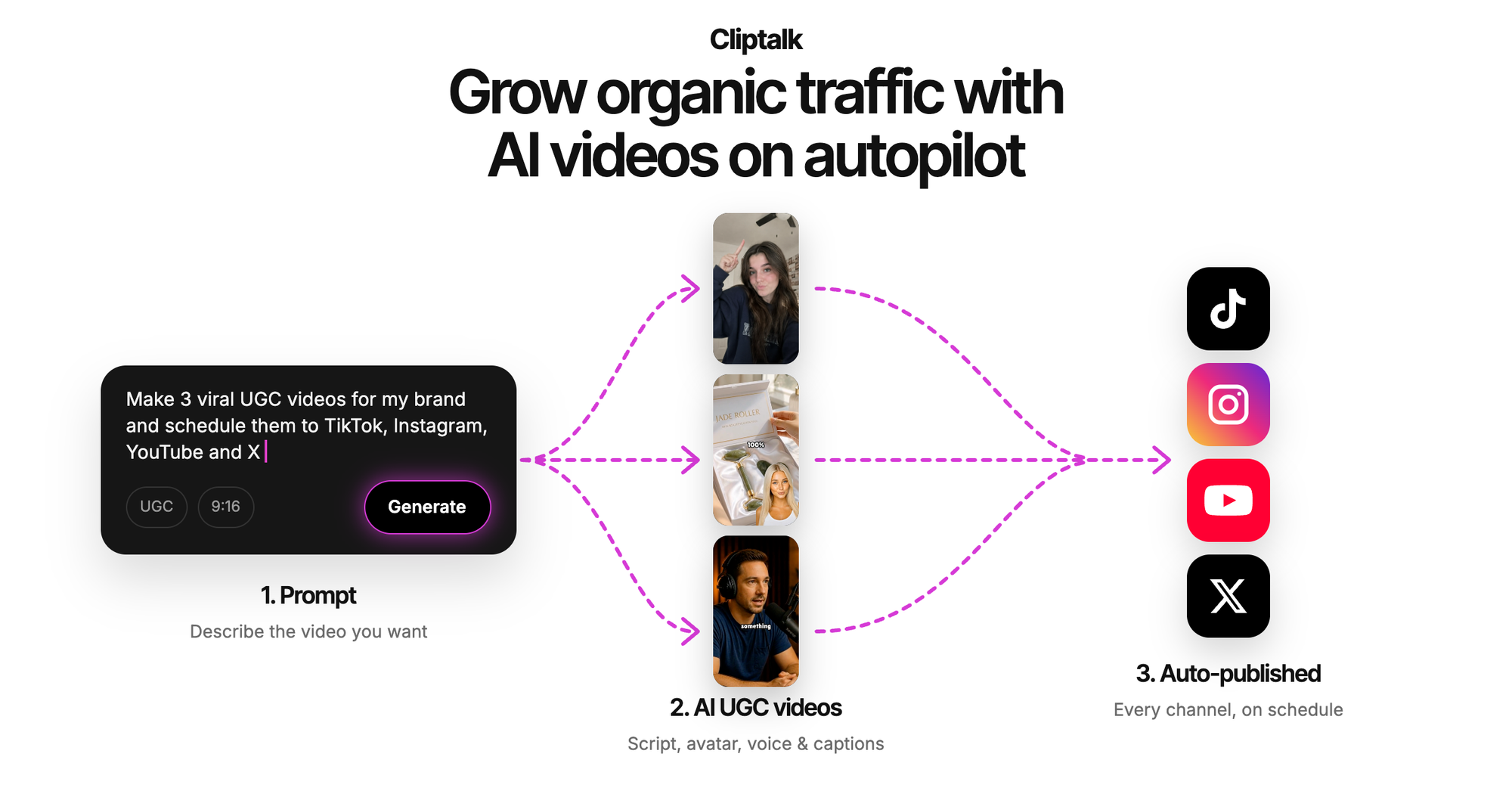
Two features matter more than they sound on paper. First, voice cloning: once I cloned my own voice, my faceless channel stopped sounding like every other stock-narrator account, and I could still write scripts at speed. Second, the editor after generation. The first render is rarely perfect, and being able to swap a clip, retime a caption, or re-record one line without regenerating the whole video is the difference between a tool you use daily and one you abandon. You can try it at cliptalk.pro and see a finished vertical video before committing to anything.
Pros
- One pass from text to captioned 9:16 video, no separate captioning or editing step
- Voice cloning and AI characters give faceless accounts a consistent identity
- Works from articles and long scripts, not just one-line prompts, which is rare
- Real editor after generation, so you fix instead of reroll
Cons
- Not a cinematic generative model: if you need a single photoreal hero shot with complex physics, a dedicated model does that better
- Auto-selected B-roll still needs a human pass on two or three scenes per video
- Less useful if your content is purely you, filmed on a phone, with no script
Skip it if: your entire workflow is clipping existing long-form podcasts. A dedicated clipper (see #4) is faster for that single job.
2. InVideo AI
Best for: turning a one-sentence idea into a full faceless short with generated footage.
InVideo sits in the "type an idea, get a video" category and does it well. The conversational editing is the standout: after the first render you type instructions in plain language, like "delete scene three" or "change the voiceover accent," and it applies them. It also pipes in premium generative models (Sora 2 and Veo 3.1 among them) for cinematic shots, plus a library of 16 million-plus stock photos and videos to fall back on. With 25 million-plus users it is one of the most battle-tested tools in this list.
Pros
- Genuinely good at going from a vague prompt to a structured short with hook, body, and CTA
- Access to top-tier generative models without separate subscriptions
- Natural-language editing is faster than dragging a timeline
- Huge stock library means scenes rarely come up empty
Cons
- The free plan exports at 720p with a watermark, which is not postable
- Credits are split across multiple pools, and working out what a video actually costs takes effort
- Prompt-first generation means less control when you already have an exact script
Best fit: creators who ideate in sentences rather than scripts and want cinematic AI footage in the mix.
3. HeyGen
Best for: talking-head shorts and posting the same video in multiple languages.
If your format is a presenter speaking to camera, HeyGen is the strongest option here. Its Avatar IV lip sync holds up in vertical close-ups, which is exactly where cheap avatars fall apart, and the library runs past 1,100 stock presenters including UGC-style ones that do not look like corporate training videos. In my testing, the time from pasting a script to a downloadable 9:16 clip was under four minutes.
The translation feature is the real multiplier. I took one English clip and generated Spanish, Japanese, and Hindi versions with the voice tone preserved and lip movement matched to the new language, across 175-plus supported languages. For anyone chasing reach outside their home market, that is a different order of leverage than better B-roll.
Pros
- Best-in-class lip sync that survives full-screen vertical playback
- 175+ languages with voice cloning that keeps your tone
- Fast: minutes, not hours, per finished clip
- Free plan gives you 3 videos a month with real studio access
Cons
- Free videos are watermarked and capped at three minutes
- Premium features like Avatar IV draw from a separate monthly credit pool, which is easy to misjudge
- It is an avatar tool first, so B-roll-heavy faceless formats need extra work
Best fit: educators, coaches, and anyone whose personal brand needs a face but not a camera. For a wider look at that category, I compared the options in 7 Best AI Avatar Video Generators Compared.
4. OpusClip
Best for: creators who already publish long-form and want vertical clips out of it.
OpusClip does one job and does it better than generalists. Feed it a podcast, stream, or long YouTube video and it finds the moments worth cutting, reframes them to 9:16 with face tracking, adds animated captions, and scores each clip for likely performance. In one test it pulled 14 clips from a 42-minute recording in under five minutes. The virality score is not magic, but it correlates well enough with real performance that I use it to decide posting order rather than ignoring it.
Pros
- Enormous time saver if long-form is already part of your workflow
- Auto-reframing and captions are strong out of the box
- Virality scoring gives you a sensible queue instead of guesswork
Cons
- Requires existing long-form video: it cannot create anything from a script
- On the free tier, clips expire after three days, so you have to act fast
- Clip quality is capped by the source recording
Best fit: podcasters, streamers, and YouTubers. Useless as your only tool if you start from a blank page.
5. Revid.ai
Best for: faceless channels that want trend research and scheduling in the same place.
Revid leans into the faceless-channel playbook: templates built around formats that already perform (motivational, story, listicle, explainer), trend research built into the creation step so you are writing toward what the feed is already rewarding, and auto-scheduling so a batch session turns into a week of posts without you touching the app again.
Pros
- Trend research inside the workflow, not in a separate tab
- Templates tuned to high-performing faceless niches
- Scheduling closes the loop from idea to published
Cons
- Visual output defaults to a stock-footage look, which is increasingly recognizable to viewers
- Limited avatar or face-to-camera options if you want a presenter
- Template-driven output can feel samey across a whole account
Best fit: operators running several faceless accounts who care more about cadence than craft.
6. CapCut
Best for: free manual editing with native TikTok trends.
CapCut is not an AI generator in the text-to-video sense, and I am including it anyway because most short-form creators end up in it at some point. It is a full editing suite at zero cost, with no watermark on basic desktop exports, TikTok-native templates refreshed weekly, auto-captions, and effects that match what is trending in the feed that week.
Pros
- Free, with no watermark on basic exports
- Templates updated weekly and aligned with what TikTok is boosting
- Best finishing tool in the list: great for polishing output from any generator
Cons
- No AI avatars or presenters
- Cannot create a video from a script or text alone
- Every video costs you manual timeline work, which does not scale to daily posting
Best fit: use it as a finisher, not a generator. Render elsewhere, polish here if a clip needs it.
7. Short AI
Best for: bulk output of story-driven formats.
Short AI is built around the specific formats that dominate faceless feeds: AI story videos, Reddit story videos, fake text-message conversations, and character dialogue clips. It also includes a clip maker for turning one long video into ten-plus shorts, a caption generator with 14-plus animated styles and claimed 99 percent speech-to-text accuracy across 32-plus languages, and scheduled posting to TikTok, YouTube, Instagram, Facebook, LinkedIn, X, and Pinterest.
Pros
- Purpose-built templates for formats that reliably perform on Shorts and TikTok
- Bulk generation plus multi-platform scheduling in one place
- Strong, well-styled captions, including standalone captioning for outside footage
Cons
- Format-locked: if your idea does not fit one of the templates, you fight the tool
- Story formats are saturated, so output quality alone will not differentiate you
- Less control over pacing and scene selection than an editor-first tool
Best fit: volume-first faceless operators working in story, Reddit, and text-conversation niches.
8. Google Veo
Best for: the single best-looking generated shot, when quality beats speed.
When I need one genuinely cinematic clip, a hero shot for the opening three seconds or a visual nobody else has, Veo is the model I use. Prompt adherence is the best of the group: you describe a scene and get roughly that scene, with consistent motion and no melting hands. It is not a Reels workflow, though. You are generating shots, not finished videos, and captions, voiceover, and assembly still happen elsewhere.
Pros
- Highest output quality with the least prompting skill required
- Follows prompts closely, so fewer wasted generations
- Generated audio in recent versions means clips arrive already voiced
Cons
- Removing the watermark is expensive
- Produces shots, not finished vertical videos: no captions, no edit, no assembly
- Cost per usable second is the highest here
Best fit: creators who want one standout visual per video and are happy to assemble around it. If you want more creative control at the shot level, Runway (from around $12 to $15 a month, and now aggregating Veo, Kling, and Seedance inside one subscription) is the alternative, though it has a steep learning curve. Pika is the cheapest entry at about $8 a month if you mainly want stylized, meme-able effects.
How I actually produce a week of Reels
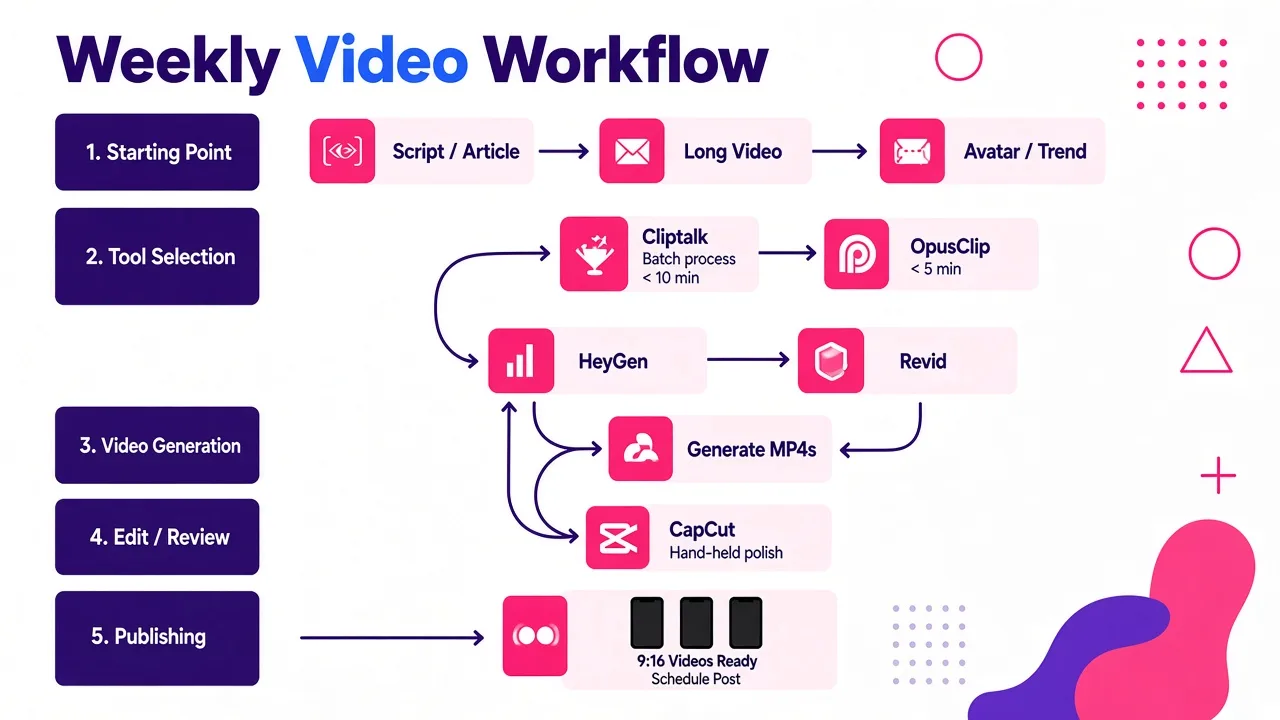
The tools matter less than the order you use them in. This is the sequence that took my output from two videos a week to fifteen:
- Write the script first, not the video. The single biggest quality jump comes from a real hook in the first line and a clear payoff by second thirty. I draft ten scripts in one sitting using a free YouTube script generator and then cut every one of them by about twenty percent.
- Batch generation in one session. Paste all ten scripts, render all ten videos, then walk away. Context switching between writing and editing is what kills a posting schedule.
- Fix, do not reroll. Regenerating a whole video to change one clip wastes credits and time. Swap the offending scene in the editor instead.
- Check the first frame on a phone. Not a laptop. If the opening frame does not stop your own thumb, nothing downstream saves it.
- Caption check at mute. Watch the whole clip with sound off. If it does not make sense, your captions are wrong, not your footage.
- Label AI content. TikTok, Instagram, and YouTube all expect AI-generated material to be disclosed. AI video is still monetizable in 2026 if you disclose it and make original work, so label it and move on. Recycled output is what gets suppressed, not AI itself.
How to choose
Match the tool to where your content starts, not to which one has the flashiest demo:
- You start with a script or an article. Cliptalk. One pass to a captioned vertical video, with voice cloning and characters if you want a recurring persona.
- You start with a vague idea. InVideo AI.
- You start with your own face, or need many languages. HeyGen.
- You start with a long recording. OpusClip.
- You start with a trend you want to ride today. Revid.ai or Short AI.
- You start with footage that just needs finishing. CapCut.
- You need one shot that looks like it cost money. Veo, then assemble elsewhere.
Most creators overbuy here. You need one generator that matches your starting point, and free finishing software. Two tools, not six. If you are weighing specific tools against each other, I keep honest side-by-side breakdowns on the alternatives page, including where other tools are the better call.
And one last thing worth saying plainly: none of these tools fix a weak idea. The fastest renderer in the world still publishes a video nobody watches if the first line is boring. Spend the time you save on editing writing better hooks, and the tool choice becomes the small decision it should be.
Tags: ai video creation, short-form video, video generators, content creation tools, reels and shorts