7 Free AI Video Generators From Text With No Sign Up
· 13 min read

If you want to turn text into a video for free without creating an account first, the honest answer is that most tools let you start without signing up, but very few let you finish and download without one. For a finished short-form video with captions, B-roll and a voiceover, I recommend Cliptalk, because you can design an AI character and write the script with unlimited re-rolls and no signup, then render the full edited clip using 50 free credits with no card. For a raw, single AI-generated clip, Magic Hour and GizAI are the strongest picks below.
I make short-form videos for TikTok, YouTube Shorts and Reels, and I've run the same text prompts through every tool on this list. Here's what each one does well, where it falls short, and who should use it.
What "no sign up" really means in 2026
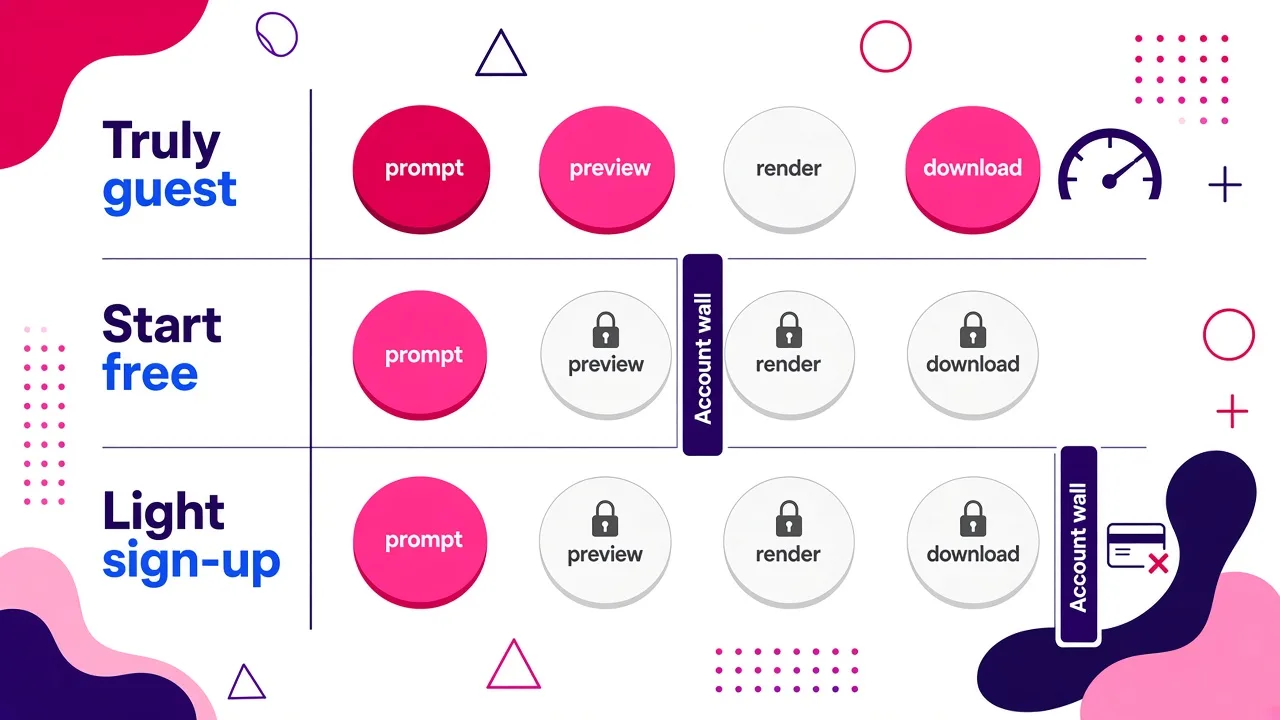
Before the list, it helps to know how these tools phrase their free offers. They usually fall into one of three groups:
- Truly no sign up: you type a prompt, generate and download, all as a guest. This is rare, and it almost always comes with tight daily limits.
- No sign up to start: you can write prompts, pick a model and sometimes preview results, but you need an account or credits for the final render or the download.
- No credit card required: these tools do need an account. They just don't ask for payment details. That's a light sign-up, not no sign-up.
None of these is a trick. Running video models costs real money per second of footage, which is why free allowances are measured in clips per day or in credits. If you want the longer explanation of why "free and unlimited" almost never lasts, I wrote about it in Is Text to Video AI Ever Truly Free and Unlimited?.
How I judged these tools
I scored each tool on five things that matter when you start from text:
- How far you get before an account wall. Prompt only, preview, or full download.
- What you actually get out. A short generated clip, or a finished video with voice, captions and editing.
- Free allowance. How many generations you get before you hit a paywall.
- Output fit for social. Vertical aspect ratio, length, and resolution.
- Model quality and choice. Whether you can pick a strong model for your prompt.
The 7 best free AI video generators from text with no sign up
1. Cliptalk (best for finished short-form videos)
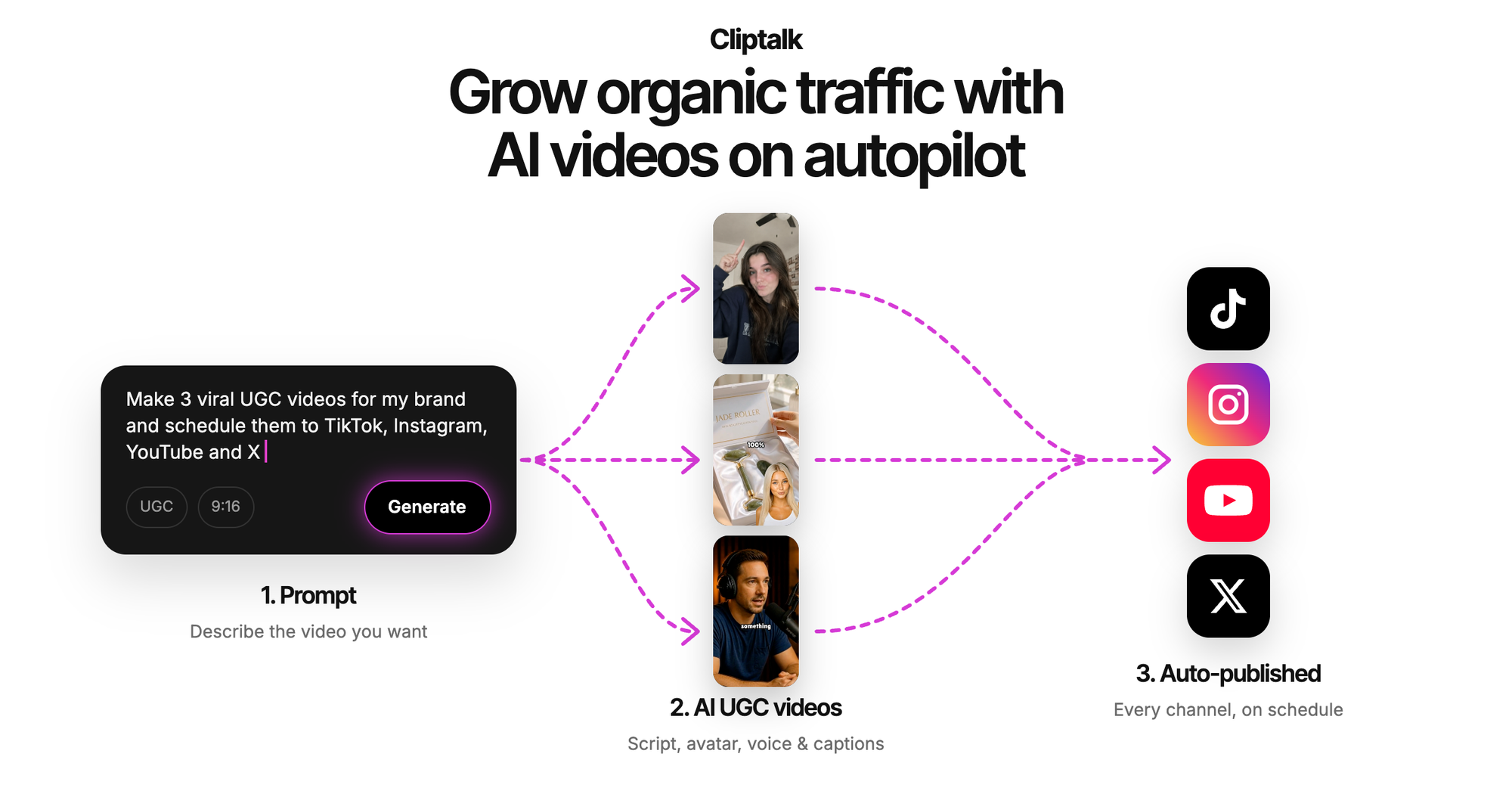
Most tools on this list generate a clip. This one generates a video you can actually post. You give it a prompt, a script or an article, and it returns an edited short with captions, B-roll, an AI voiceover and, if you want, an AI character presenting it.
The no-signup part covers the creative work where you'll spend most of your time. On the free AI influencer video generator, you can design the influencer and write the script with unlimited re-rolls, and nobody asks for an email. When you're happy with it, you render the talking video with captions, B-roll and music using the 50 free credits, with no card required. The script generators on the free tools page also work without signing up, which is handy if you just need a hook or a 30-second script to paste into another tool.
This is what I use for my faceless channel work. The workflow fits short-form well: script, voice, visuals, captions, done, without exporting to a separate editor.
Pros
- Outputs a complete, edited short-form video, not just a raw clip
- Unlimited re-rolls on character design and scripts with no signup
- Captions, B-roll, AI voiceovers and music are built in
- Voice cloning and AI characters for consistent faceless channels
- 50 free credits to render, no card
Cons
- The final render uses credits, so the free allowance runs out after a handful of videos
- Built for TikTok, Shorts and Reels, not long cinematic single shots
- If you only want an abstract 5-second art clip, a pure generative model tool is a better fit
Best for: creators, faceless channel operators and marketers who need publish-ready vertical videos from text.
2. Magic Hour (best for downloadable clips without an account)
Magic Hour's text-to-video page is one of the cleanest guest experiences I've tested. The flow is three steps: describe the scene, choose an aspect ratio, then generate and download the MP4. It's a big platform too. The site cites more than 40 million AI videos generated and over 1 million monthly users, with a 4.9/5 rating on Product Hunt.
Model choice is where it stands out. You can pick from Kling 3.0, Seedance 2.5, Veo 3.1, LTX 2.5, MiniMax H3, Wan 3.0 and several others from a single place. That matters, because different models handle different prompts better. Kling 2.6 is positioned for action and controlled camera moves, and Seedance 2.5 for realism and natural motion.
Pros
- Simple three-step flow with MP4 download
- Aspect ratio picker, so you can go vertical for social
- Wide model lineup in one interface
Cons
- You get a single generated clip with no voiceover script, captions or editing
- Premium models will push you toward credits quickly
- You still have to stitch clips together yourself for a full video
Best for: anyone who needs one good AI clip, fast, for B-roll or a concept test.
3. GizAI (best for transparent daily free limits)
GizAI is the most upfront about what "free" means, and I respect that. Each model card lists its exact allowance. When I checked, MiniMax H3 Turbo was free for 2 generations per day, then about $0.22 per use. LTX-2.5 Distilled was also 2 per day, then about $0.0413 per second based on a 4-second clip.
The specs are listed clearly too. MiniMax H3 Turbo outputs video with stereo audio at 480p, 576p or 736p (with optional 2× upscale) and runs 4.5 to 20 seconds. LTX-2.5 Distilled covers 480p up to 1080p and 1 to 20 seconds. Their own example product shot came out at 832×448 and about 4 seconds, which gives you a realistic idea of default output.
There are also utility tools like video upscale and enhance, free once every 6 hours.
Pros
- No sign-up to start, with clearly stated free limits per model
- Models that generate synchronized audio along with video
- Advanced controls like first/end frames and keyframes
Cons
- Two free generations a day per model goes fast while you're learning to prompt
- Default resolutions on the free models are modest
- The interface shows a lot of technical options that beginners may find overwhelming
Best for: people who want to test strong models every day without paying, and who like to know the exact cost before they hit generate.
4. VideoGeneratorAI.io (best for templates and longer clips)
This site markets itself as no sign-up and no watermark, and it's built around current models: Seedance 2.5 for 30-second clips at 1080p, MiniMax H3 for 2K video with native stereo audio, and Wan 3.0 for 30-second single takes from text or even a document.
The part I found most useful is the two-step templates. You generate a reference image first, then turn it into a 15-second video. The templates include a travel vlog, a get-ready-with-me routine and a stadium broadcast clip, and the site estimates about four minutes from start to finish. For trend-style content, that's a real shortcut over writing a detailed prompt from scratch.
Pros
- No-watermark positioning, which matters if you're posting the clip directly
- Longer clip options (up to 30 seconds on some models)
- Ready-made templates for popular social formats
Cons
- The best models are promoted with discounts, which tells you they're paid
- Templates lean toward trend formats rather than scripted, informational content
- No built-in captions or voiceover script workflow
Best for: creators chasing trend formats who want a longer clip without a watermark.
5. Pixlr (best for quick HD exports)
Pixlr is known as a photo editor, but its video generator handles both text to video and image to video, and it runs on Google Veo, Kling and Seedance. The process takes four steps: choose a mode, write a detailed prompt or upload an image, pick a model, then generate and export.
Its main pitch is HD export with no watermarks, which is the right promise for social use. It also gives practical use cases like promotional clips for TikTok ads and turning product specs into short explainer clips.
Pros
- Text-to-video and image-to-video in the same simple interface
- HD export with no watermark
- Access to well-known models without juggling platforms
Cons
- Fewer advanced controls than GizAI or Magic Hour
- Still single-clip output with no script-to-video assembly
- Free usage is limited, like everywhere else
Best for: people who already use Pixlr, or anyone who wants a no-fuss HD clip for a product post or ad test.
6. Adobe Firefly (best for brand-safe creative work)
Adobe's free video generator turns a prompt or an image into a clip using the Firefly Video Model plus partner models. You can type straight into the prompt box on the page, and you can optionally add a first frame. A few limits to know: prompts max out at 1,024 characters, uploaded images must be JPG or PNG under 50MB, and by uploading you confirm you're 18 or older.
Adobe positions it for product shots, cinematic scenes, B-roll social clips and concept work, and that matches what I got. Clean, polished, a bit conservative. The catch for this specific search is that it's an Adobe product, and continuing your work generally means an Adobe account. So it belongs in the "start without signing up" group, not the "finish without signing up" group.
Pros
- Polished output that's well suited to brand and product work
- Optional first-frame control for consistency
- Fits into the wider Adobe workflow if you already use it
Cons
- Expect an account sooner than with guest-first tools
- 1,024-character prompt cap limits very detailed scene descriptions
- Clip generation only, no scripted short with voice and captions
Best for: marketers and designers already in the Adobe ecosystem.
7. VEED (best if you want an editor and don't mind a light sign-up)
VEED is the closest competitor to a full script-to-video workflow on this list. You describe your idea or paste a script, and it builds a video with visuals, AI voiceover, avatars and subtitles. You can then customize aspect ratio, voice, music and caption style, swap footage with stock or AI-generated media, and open the full editor. It offers models like Veo 3.1, PixVerse and Hailuo, plus voice cloning.
It's well reviewed (4.6 from more than 2,100 reviews), but it promises "no credit card required," not "no sign up." You will make an account. I included it because if your real goal is a finished video, it's worth knowing about even with that step.
Pros
- Script-to-video with voiceover, avatars and subtitles
- Full editor for brand assets and fine-tuning
- Multiple generation models at different price points
Cons
- Account required, so it doesn't strictly meet the no-sign-up brief
- More features means more clicks per video than a dedicated short-form tool
- The best models cost more to run
Best for: teams who want a general-purpose online editor with AI generation built in.
Side-by-side comparison
| Rank | Tool | How far you get without an account | What you get | Watch out for |
|---|---|---|---|---|
| 1 | Cliptalk | Character design and scripts, unlimited re-rolls | Full short with captions, B-roll, voiceover, music | Render uses 50 free credits |
| 2 | Magic Hour | Prompt to MP4 download | Single clip, chosen aspect ratio | No editing or voice script |
| 3 | GizAI | Generate on free models | Clip with audio on some models | 2 free per day per model |
| 4 | VideoGeneratorAI.io | Generate, no-watermark positioning | Up to 30-second clips, templates | Top models are paid |
| 5 | Pixlr | Generate and export | HD clip, no watermark | Few advanced controls |
| 6 | Adobe Firefly | Prompt box on the page | Polished brand-style clip | Account needed to continue |
| 7 | VEED | Account required (no card) | Script-to-video with editor | Not truly no sign-up |
How to get better results from text, whichever tool you use
Free allowances are small, so wasted generations hurt. These are the habits that have saved me the most credits.
Give each clip one job. A prompt that asks for a character walking in, a product reveal and a sunset ending will usually get all three slightly wrong. Generate one action per clip and combine them afterwards.
Write prompts in a fixed order. Subject, action, setting, camera, lighting, style. The best example prompts on these sites follow that pattern: an object, where it is, how the light moves, how the camera moves, and how the shot ends. That structure gives the model fewer things to guess.
Run a short test first. On tools billed per second, generate the shortest duration to check the composition before paying for a long take. On GizAI, a 4-second test costs a fraction of a 20-second clip.
Pick vertical before you generate. Cropping a landscape clip to 9:16 later throws away most of the frame. Set the aspect ratio up front for TikTok, Shorts and Reels.
Separate the script from the visuals. For talking or narrated videos, get the script right first. A no-signup script generator is the cheapest place to iterate, because rewriting text is free while re-rendering video is not.
Review like an editor. AI video still struggles with text, logos, hands and product details, and motion can drift between frames. Watch every clip at full size before posting, and check that any facts in the voiceover are correct.
Check the watermark policy before you fall in love with a clip. Some free tiers add a watermark on export. If that's a dealbreaker, my roundup of text to video AI free tools without watermark covers that angle specifically.
Which one should you pick?
Start with what you're trying to publish.
- You need a finished TikTok, Short or Reel from a script or idea: start at #1. The point is to skip the editing stage entirely.
- You need one striking clip for B-roll or a concept: Magic Hour or GizAI. Magic Hour is easier, GizAI is more transparent about limits.
- You're chasing a trend format: VideoGeneratorAI.io's templates get you there quickly.
- You want a clean product or brand shot: Pixlr for speed, Adobe Firefly for polish.
- You want a full editor and don't mind making an account: VEED.
FAQ
Is there any text-to-video generator that's completely free and unlimited with no sign up? Not in a way that lasts. Every tool I tested either caps free generations (GizAI's 2 per day per model is a typical example) or moves you to credits for the render. "No sign up" usually means no sign up to try.
Can I use these clips commercially? It depends on each tool's terms and the model you pick, so read them before running ads. Also be careful with recognizable people, brands and logos in your prompts.
Why do my clips look different from the examples? Example clips are usually made with the best model, at the highest resolution, from carefully written prompts. Free tiers often default to faster, lower-resolution models. Use the prompt order above and compare models on the same prompt.
How long can a free AI video be? Most single clips land between 4 and 20 seconds, and some newer models reach 30 seconds. For anything longer, you either stitch clips together or use a tool that builds a full video from a script.
Final take
If you only need a single generated shot, the guest-friendly model hubs on this list will get you a free clip today. If you're making content every week, a raw clip is only the first step: you still need a script, a voice, captions and editing. That's why Cliptalk tops this list for creators, since you can shape the character and script for free without signing up and then turn the result into a ready-to-post short.
Tags: ai video generator, text to video, free tools, short-form video, faceless channels