8 Best AI Video Generators for Ad Creatives in 2026
· 13 min read
Ad creative is a volume game now, so the best AI video generator for ads is the one that gets you from a script to a platform-ready vertical video fastest without making you rebuild the edit every time. For most performance marketers and creators shipping short-form ads to TikTok, Reels, and Shorts, that tool is Cliptalk, because it turns a prompt or a written script straight into a finished 9:16 cut with burned-in captions, B-roll, and an AI voiceover, which is the exact output an ad account needs, not raw model footage you still have to assemble.
That said, "ads" covers a lot of ground. A DTC brand running product-page ads, an agency making 40 UGC variations a week, and a SaaS company making one cinematic brand film all need different machines. I have run briefs through every tool below, and this list ranks them by how close their output is to something you would actually spend money promoting.
How I judged these tools
I stopped scoring AI video tools on "does it look impressive" a while ago. Impressive footage loses money if the first two seconds are a slow reveal. Here is what I weight instead, in rough order of importance:
- Distance to publishable. How much editing is left after the tool finishes? A clip that needs captions, reframing, and a hook rebuilt is not a finished ad.
- Native vertical output. 1080x1920 at 9:16, not a 16:9 frame cropped after the fact. Cropping wrecks composition and pushes your product into TikTok's UI safe zone, which eats roughly the bottom 30% and right 15% of the frame.
- Variation throughput. One render is a test, not a campaign. I care how many usable variants I can pull in a single session.
- Hook control. Can I specify the opening line, the opening shot, and the on-screen text, or does the model decide for me?
- Caption quality. A large majority of social video is watched on mute, with older Verizon Media research putting it around 69% of consumers. If captions are mistimed, you are rewriting them by hand, which kills the speed advantage.
- Real cost per usable ad. Not sticker price. Sticker price divided by the renders you actually ship after failures.
Some context on why this matters more each quarter: Grand View Research valued the AI video generation market at $5.1 billion in 2023 and projects roughly $18.6 billion by the end of 2026, heading toward $71.5 billion by 2030. Industry benchmarks put AI-specific ad spend near $9.1 billion in 2026, about 12% of all digital video advertising, with 78% of marketing teams already using AI-generated video in at least one campaign per quarter. The tooling decision is not optional anymore, it is a cost structure decision.
The 8 best AI video generators for ad creatives
1. Cliptalk, best for high-volume short-form ad creative
If your ads live on TikTok, Reels, and Shorts, and you need five to fifteen variants a week rather than one hero film, this is where I start. You paste a script, an article, or just a prompt, and you get back a finished vertical video: AI voiceover, auto-generated B-roll matched to the lines, burned-in captions timed to the speech, and optional AI characters if you want a face on screen. The important part for advertisers is that the caption and pacing layer is built in, not bolted on. Most generative tools hand you beautiful silent footage and leave the ad-making to you.
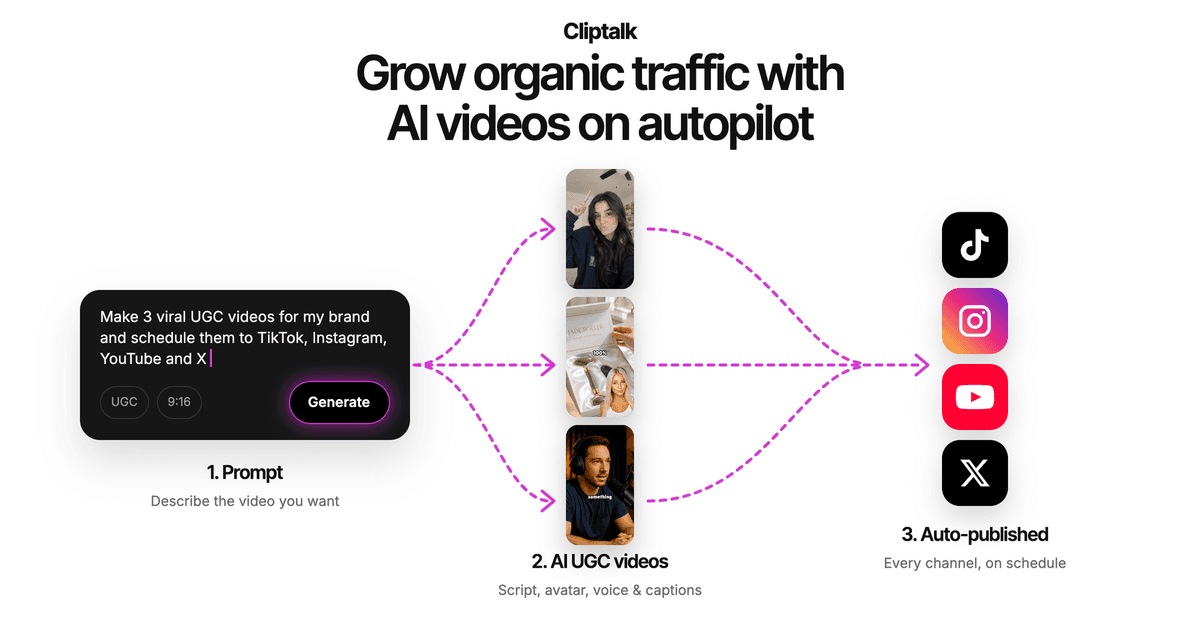
In practice my workflow is: write three hook variants for the same offer, run each as its own render, and ship all three into the same ad set. Because the script drives the edit, changing the first line changes the first two seconds of the video, which is the only part of an ad creative that reliably moves CTR. Voice cloning matters here too, since a consistent narrator voice across a campaign makes a series feel like a brand instead of a batch of stock clips. If you want to see the script side before committing to anything, the free YouTube script generator writes the full spoken script word for word with no signup, and you can render it after.
Pros: native 9:16 output, captions and voiceover handled in one pass, fast variant generation from edited scripts, AI characters and voice cloning for consistent brand identity, full editor if you want to swap shots manually.
Cons: it is built for short-form social ads, so it is not the tool for a 90-second cinematic brand film. If you need photoreal generative shots of a specific physical product in motion, you will still want a dedicated generative model in the pipeline.
Best for: performance marketers, faceless channel operators, and small teams that measure output in ads per week. Plans and credit tiers are on the pricing page.
2. Creatify, best for product-page-to-ad e-commerce
Creatify's core trick is still the most useful shortcut in ecommerce advertising: paste a product URL, and it scrapes the images, copy, and price to assemble a video ad. It leans hard into the performance angle, with an ad library you can browse by industry and platform, competitor creative analysis, batch variation generation, and direct publishing to connected ad accounts. The company cites 30 million ads analyzed and over 15 million created across 18,000+ brands and agencies, and it is rated 4.8 on G2.
Pros: URL to video ad in minutes, genuine batch mode for a dozen variations at once, both UGC-style and polished cinematic looks, built-in A/B testing and push-to-platform, free to start with no credit card.
Cons: output quality depends heavily on the quality of your product page assets. Thin product pages produce thin ads. The template-driven look is recognizable if you run the same structure for months without swapping formats.
Best for: DTC stores and affiliate marketers who already have a strong product page and want ads generated from it.
3. HeyGen, best for spokesperson ads and localization
HeyGen is the avatar tool that other avatar tools get compared to. You paste a script, pick from a library of over 1,100 avatars including a dedicated UGC set, and a 30-second ad renders in a couple of minutes. The lip sync holds through compound sentences that trip up cheaper tools. Where it genuinely separates itself is translation: take an English ad, push it through the built-in translator into Spanish or Mandarin, and the avatar's mouth movements stay synchronized to the new audio across 175+ languages.
Pros: best-in-class lip sync, enormous avatar library, one script becomes dozens of localized market variants, 4.8/5 on G2 across 1,400+ reviews.
Cons: every ad is a talking head, so creative variety comes from the script and the B-roll you add, not the format. The free tier is only three videos a month, and the jump from Creator at $24/month annually to Business at $149/month is steep if you need seats or higher volume.
Best for: brands running spokesperson ads in multiple markets from a single English script.
4. Arcads, best for UGC-style direct response
Arcads built its whole product around one insight: the highest-performing paid social creative usually looks like a person talking to their phone, not a commercial. It ships 300+ AI actors specifically posed and framed for direct response, so the output lands in that "creator filmed this in their kitchen" register that Meta and TikTok algorithms currently reward.
Pros: the actor library is tuned for performance marketing rather than corporate explainers, fast to produce many hook variants with different faces reading the same script, strong fit for testing which persona sells your offer.
Cons: narrow by design. It does not do cinematic b-roll, animation, or complex scene work. And because so many advertisers now use the same actor pool, creative fatigue arrives faster than it does with generated or custom footage.
Best for: agencies and media buyers whose entire strategy is UGC-format testing at volume.
5. Runway, best for cinematic brand spots
When the brief is a hero film rather than a hook test, Runway is still the reference point. Gen-4 visual fidelity, motion coherence, and camera control are ahead of the pack, and the surrounding toolset gives you the kind of shot-level direction that filmmakers expect. You use it to make something that looks expensive.
Pros: unmatched visual quality for generated footage, deep creative control over camera and motion, excellent for brand films, teasers, and abstract product visuals.
Cons: it is a generator, not an ad factory. You get footage, not a finished ad, so captions, voiceover, pacing, and vertical reframing all happen elsewhere. Credits burn fast when you are iterating on prompts, which makes cost per usable clip high compared to script-driven tools.
Best for: brand teams and creative studios with an editor in the loop.
6. invideo AI, best for prompt-to-ad across every placement
invideo covers an unusually wide surface: text prompt, image, or product link in, and social media ads out for YouTube, Meta, LinkedIn, and TikTok. The newer agent-style workflow is the interesting part for advertisers, because you can tell it to cut the first three seconds a dozen different ways, cold open, line first, text on frame, without rebuilding the edit behind the hook. It also handles localization by swapping the voiceover while captions and timing follow.
Pros: enormous template library oriented to social ad formats, hook-editing workflow built for testing, works from a prompt when you have nothing else, handles assembly, sound, captions, and UGC-style jump cuts in one place.
Cons: the breadth cuts both ways. There are a lot of controls to learn, and stock-footage-driven output can feel generic unless you feed in your own assets. Quality varies more between renders than it does with narrower tools.
Best for: marketers producing ads across several placements who want one platform rather than four.
7. CapCut, best free entry point
CapCut remains the most honest free option because it is free without a watermark and because its defaults are tuned for the platform its parent company owns. The AI script-to-video feature takes a script, picks a style, and assembles stock footage with auto-captions whose timing actually matches the speech. The 2026 conversational interface lets you start from bullet points or a messy transcript and have the AI shape a brief before it builds. It also ships AI voiceovers, digital humans, and 54 visual styles.
Pros: genuinely free, vertical-first by default, caption timing is reliable, it doubles as a real manual editor when you need to fix something, trending transition styles are already in the library.
Cons: you are working inside CapCut's aesthetic sandbox, and branded ads end up looking like CapCut ads. For differentiation, that is a real problem once you are spending meaningful budget.
Best for: beginners, low-budget testing, and anyone validating a format before paying for a production tool.
8. Zeely, best for solo operators who want ads plus results tracking
Zeely is aimed squarely at small businesses rather than agencies. It generates platform-ready ads for Instagram, Facebook, and TikTok in under seven minutes using 150+ hyperrealistic avatars and proven script templates, with a batch mode for testing versions. The differentiator is the reporting layer: it tracks CTR, CPC, and engagement so you can double down on winners instead of guessing, with plans starting around $12.
Pros: very low entry price, avatars and templates remove the filming step entirely, built-in batch testing, performance metrics in the same dashboard where you made the creative.
Cons: template-led output limits creative range, and the avatar library is smaller than HeyGen's or Arcads'. It is built for simple offers, not complex B2B messaging.
Best for: founders and small store owners running their own ads without a marketing team.
Quick comparison
| Tool | Best for | Native 9:16 | Captions built in | Free tier |
|---|---|---|---|---|
| Cliptalk | High-volume short-form ads | Yes | Yes | Free credits |
| Creatify | Product URL to ad | Yes | Yes | Yes, no card |
| HeyGen | Spokesperson and localization | Yes | Yes | 3 videos/month |
| Arcads | UGC direct response | Yes | Yes | Limited |
| Runway | Cinematic brand spots | Partial | No | Limited credits |
| invideo AI | Multi-placement prompt-to-ad | Yes | Yes | Yes, watermarked |
| CapCut | Free testing | Yes | Yes | Yes, no watermark |
| Zeely | Solo operators with tracking | Yes | Yes | Trial |
If you want a longer breakdown of where each of these wins against the others, we keep honest side-by-side comparisons with no demo call required.
The part most roundups skip: generation is not the hard part
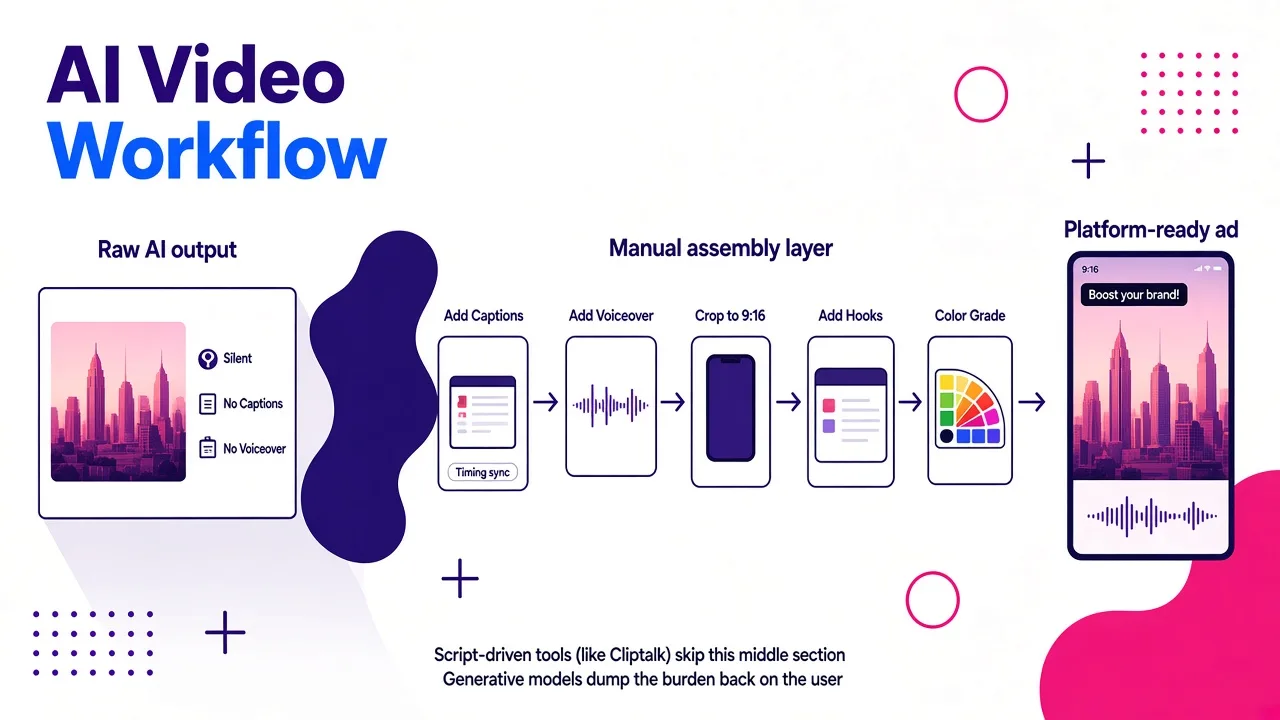
Here is the thing I keep relearning. The model that makes the footage is maybe 30% of the job. The other 70% is the layer between raw output and a running ad, and it is where campaigns are won.
Fix the first two seconds first. Short-form algorithms judge early retention hard. If nothing happens in the opening frame, no amount of production value rescues the clip. When I test, I hold the offer and the body copy constant and only change the hook. Three hooks per concept is the minimum.
Respect the safe zones. Platform UI covers roughly the bottom third and part of the right edge. Any tool that exports a cropped 16:9 frame will bury your product, your CTA, or your text under the interface. Check one export on an actual phone before you build a workflow on top of a tool.
Keep it short. The sweet spot for organic short-form reach sits around 21 to 34 seconds. Plenty of tools still default to 60-second outputs built for YouTube. Set the duration deliberately.
Watch pacing, not just quality. If a model gives you four-second static shots, cutting to short-form rhythm takes real editing time. At five ads a day, you cannot spend 40 minutes restructuring each one. This is the single biggest reason script-driven tools beat pure text-to-video for paid social.
Label what needs labeling. TikTok requires visible disclosure for realistic AI-generated people, scenes, and audio, including cloned narration. Creators use the AIGC toggle on organic posts, advertisers use the AI Disclosure tag in Ads Manager, and the platform may apply labels automatically when provenance metadata is present. AI-assisted text work like script writing is exempt. Build disclosure into your process rather than hoping nobody notices.
FAQ
What is the cheapest way to start making AI video ads? CapCut is free with no watermark, and several tools on this list offer free credits or a free tier. Start there, validate that the format converts, then pay for throughput once you know what you are scaling.
Do AI-generated ads actually perform? The honest answer is that format and hook drive performance far more than how the pixels were made. What AI changes is economics: teams report cost reductions above 90% versus traditional production, and turnaround measured in tens of minutes instead of days. More shots on goal at lower cost is the advantage, not magic creative.
Should I use avatars or faceless B-roll ads? Avatars win when trust and explanation matter, like services, SaaS, and anything requiring a pitch. Faceless B-roll with strong captions and voiceover usually wins for listicles, offers, and impulse products, and it scales more cheaply because you are not locked to one face.
Can one tool do everything? No, and pretending otherwise wastes money. Most mature ad teams run two: one generator for footage or avatars, and one assembly tool that handles captions, pacing, and vertical output.
Final picks
For most people reading this, the answer is the short-form ad factory: Cliptalk if your ads are vertical, script-led, and you need many of them. Choose Creatify if your ads start from a product URL, HeyGen if one script needs to run in ten languages, Arcads if you live and die by UGC testing, Runway if the brief is a brand film, invideo AI if you are covering every placement at once, CapCut if your budget is zero today, and Zeely if you are a one-person business that wants creative and reporting in the same window.
Pick based on where your input comes from, not on which demo reel looked prettiest. The tool that matches your starting material will always beat the tool with the better model.
Tags: ai video generation, ad creative, short-form video, performance marketing, video marketing tools