10 Best YouTube Shorts Video Makers, Compared
· 13 min read
If you want a YouTube Shorts video maker that turns a text prompt, script, or article into a finished vertical video without editing anything yourself, Cliptalk is the one I recommend, because one pass produces the captions, B-roll, and AI voiceover together and gives you an editor for the final tweaks. If your Shorts start from long videos you've already filmed, a clipping tool like OpusClip or VEED fits better, and the comparison below shows which tool suits which kind of creator.
I've run every tool on this list through the same kind of test: make a few Shorts for a faceless channel, then make a few from existing footage. They split cleanly into two camps, and choosing the wrong camp wastes more money than choosing the wrong tool inside the right one.
Quick comparison
| # | Tool | Best for | Starts from | Entry pricing (as reported) |
|---|---|---|---|---|
| 1 | Cliptalk | Script, prompt, or article to a finished Short | Text | Free to try; see pricing page |
| 2 | InVideo AI | Prompt-based faceless Shorts with a huge stock library | Text | No free plan since July 2026 repricing |
| 3 | OpusClip | Turning long videos into Shorts | Video | Free; Starter $15/mo |
| 4 | Revid.ai | Mass-producing auto-posted faceless Shorts | Text or URL | $39/mo Hobby |
| 5 | VEED | Clipping plus a full browser editor | Video | Free to try |
| 6 | SendShort | Mixing faceless videos with repurposing | Both | $19/mo, or $15/mo annually |
| 7 | Fliki | Natural, multilingual AI voiceovers | Text | Credit-based |
| 8 | AutoShorts.ai | Hands-off faceless series on autopilot | Niche or topic | Cheap entry |
| 9 | Pictory | Articles, scripts, and webinars into video | Text or video | $25/mo billed annually |
| 10 | Vidnoz AI | Free experiments and AI avatars | Text | Free plan with daily credits |
Pricing changes often. Treat these figures as a starting point and check each vendor before you commit.
What a good YouTube Shorts video maker actually needs
A good general video editor isn't automatically a good Shorts maker. These are the things I check before I spend a single credit:
- Native 9:16 output. Shorts play full-screen and vertical. You want a tool that builds the video tall from the start, not one that crops a landscape clip and cuts off half the frame. If you're unsure about the specs, here's a breakdown of Shorts dimensions and safe zones.
- Word-synced captions. Many viewers start watching with the sound off. Captions that highlight each word as it's spoken are the single biggest retention win I've found on the format.
- A strong first two seconds. The hook decides whether someone keeps watching. Tools that let you rewrite or regenerate the opening line are worth more than tools with fancy transitions.
- Clean output with no watermark. A visible logo makes a Short look recycled.
- Fair credit rules. Some tools charge credits only for the video you keep. Others charge while you edit and preview. That difference changes your real cost per Short a lot.
- A free way to test. You should be able to see the quality before you pay.
One format note: YouTube now allows Shorts up to three minutes for square or vertical videos uploaded after October 15, 2024. Most of my best performers are still well under a minute, but your tool shouldn't force you into 60 seconds if a topic needs more.
The 10 best YouTube Shorts video makers
1. Cliptalk: best for turning a script, prompt, or article into a finished Short
This is the tool I use most for original Shorts. You give it a text prompt, a full script, or an article, and it returns a fully edited vertical video: AI voiceover, B-roll matched to what's being said, auto-captions, and optional AI characters if you want an on-screen presence without filming yourself. When the draft is 90% right, you fix the last 10% in the built-in video editor instead of exporting to another app.
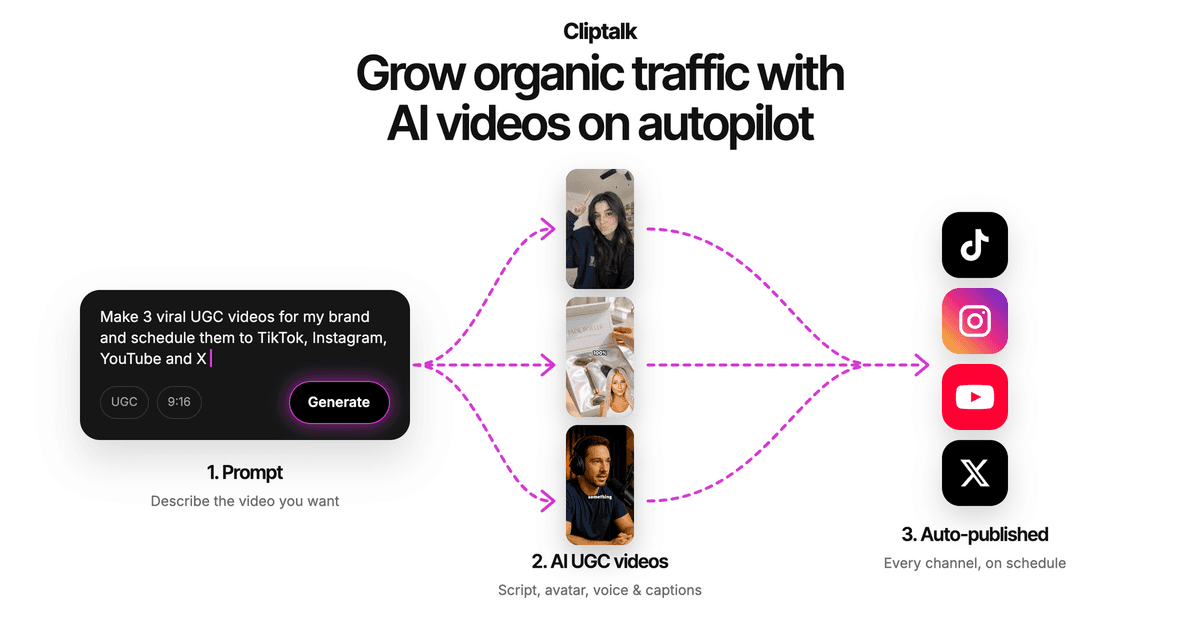
What I value most is that the script and the edit live in the same place. I usually start with the free YouTube script generator, which writes the full spoken script from hook to call to action, word for word, plus title options, with no signup. Then I render that script straight into a video. Voice cloning matters too if you run a channel where a consistent narrator is part of the brand: you can keep your own voice on every Short without recording each one.
Pros
- One pass handles voiceover, B-roll, captions, and editing
- Accepts prompts, finished scripts, or full articles as input
- Voice cloning and AI characters for faceless channels that still want personality
- Built-in editor, so you aren't locked into the first draft
- Free script and thumbnail tools sit around the core product
Cons
- It's a generator, not a highlight clipper. If your source is a two-hour podcast, a dedicated clipper like OpusClip gets you there more directly
- Focused on short-form for TikTok, Shorts, and Reels, not long-form YouTube uploads
- As with every AI generator, a weak script gives you a weak video. The tool won't rescue a dull hook
Best for: faceless channel operators, creators, and marketers who start from words and want a publish-ready Short with minimal editing. Plans for individuals, creators, and businesses are on the pricing page.
2. InVideo AI: best for prompt-based faceless Shorts with a large stock library
InVideo AI writes the script, builds scenes, adds generative media, voiceovers, subtitles, and sound effects, then lets you edit with text commands like "delete scene" or "change voiceover accent." Its stock library is massive: the company advertises 16 million+ photos and videos, and it claims 25M+ users.
Pros
- Fast path from a one-line idea or a blog URL to a narrated vertical video
- Text-command editing means you never touch a timeline
- Huge stock and voice library with multilingual support
Cons
- Reviewers report there's been no free plan since the July 2026 repricing, so testing costs money
- Unused credits reportedly expire at the end of each month
- Output can feel generic when the prompt is vague, which is a common complaint with stock-heavy tools
Best for: creators who want a broad prompt-to-video system and lean heavily on stock footage.
3. OpusClip: best for turning long videos into Shorts
OpusClip is the clipper most people mean when they say "AI Shorts." It scans a full-length video, finds the moments most likely to perform, reframes them to 9:16, adds animated captions, and scores each clip so you know which to post first.
Pros
- Excellent at finding highlights in podcasts, interviews, and tutorials
- Clip scoring helps you prioritize what to post
- Free tier, with Starter reported at $15/mo
Cons
- Useless if you have no source footage. It repurposes; it doesn't create
- Output quality depends entirely on how strong the original video is
Best for: podcasters, educators, and long-form YouTubers who want several Shorts from every upload.
4. Revid.ai: best for mass-producing auto-posted faceless Shorts
Revid.ai turns a prompt, script, or URL into a faceless Short, and its Auto-Mode workers can generate and post on a schedule. It has one of the widest toolkits in the category, covering Shorts, TikTok, Reels, ads, and repurposing.
Pros
- Purpose-built for faceless short-form
- Strong generate-and-post automation for YouTube
- Lots of formats in one place
Cons
- Reviewers report recurring reliability complaints, including credits lost on failed generations
- Demo samples can look better than real-world output
- The $39/mo Hobby entry price is high for a test run
Best for: operators who want volume and automated posting more than fine control over each video.
5. VEED: best for clipping plus a full browser editor
VEED currently ranks first on Google for this query, and for good reason if you already have footage. You upload a video or paste a YouTube link, choose size, caption style, and max length, and its AI Clips tool pulls the most engaging segments. From there you're inside a complete browser editor with captions, music, graphics, brand assets, and voice cloning.
Pros
- Combines AI clipping with a real editor, so you can fix anything manually
- Also has a text-to-video generator if you need original content
- Free to try, with team collaboration features
Cons
- The editor-first approach means more manual work than a one-pass generator
- Better for production than for running a high-volume faceless channel
Best for: teams and creators whose Shorts start from source videos, customer clips, or recordings.
6. SendShort: best for mixing faceless videos with repurposing
SendShort sits between the two camps. It handles captions, B-roll, faceless video generation, and scheduling, and it can also clip existing footage. Reported pricing is $19/mo monthly or $15/mo billed annually.
Pros
- Covers both from-scratch and repurposed Shorts
- Scheduling built in
- Reasonable entry price
Cons
- Doing both jobs means it isn't the deepest at either one
- Faceless video limits on lower tiers can constrain volume
Best for: creators who publish original faceless Shorts and clips from existing videos in the same week.
7. Fliki: best for natural, multilingual AI voiceovers
Fliki turns a script or blog post into a narrated vertical video, and its voices are among the most natural I've heard in this category. It supports many languages and offers voice cloning.
Pros
- Lifelike voices across lots of languages
- Simple workflow for voiceover over stock footage
- Good for multilingual channels
Cons
- Credits are spent while you edit and preview, not only on export, which inflates real cost
- The AI voice sometimes skips or mispronounces words, forcing regenerations
- Easy to end up looking like every other stock channel unless you lock in a visual style
Best for: explainer channels where voice quality matters more than visual variety.
8. AutoShorts.ai: best for a hands-off faceless series
AutoShorts.ai builds a fully automated faceless series from a niche or topic. It writes the script, adds voiceover and stock visuals, and posts to YouTube Shorts, TikTok, and Instagram Reels on a schedule.
Pros
- True set-and-forget automation
- Cheap entry point
- Multi-platform auto-posting
Cons
- Thin third-party review footprint, so quality is harder to verify before buying
- Output can be templated and repetitive, with limited fine editing
Best for: people testing a niche who want daily uploads with almost no involvement.
9. Pictory: best for articles, scripts, and webinars
Pictory turns blogs, scripts, webinars, and trainings into footage with captions, and it includes stock media, voiceovers, and brand kits. Reported pricing starts at $25/mo billed annually.
Pros
- Strong at article-to-video if you already have written content
- Brand kits keep marketing videos consistent
- Handles long-form source material too
Cons
- Pacing often feels closer to LinkedIn or YouTube than a scroll-stopping Short
- Weak native hooks for the first two seconds
- No autopilot posting
Best for: marketers repurposing articles and webinars who care more about brand consistency than viral pacing.
10. Vidnoz AI: best free allowance for experimenting
Vidnoz AI offers 1,800+ avatars and 2,600+ voices, plus a generous free plan with daily credits. It's the easiest way to play with AI video without a card.
Pros
- Very generous free plan
- Huge avatar, template, and voice library
Cons
- The free tier is watermarked, capped at 720p, and limited to about three minutes
- Reports are split: strong ratings on G2, but many billing complaints elsewhere
- Avatar-led videos aren't truly faceless, which matters if that's your channel format
Best for: beginners who want to experiment before paying for anything.
Also worth knowing
A few tools didn't make the top 10 but solve specific jobs well:
- StoryShort is built for narrated story channels like Reddit stories and history, with a reported $39/mo Starter plan. Great if that one format is your whole channel, limiting otherwise.
- Klap does the same repurposing job as OpusClip, with reframing that tracks the speaker.
- CapCut is a capable editor, but you do all the work yourself. It's an editor, not a generator.
- Choppity is a free clip maker that pulls 30+ clips from a long video or podcast.
- Synthesia and HeyGen are avatar presenter tools, the opposite of faceless.
Generator or clipper: pick by where your Short starts
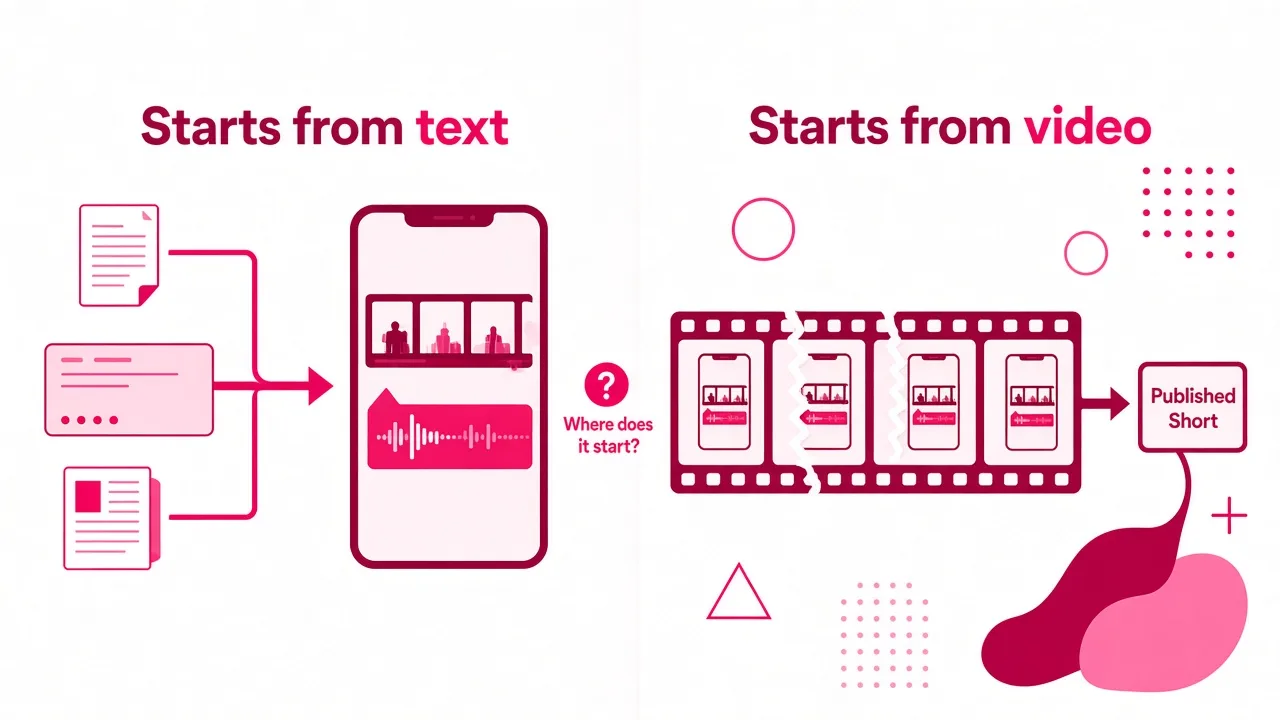
The most useful question I've learned to ask isn't "which tool is most powerful?" It's "where does my Short start?"
- You start from an idea, a script, or an article: you need a generator. That's Cliptalk-style tools, InVideo AI, Revid.ai, Fliki, AutoShorts.ai, and Pictory.
- You start from long videos you've already recorded: you need a clipper. That's OpusClip, VEED, Klap, and Choppity. Our guide on creating Shorts from a YouTube video with AI walks through that workflow.
- You do both: SendShort or VEED cover the overlap, or you pair one generator with one clipper.
Buying a clipper with no footage means you'll be filming just to have something to clip. Buying a generator when your best material already lives in hour-long videos means you're paying to recreate content you already own.
Tips that matter more than the tool
After making a lot of Shorts across these platforms, the biggest gains came from habits, not features:
- Write the hook yourself. Every generator produces a decent middle. The first line is where AI drafts are weakest, so rewrite it until it makes a specific promise in under two seconds.
- Keep captions out of the danger zone. YouTube's interface covers the bottom and right edges of the screen. Captions placed there get hidden behind the title and buttons.
- Lock a visual style. Random stock footage on every upload makes a channel feel spammy. Pick a caption style, voice, and color treatment and keep them.
- Calculate cost per finished Short. A cheaper plan that charges credits for previews and failed renders can cost more than a pricier plan that only charges for exports.
- Add real value before you monetize. YouTube says reused or repetitious content can be ineligible for monetization if it lacks meaningful differences or original value. An original script with a point of view is your best protection against that.
- Test before committing. Make the same Short in two tools from an identical script. The difference in output tells you more than any feature list.
Which one should you choose?
- Choose Cliptalk if you start from text and want a finished, captioned, voiced Short with B-roll in one pass, plus an editor and voice cloning for consistency.
- Choose InVideo AI if you want prompt-to-video with the biggest stock library and don't mind paying to test.
- Choose OpusClip if you already publish long-form videos or podcasts.
- Choose Revid.ai or AutoShorts.ai if automated posting and volume matter more than polish.
- Choose VEED if you want clipping inside a full browser editor.
- Choose SendShort if you mix original and repurposed Shorts.
- Choose Fliki if voice quality and languages come first.
- Choose Pictory if you're turning articles and webinars into branded video.
- Choose Vidnoz AI if you only want to experiment for free.
FAQ
What is the best YouTube Shorts video maker?
For original Shorts made from text, a script-to-video generator with built-in captions, B-roll, and voiceover is the fastest route to a publish-ready video. For repurposing long videos, OpusClip is the strongest clipper. The right answer depends on whether your content starts as words or as footage.
Can AI make a YouTube Short from just text?
Yes. Generators take a prompt, script, or article and produce the voiceover, visuals, and captions automatically. In my experience, the quality of the script decides the quality of the Short far more than the tool does.
Are AI-generated YouTube Shorts monetizable?
They can be, but YouTube's policy says reused or repetitious content may be ineligible if it lacks meaningful differences or original value. Original scripts, a consistent voice, and a clear point of view keep you on the right side of that line.
How long can a YouTube Short be?
Square or vertical videos uploaded after October 15, 2024 can run up to three minutes. Shorter usually holds attention better, but you're no longer capped at 60 seconds.
Should I use a Shorts generator or a clipping tool?
Use a generator if you start from ideas or scripts. Use a clipper if you already have long-form videos, podcasts, or webinars. If you do both regularly, pair one of each or pick a hybrid like SendShort or VEED.
Tags: youtube shorts, ai video, video editing tools, faceless channels, short-form video