How to Create Shorts From a YouTube Video With AI
· 9 min read
To create Shorts from a YouTube video, you have two options. You can cut the strongest moments out of the original footage and reframe them to vertical 9:16, or you can pull the transcript, rewrite each key idea as a tight script, and generate a fresh vertical video from each one. For most creators, and especially faceless channels, I recommend Cliptalk for the second route. You paste in a script and get back a fully edited Short with captions, B-roll, and an AI voiceover, so one long upload can become several original Shorts without you ever opening a timeline.
Below I cover both methods, the specs you need to hit, and the habits that decide whether repurposed Shorts actually get watched.
Two ways to turn a long video into Shorts
Most guides treat "repurposing" as one job. In practice there are two, and they suit different channels.
Clipping keeps your original footage. An AI tool scans the video, finds moments that stand alone, crops them to vertical, and adds captions. This works best when the long video already contains strong visual or vocal moments: podcasts, interviews, talking-head explainers, panels, and reactions.
Rewriting keeps your ideas but not your footage. You take the transcript, pull out individual points, and turn each one into a short, punchy script. Then you produce a new vertical video around that script. This works best when the original is slow, widescreen-heavy, screen-recorded, or faceless. It also works when the best insight is spread across ten minutes instead of sitting in one quotable 40-second stretch.
I use both. If a guest says something brilliant in one breath, I clip it. If the value of a video is a list of tips, a story, or an argument that builds slowly, I rewrite it. A five-point tutorial almost never produces five clean clips, but it easily produces five clean scripts.
What to check before you start
A few things are worth settling up front so you don't redo work later.
Rights. Only repurpose videos you own or have permission to use. Pulling clips from other creators' uploads is the fastest way to get claims or strikes. Rewriting your own long video's ideas into new Shorts is the cleanest path of all.
Format specs. YouTube Shorts are vertical, 9:16 portrait. Clips can run up to 180 seconds, and MP4 or MOV files work fine. If the 9:16 framing is new to you, our guide on YouTube Shorts size, dimensions, and safe zones explains where the interface covers your video and where your text should sit.
Captions and sound. Treat both as required. Many people scroll with sound off, and captions keep them watching long enough to turn it on.
The goal of each Short. Decide whether a Short is meant to stand alone or to push viewers to the full video. Standalone Shorts need a complete payoff. Teaser Shorts need a clear reason to click through. Mixing the two produces Shorts that do neither.
Method 1: Clip the original footage with AI
This is the route most "YouTube to Shorts" tools are built for. Choppity, Klap, Flowjin, and Spikes Studio all follow roughly the same flow: paste a link or upload a file, let the AI find moments, then review and export. Some of them advertise dozens of clips from a single long video. That is useful, but quantity is not the goal.
Here is how I run it:
- Upload or paste the link. Use your own video. Higher source resolution survives the vertical crop better.
- Let the AI suggest clips, then cut the list in half. Auto-detected "viral moments" are often just loud moments. Keep the clips where the first sentence makes sense to someone who never saw the full video.
- Check the reframing. Smart cropping follows faces, but it can lose a second speaker, a whiteboard, or an on-screen demo. Fix any shot where the important thing drifts out of frame.
- Trim the opening. Start on the most interesting line, not on "So, yeah, the thing is." Cutting even two seconds of throat-clearing at the start makes a noticeable difference.
- Style the captions. Pick one readable caption style and use it everywhere so your Shorts look like a series.
- Export in 9:16 and upload. Write a title that states the payoff and doesn't just name the topic.
If you only make the occasional Short, the YouTube app can also turn a segment of one of your own uploads into a Short. Desktop editors like Clipchamp give you templates and manual control if you prefer to build each one by hand. Both take more of your time per Short than an AI clipper does.
Where clipping falls short: if your long video is a screen recording, a slideshow, a slow build-up, or narration over widescreen B-roll, the crops look awkward. The "best moments" also tend to depend on context the viewer doesn't have. That's when I switch to Method 2.
Method 2: Turn the video's script into new Shorts
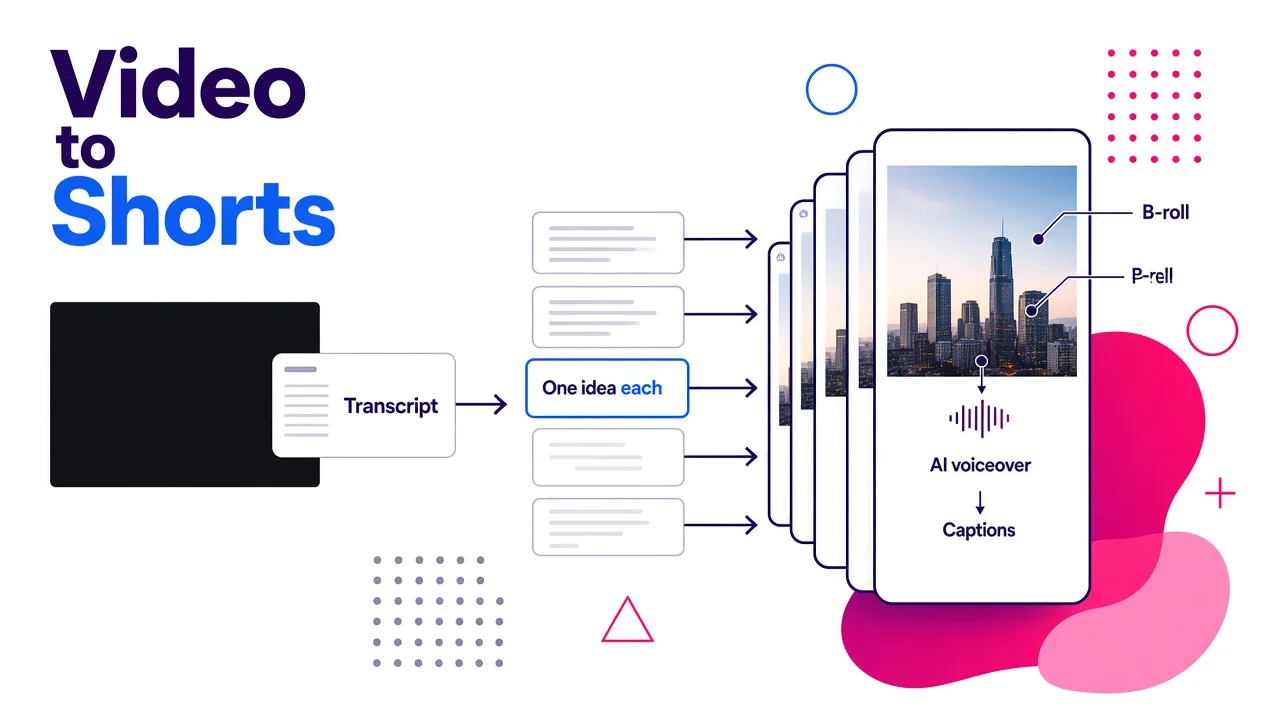
This method treats your long video as a source of ideas rather than a source of footage. It's how I get the most Shorts out of a single upload, and it's the only method that works well for faceless channels.
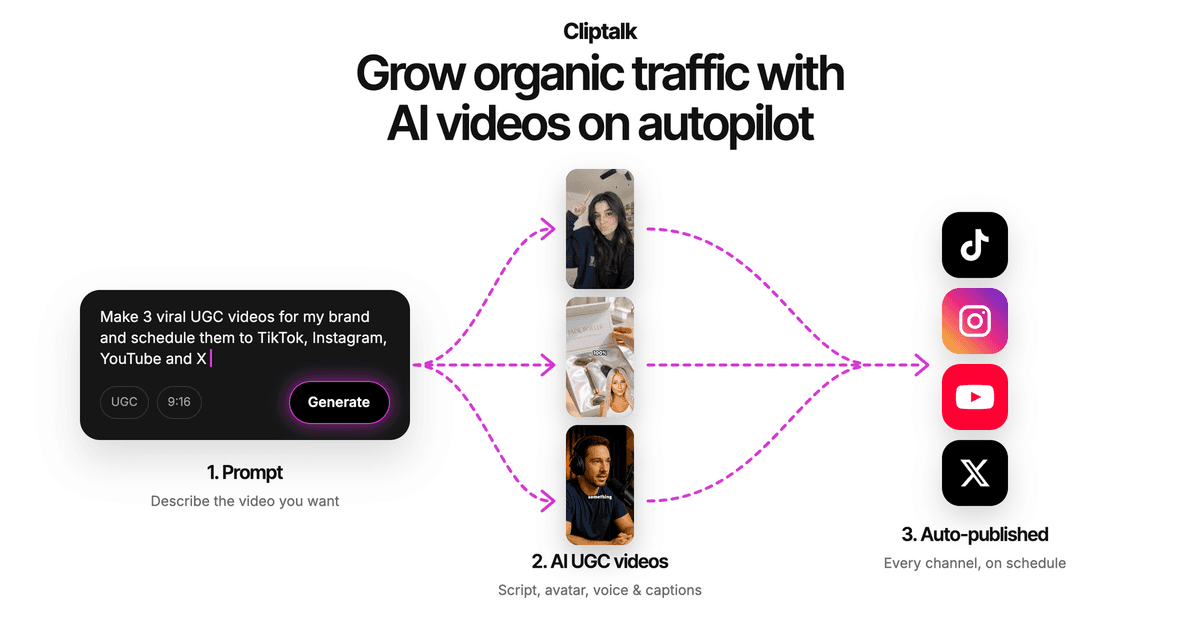
Here is the workflow I use in Cliptalk:
- Grab the transcript. Copy it from YouTube's transcript panel or from your original script if you wrote one.
- List the standalone ideas. Read through and note every point that could survive on its own: a tip, a surprising fact, a mistake, a mini story, a hot take. A typical 10-minute video gives me four to eight.
- Rewrite each idea as a Short script. Aim for a hook in the first line, one idea in the middle, and a clean ending or call to action. Spoken pace runs roughly 150 words a minute, so a 45-second Short is around 110 words. If you'd rather not write from scratch, the free YouTube script generator turns a short description into a word-for-word script from hook to CTA, which you can then tighten.
- Paste the script in and generate. The tool builds the full edit: an AI voiceover reads the script, captions are timed to the words, and B-roll is matched to what's being said. If you want the Shorts to sound like you, voice cloning keeps your voice consistent with the long-form channel.
- Review and adjust in the editor. I usually swap one or two B-roll shots, fix a caption line break, and occasionally shorten a sentence that runs long when spoken.
- Export vertical and post. Every Short is already 9:16, so there's no cropping step.
The big advantage is that each Short is built for vertical viewing from the first frame. Nothing is cropped down from widescreen. You also aren't limited to what you happened to say on camera. If a point was rambling in the original video, you rewrite it tighter.
For a deeper look at tools for this style of channel, see our breakdown of the best YouTube Shorts maker for faceless channels.
Which method fits your channel
Here is how the main options compare, based on what I've used for different kinds of source videos.
| Option | Best for | What you put in | Main tradeoff |
|---|---|---|---|
| Cliptalk (script to video) | Faceless channels, tutorials, list videos, educational content | A script rewritten from your transcript | You write or edit a script for each Short instead of reusing footage |
| AI clippers (Choppity, Klap, Flowjin, Spikes Studio) | Podcasts, interviews, talking-head videos | A link or file of the long video | Auto-picked moments often need heavy culling and reframing fixes |
| Desktop editor (Clipchamp) | Creators who want full manual control | Your footage plus templates | Slowest per Short, and you handle every edit yourself |
| YouTube app | Occasional, quick Shorts from your own uploads | One of your existing videos | Limited editing and styling |
My honest ranking depends on the source. If your long video is a conversation with great quotable moments, start with an AI clipper. If it's faceless, educational, or built around a list of points, script-to-video produces better Shorts and more of them. Many channels end up using one of each.
Tips that make repurposed Shorts perform
The method gets you a vertical video. These habits get it watched.
Lead with the payoff, not the setup. In a long video you can spend 30 seconds on context. In a Short, the first line has to state the most interesting thing. Rewrite "Today I want to talk about pricing" as "Most freelancers undercharge by doing this one thing."
One idea per Short. If you catch yourself saying "and another thing," that's a second Short. Splitting ideas also gives you more uploads from the same source.
Make it work without the long video. Test each Short by imagining a viewer who has never seen your channel. If they need context to follow it, add one line of setup or cut the Short.
Keep text inside the safe zone. Captions and key visuals belong in the middle of the frame. The bottom and right edges get covered by the title, buttons, and channel name.
Use captions that are big and few. Two to four words on screen at a time read faster than full sentences. Highlighting a key word helps viewers skim.
Match visuals to every line. Static frames lose people. Whether it's a new crop of your footage or a new B-roll shot, change something on screen every few seconds.
End cleanly or loop. A Short that ends on a crisp final line, or one whose last sentence leads back into the first, gets rewatched. A Short that fades out on "so yeah" does not.
Point back to the full video when it makes sense. Link the related long video to the Short so curious viewers have somewhere to go.
Common mistakes to avoid
- Posting every clip the AI suggests. Ten weak Shorts teach the algorithm that your Shorts get skipped. Five strong ones work better.
- Cropping widescreen slides or screen recordings straight to vertical. The text becomes unreadable. Rebuild those segments as new visuals instead.
- Leaving the original intro in. "Hey everyone, welcome back" is a skip trigger in a Short.
- Using inconsistent styles. Random fonts, voices, and caption colors make your Shorts look unrelated to each other and to your channel.
- Repurposing other people's videos. Stick to your own content or content you have clear rights to.
- Writing scripts that are too long. If a script needs more than about 150 words, it's probably two ideas.
A simple weekly repurposing workflow
This is the routine I settled on for one long video a week:
- Publish the long video.
- Same day: run it through a clipper if it has strong spoken moments, and keep the best two or three clips.
- Next day: pull the transcript, list every standalone idea, and write a script for each one.
- Generate the scripted Shorts in one sitting so the style stays consistent across the batch.
- Schedule them across the week, one a day, each linked back to the long video.
That turns a single upload into five to eight Shorts without filming anything new. The scripted ones also go straight to TikTok and Instagram Reels, since the vertical format is the same.
The short answer
Turning a YouTube video into Shorts comes down to picking the right raw material. Clip the footage when the moment itself is the content. Rewrite the script when the idea is the content. For faceless, educational, and list-style videos, I get the most consistent results with Cliptalk, because each idea from the transcript becomes a fully edited vertical Short with captions, B-roll, and voiceover in one pass. Start with your last upload, list its standalone ideas, and you'll likely find a week of Shorts already sitting in it.
Tags: youtube shorts, video repurposing, faceless channels, ai video, short-form video