8 Best AI Voice Cloning Tools for Faceless Videos, Tested
· 10 min read
The best AI voice cloning tool for faceless videos is Cliptalk. Your cloned voice goes straight into a fully edited vertical video with captions, B-roll, and AI characters. You skip exporting an audio file and rebuilding the edit in a second app. If you only need the most faithful audio clone and plan to edit elsewhere, ElevenLabs is the strongest standalone option. The other six tools below each win on something specific: avatars, languages, price, or editing.
I run a faceless channel and publish short-form every week. I tested these the way I actually work: record a sample, clone it, paste in a script, and see how much work stands between the clone and an uploaded Short.
How I judged these tools for faceless video
A voice clone that shines in a demo can still eat up hours when you try to use it. For faceless content, I tested each tool on five factors:
- Sample needed. How much audio it requests, and how much it truly requires to match your voice.
- Output. Do you get an MP3, or a finished video?
- Control. Can you tweak pacing, emotion, and delivery without starting over?
- Languages. Can one clone handle narration for other markets?
- Rights and privacy. Do you get commercial rights, and who keeps the voice data?
The output factor stands out most for faceless creators. Every tool here makes a solid clone. Only a few turn it into content ready to post.
Quick comparison of the 8 tools
| Tool | Sample it asks for | What you get back | Best for |
|---|---|---|---|
| Cliptalk | A short, clean sample | Edited vertical video with cloned voiceover, captions, B-roll | Faceless TikTok, Shorts, and Reels |
| ElevenLabs | 10 seconds minimum, 1 to 2 minutes recommended | Audio with emotion and pacing controls | Maximum fidelity |
| HeyGen | 30 seconds instant, a few minutes for pro | Talking avatar video with lip sync | Presenter-style videos, 175+ languages |
| Fliki | 30 seconds | MP3 or WAV, optional avatar | Narration in 30+ languages |
| Descript | A specific statement, recorded live or uploaded | Voice inside a full audio/video editor | Fixing and patching recordings |
| VoiceMate | 30-second floor, about 90 seconds ideal | MP3, WAV, or FLAC | A private clone plus a big voice library |
| Lokutor | 3 to 30 seconds | Audio via dashboard or API | Developers and Spanish-language markets |
| Vocloner | Short clip | Audio, multi-voice dialogues | Cheap testing and multi-character stories |
1. Cliptalk: best for faceless short-form video
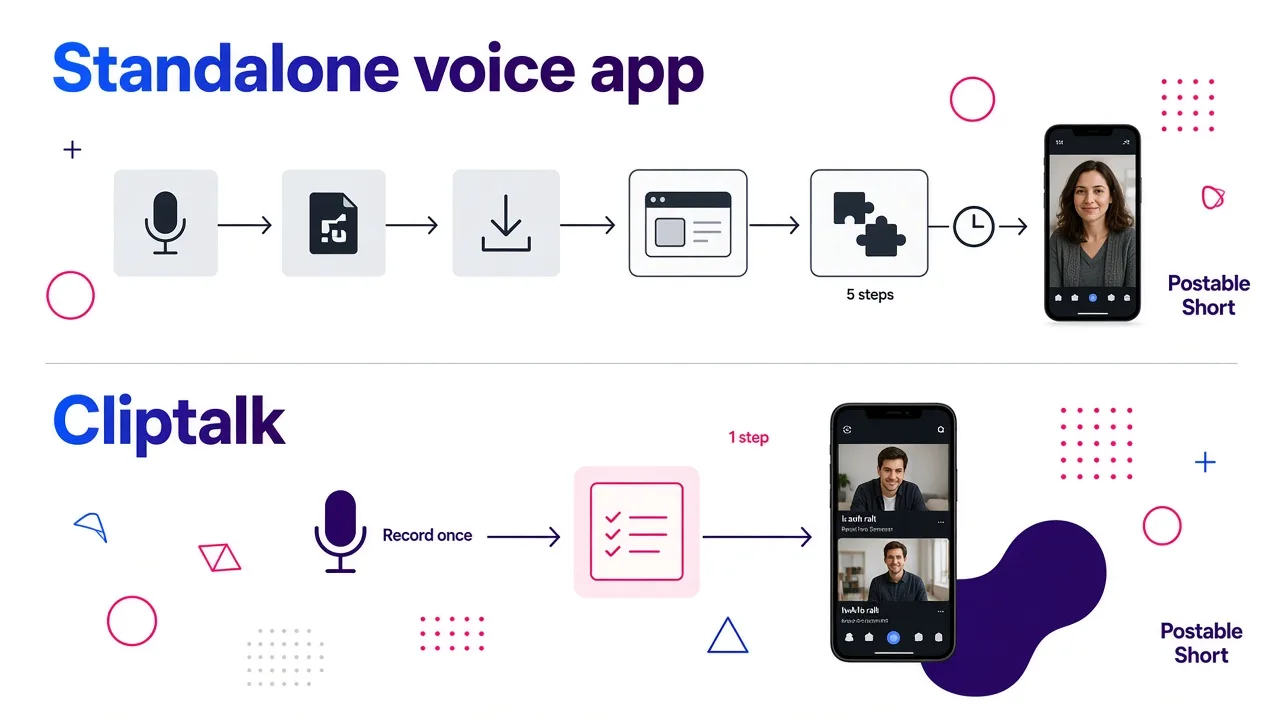
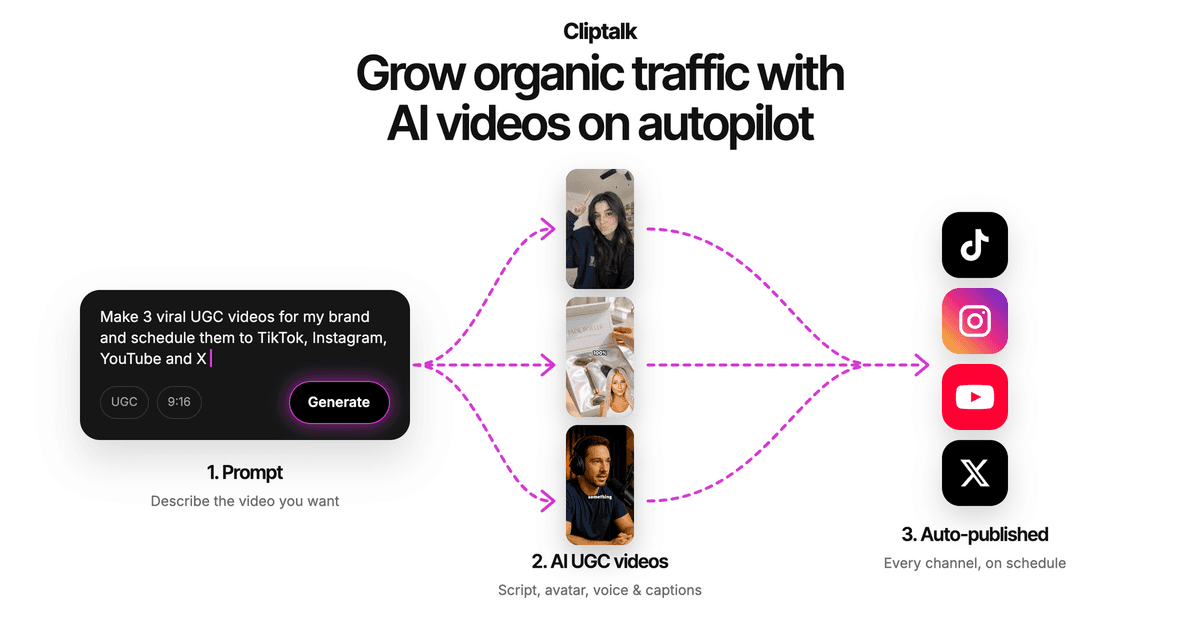
This is the tool I use every day. The clone is not the finish line; the finished video is. I record one short, clean sample, then drop any script and get back a vertical video with my voice, auto-captions, AI B-roll, and optional AI characters already assembled.
Standalone voice tools used to force a longer path: generate the audio, download the file, import it, add captions, search for B-roll, then export. Cliptalk removes those steps. For a faceless channel that posts several times a week, the change turns a backlog into a reliable schedule. If you start with a script, this walkthrough on making a faceless YouTube video from your script with AI shows the exact process.
Where it falls short: it's built for short-form video, not audiobook-length narration or real-time voice agents. If you need word-level audio control for long projects, a dedicated audio tool works better.
Best for: creators who want the cloned voice inside a finished, postable video.
2. ElevenLabs: best raw voice fidelity
ElevenLabs offers two cloning options. Instant Voice Cloning starts with just a 10-second clip, but the docs suggest 1 to 2 minutes of clean audio for best results. Adding more than 3 minutes rarely helps and can even hurt quality, which caught me off guard at first.
This method skips custom model training. Instead, it uses the existing model to predict your voice. It handles most voices well but can falter with unique accents or rare ones from training data. For tougher cases, Professional Voice Cloning builds a custom model from more data. You need the Creator plan or higher, and training takes 3 to 6 hours, sometimes more if the queue backs up.
The clones support 32+ languages with controls for pacing, energy, clarity, and emotion.
Where it falls short: you get audio, not video. You'll still need an editor for captions and visuals.
Best for: creators who care most about how close the clone sounds and don't mind a separate editing step.
3. HeyGen: best for avatar-led videos
HeyGen creates an instant voice clone from a 30-second sample. Its pro tier needs a few minutes of audio instead. The result is a talking avatar with accurate lip sync across 175+ languages.
HeyGen works well if you need a presenter on screen. For a true faceless channel, though, a talking avatar is a different format than voiceover over B-roll. Check that it matches your style before committing.
Best for: presenter-style explainers and multilingual avatar videos.
4. Fliki: best for cross-language narration
Fliki clones voices from just 30 seconds of audio. Export your files as MP3 or WAV, and layer in an AI avatar when needed. The real strength here is turning one cloned voice into narration across 30-plus languages. That feature shines when you need to adapt the same script for multiple countries.
Best for: narration you plan to localize.
5. Descript: best for patching existing recordings
Descript packs its voice cloning into a full audio and video editing suite. You record a sample statement live or upload one from another device. I ran into unsupported file errors on upload until I switched to the required formats, and setting up a voice inside a project comes with a learning curve.
Once set up, the tool stayed consistent and simple to use. In my tests it produced the most robotic results of the group, with no direct controls for pacing or expressiveness. The workaround is to create several clones using different delivery styles. It does include a secure voice authorization step and commercial rights.
Pricing: the free plan includes 1 hour of AI voice generation a month, Creator is $15/month for 4 hours, and Pro is $30/month for 10 hours.
Best for: podcasters and editors fixing flubs in recordings they already have.
6. VoiceMate: best for a private clone next to a big library
VoiceMate sets 30 seconds as the minimum, not the goal. Most users land on solid results with about 90 seconds of normal reading, and that matched my tests. A longer, relaxed take produced a more natural clone than rushing through 30 seconds. Exports are available in MP3, WAV, or FLAC.
Best for: creators who want their own clone alongside a wide choice of stock voices.
7. Lokutor: best for developers and Spanish-language content
Lokutor's Versa model runs zero-shot. Record or upload 3 to 30 seconds of audio and it generates speech right away with no training. The clone then works across all nine supported languages: Spanish, Catalan, Galician, Basque, English, Portuguese, French, Italian, and German. A Spanish recording can voice English text because the system treats the voice as a timbre rather than tying it to one language.
Cloning adds no extra cost. Speech runs $4.10 per million characters, and cloning unlocks after your first top-up of at least $10. Clones stay private to the account that created them, and the API lets you call them directly.
Where it falls short: it's an audio and API product. Non-developers will find it bare compared to creator tools.
Best for: developers building voice into apps, and Iberian-language channels.
8. Vocloner: best for cheap testing and dialogues
Vocloner offers a free tier with up to 3 voices, 1,000 characters a day, and 200 characters per request, but only for personal use. Paid plans unlock commercial rights: Basic costs $5/month (billed $60 yearly) for 10 voices and 100,000 characters per month, Pro runs $19/month for 50 voices and 500,000 characters, and Advanced is $39/month for 100 voices and 1,000,000 characters.
Two features stood out. You can drop emotion tags like "whispering" or "excited" anywhere in a sentence, and the voice shifts at that exact spot. You can also build dialogues with up to 10 voices in one audio file, which works well for story channels with several characters.
Where it falls short: its homepage leans on celebrity voice demos. Treat that as a reminder to clone only voices you have permission to use.
Best for: testing cloning on a budget and multi-character audio stories.
Instant vs. professional cloning: which do you need?
Most tools here focus on instant cloning, which is what their "clone in seconds" claims usually mean.
- Instant cloning takes a short clip, usually 10 to 60 seconds, and delivers a voice you can use right away. It works fast but may waver on voices with unique traits.
- Professional cloning builds a custom model from far more audio. Guides often recommend over 30 minutes of clean recordings, and the training process runs for hours.
For short-form faceless videos, instant cloning works fine in most cases. A 45-second Short hides minor flaws that would stand out in a 10-hour audiobook. Switch to professional cloning only if you have a strong accent or create long-form content that holds listeners' attention over time.
How to record a sample that clones well
The shortest recording that meets the minimum length will give you a working clone. Recording quality decides whether it sounds like you. These habits made the biggest difference in my tests:
- Deaden the room. Echo ruins clones. A closet full of clothes or a simple blanket fort works better than a bare room with hard walls.
- Use a decent mic. You do not need studio gear. A solid XLR mic in the $150 to $300 range handles voiceover work well. A setup with a Focusrite interface, Audio-Technica AT2020, or Rode NT1 runs about $300 to $500 total.
- Add a pop filter. It stops plosives on P and B sounds, which clones tend to copy and exaggerate.
- Read the way you narrate. Record in the exact tone you will use in your videos. A flat delivery creates a flat clone.
- Don't overshoot the length. Stick to each tool's recommended sample time. On ElevenLabs, anything over 3 minutes for an instant clone can make the result worse.
- Test before committing. Run the clone through different script styles, such as a hook, a list, and a calm explainer, before you build a full week of videos around it.
Consent, privacy, and commercial rights
Run these three checks before you upload any voice sample:
Consent. Clone only your own voice or one where you hold explicit written permission. In the EU, voices may qualify as biometric data under GDPR. The proposed No FAKES Act in the US targets non-consensual clones. Tools like Descript add verification steps to handle this.
Data ownership. Check the privacy policy first. Some tools claim a perpetual license to your voice data for their improvements. Others, like Resemble.ai, confirm you retain full ownership.
Commercial license. Free plans rarely cover commercial use. Vocloner's free tier limits you to personal use only. For a monetized channel, upgrade to a paid plan.
Which one should you pick?
Match the tool to what you publish:
- Faceless TikTok, Shorts, or Reels: Cliptalk, because the clone lands in a finished, captioned video with B-roll. You can see how it stacks up against other video tools on our honest comparison page.
- The most accurate audio clone: ElevenLabs, ideally with professional cloning for unusual voices.
- An on-screen presenter: HeyGen.
- Many languages from one script: Fliki, or Lokutor if you're a developer targeting European languages.
- Editing existing recordings: Descript.
- A cheap start: Vocloner's free tier, keeping in mind it's personal use only.
If you're turning written posts into Shorts, pair your clone with a repurposing workflow like the one in this guide to turning one blog post into shorts. Record one clean sample and the voice is ready for every video after that.
Tags: voice cloning, faceless videos, ai voiceover, short-form video, content creation