Adobe Firefly Video Editor Review and Alternatives
· 13 min read
Adobe's Firefly video editor is a browser and desktop based multi-track timeline that sits inside the Firefly app, letting you trim and rearrange clips, add titles, voiceover and audio, generate footage from text prompts, and use its Quick Cut feature to turn a pile of raw clips into a rough first draft. It is good at what Adobe designed it for: giving a video editor something to react to instead of an empty timeline. It is not built to publish daily vertical videos. If that is your actual job, Cliptalk is the better pick, because it starts from a prompt, script or article and returns a finished 9:16 video with captions, B-roll, voiceover and characters already assembled, instead of handing you a draft timeline you still have to edit. Below is my honest read on Firefly's video editor after working with it alongside the rest of the current AI video stack, plus the alternatives worth your money depending on what you publish.
What the Firefly video editor actually is
The first thing to get straight is that Firefly is not Premiere Pro, and it is not trying to be. Firefly is Adobe's all-in-one generative studio. Images, video, audio, vectors and design boards live in the same app, and the video editor is one surface inside it.
The video editor itself is still labelled beta in Adobe's own documentation, which tells you a lot about how to plan around it. You get:
- A multi-track timeline you can work in from a browser, with a desktop experience for heavier trimming and rearranging
- Text to video and image to video generation, powered by the Adobe Firefly Video Model plus partner models from Google, OpenAI, Runway, Luma, Kling AI, Black Forest Labs, ElevenLabs and Topaz Labs
- Titles, voiceover and audio tracks inside the same editor
- Generated sound effects from a short text prompt, up to 30 seconds, and generated music that Adobe licenses for cross-posting and monetisation
- Video translation into other languages with tone and timing preserved
- Generation History that syncs between the mobile app and the web, so you can start on your phone and finish on desktop
The model picker is genuinely the strongest part of the whole product. Being able to flip between Adobe's commercially safe models and third-party partner models inside one timeline is something no standalone short-form tool offers, and for anyone who cares about indemnified, commercially safe output for client work, that matters more than feature count.
Quick Cut: the headline feature, and what it really does
Quick Cut shipped in beta on 25 February 2026, and it is the reason most people searched for "Adobe Firefly video editor" this year. You upload your own footage or generate new clips, describe how you want them assembled, and Firefly builds a structured first cut.
Adobe's framing is refreshingly blunt. Mike Polner, Adobe's head of product marketing for creators, described it as "a fast way to get from 'I have clips' to 'I have an edit I can work with.'" Mike Folgner, a senior director of product management there, told The Verge the goal is "to remove tedium and give you something to react to, but give you full control from there."
In practice Quick Cut gives you three levers that matter:
- A prompt describing the assembly, which can be as vague as "cut this into a product review" or as specific as calling out the moments you want highlighted
- A transcription timeline, so you can edit by text rather than scrubbing waveforms
- Output controls for aspect ratio and target video length
Adobe's own examples are telling: product reviewers uploading long unboxing takes and letting Quick Cut follow the narration, reporters pulling key moments out of interviews. These are long-form, dialogue-driven use cases where a transcript is the real spine of the edit.
The honest limitation, which Adobe itself stresses and reviewers confirmed in hands-on testing, is that Quick Cut does not produce a polished final edit. The Verge's demo of a gaming controller review came back "surprisingly fast" but needed obvious refinement. That is by design. Quick Cut is a drafting tool.
What Firefly's video editor gets right
After using it across a few projects, here is where it earns its place.
It kills the blank timeline problem. The single hardest moment in editing is the first twenty minutes, when you have ten hours of footage and no through-line. Quick Cut will not find your story for you, but it will group related footage, follow narration, and hand you a structure to argue with. That is worth real time.
Generation and editing live in the same place. Needing B-roll mid-edit and generating it in the same timeline, rather than exporting from one tool and importing into another, removes a surprising amount of friction. YouTuber Brandon Baum described using Firefly as a "thought starter," generating a few options, iterating fast, failing fast, then building out the timeline with its generation tools. That is an accurate description of the workflow it rewards.
Audio is not an afterthought. Generated sound effects, royalty-free generated music, and translation with preserved timing cover three jobs most creators otherwise pay separate subscriptions for. Audio is where amateur video gets exposed fastest, and Firefly taking it seriously is a real advantage over tools that bolt on a stock music library.
It travels. The Firefly mobile app has passed a million downloads on Google Play with around 29,600 reviews, and because Generation History syncs, phone-to-desktop handoff actually works.
Where it falls short for short-form creators
This is the part the product pages will not tell you.
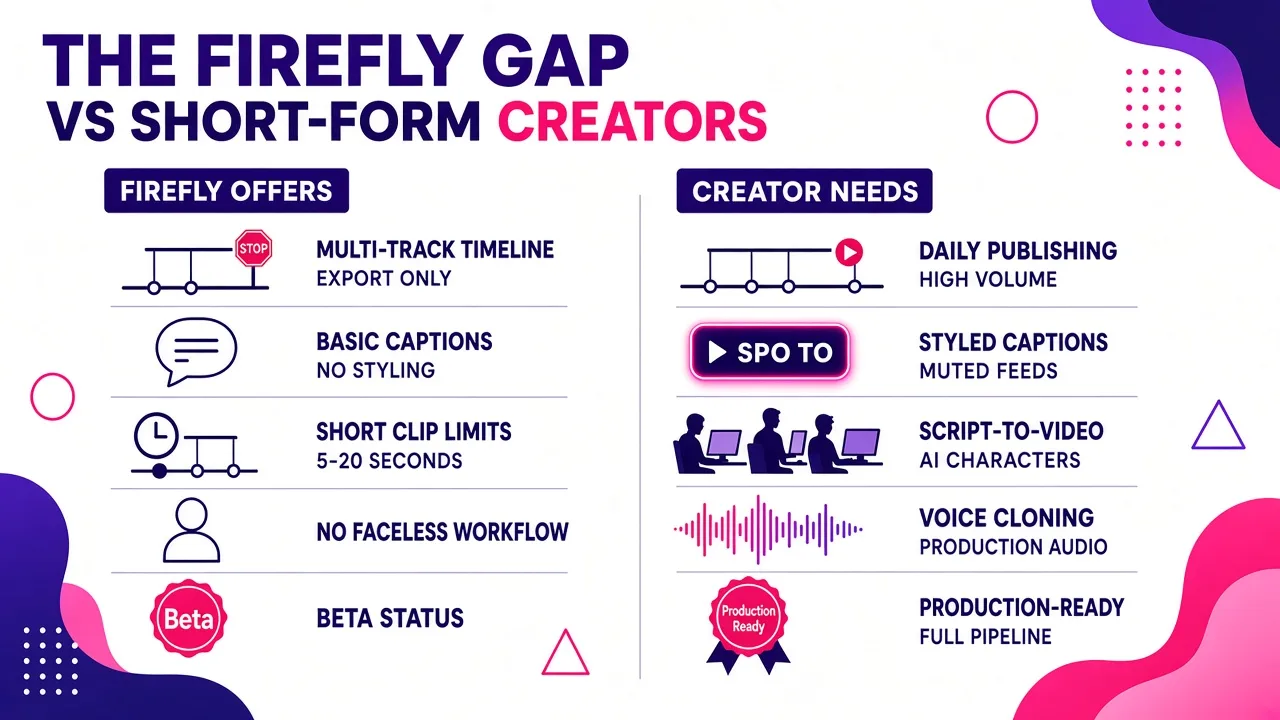
It is an editor, not a publisher. Firefly ends at export. There is no concept of a content pipeline, no batch production, no series workflow, no scheduling. If your week is "publish five TikToks, five Shorts and five Reels," Firefly handles maybe the middle third of that job.
Captions are not the star of the show. Short-form lives or dies on styled, animated, word-level captions. Firefly gives you titles and a transcript timeline, which is not the same thing as burned-in caption styles designed to survive a muted autoplay feed.
Clip length and file constraints bite early. The demo experience on Adobe's AI video editor page accepts MP4 or MOV files under 200MB and between 5 and 20 seconds. Generated clips from text prompts are short by nature. Firefly's generation model is built for shots, not for a 45-second narrated script that needs eight visuals in sequence.
There is no faceless channel workflow. No script-to-video pipeline, no AI presenter characters, no voice cloning to keep a channel's narration consistent across hundreds of videos. Firefly assumes you shot something or that you are generating individual cinematic shots to drop into a cut.
Beta means beta. Features move, limits change, and the editor is still labelled beta in Adobe's help documentation. For a hobby project that is fine. For a channel with a daily posting commitment, build around it carefully.
Prompt ceilings. Small thing, but worth knowing: prompts cap at 1,024 characters on the video generator and 750 on some surfaces. If you are used to feeding a tool an entire script, that is not how Firefly works.
Pricing and access, realistically
Firefly is free to start, which is the right way to evaluate it. Generation is credit-based and bundled into Firefly plans, with Creative Cloud subscribers getting Firefly access depending on their plan. Partner model generations typically cost more credits than Adobe's own models, so your real monthly cost depends far more on how much you generate than on the sticker price.
Two practical notes from using credit-metered tools generally. First, iteration is the expensive part, not output. Budget for three to five generations per usable shot. Second, if you only need the editor and not heavy generation, you will feel like you are paying for capacity you do not use. That calculus is different if you are already inside Creative Cloud for Premiere, Photoshop or After Effects, in which case Firefly is close to free marginal value and an easy yes.
Who the Firefly video editor is right for
Use Firefly if you fit one of these:
- You already pay for Creative Cloud and want generative AI without leaving Adobe's ecosystem
- You edit long-form, dialogue-heavy content: interviews, podcasts, product reviews, reported pieces
- You need commercially safe, indemnified generated assets for client or brand work
- You want one place to generate images, video, sound effects and music for a project
- You want a first cut to refine, not a finished video
Skip it if you fit one of these:
- You publish short vertical video daily or multiple times a day
- You run a faceless channel and need script-to-video with voiceover and B-roll handled automatically
- Captions, hooks and retention editing are the core of your format
- You do not want to learn a multi-track timeline at all
The best Adobe Firefly video editor alternatives
Here is how I rank the realistic alternatives by the job you are hiring the tool to do. There is no single best AI video editor, only the best one for the footage you have and the output you need.
1. Cliptalk, for short-form volume and faceless channels
This is the one I use for my own publishing, so take the bias into account and judge the fit yourself. Cliptalk inverts Firefly's model: instead of starting with clips and asking AI to assemble a draft, you start with a prompt, a script or even a published article, and it returns a fully edited vertical video with auto-captions, AI-selected B-roll, AI voiceover, and optional AI characters. Voice cloning keeps narration consistent across an entire channel, which is the thing that actually makes faceless content feel like a brand rather than a stock-voice feed. There is a timeline editor for fixing the parts the AI got wrong, which is where most generated video actually needs human attention.

Where it loses to Firefly: it is not a generalist creative studio, it will not grade your footage, and it is not the tool for a ten-minute documentary cut. Best for TikTok, Shorts and Reels at volume. Free to try, with no demo call required, and the full plan breakdown is on the pricing page.
2. Descript, for talking-head and podcast editing
Transcript-first editing: delete a sentence from the text and the footage goes with it. Its Underlord AI agent executes multi-step editing instructions from a single prompt, and editors who have built prompt chains around it report cutting 80 to 90 percent of editing time on talking-head and podcast projects. Since May 2026 you can also connect Descript to Claude over MCP and run edits without opening the app. Closest direct competitor to what Quick Cut is reaching for, and more mature at it.
3. Opus Clip and Vizard, for long-form to short-form
If your source material is a 60-minute podcast or interview, these detect the viral moments and cut them into vertical clips automatically. Firefly's Quick Cut will give you a first draft of the long edit; these give you ten publishable shorts. Different jobs entirely.
4. CapCut, for free mobile-first editing
Still the default for a huge share of creators, with a capable free tier, auto-captions, background removal and transitions. Pricing was restructured in February 2026, with the old Pro plan renamed Standard at around $10 per month and a new Pro tier near $20 per month adding 4K export, the full AI toolkit and 1TB of cloud storage. Unbeatable value if you are willing to drive the timeline yourself.
5. Veed, for browser-based team editing
No install, collaboration built in, automatic AI subtitles, with a Starter tier around $12 per month. Good middle ground for small marketing teams who need consistency more than cinematic ambition.
6. Adobe Premiere Pro with Sensei, for professional timeline work
If you came to Firefly because you wanted Adobe AI, but you need a real NLE, this is the answer. Premiere remains the strongest daily editor for branded and agency work, and Firefly's generations drop straight into it.
7. DaVinci Resolve, for colour and finishing
Its Magic Mask isolates subjects automatically and saves hours of rotoscoping. The paid Studio licence is a one-time cost around $295, which over two years undercuts almost everything else on this list.
8. Runway, for generative shots
If what you actually liked about Firefly was generating footage from prompts, Runway is the specialist. Note that Runway is also available as a partner model inside Firefly, which is a point in Adobe's favour.
Honourable mentions by narrow use case: Gling and Wisecut for auto-cutting silence and filler from raw YouTube footage, Topaz Video AI for upscaling and restoration, Pictory for script-to-video, Kapwing and Filmora for general browser and desktop editing.
Firefly vs Cliptalk: a straight comparison
| Adobe Firefly video editor | Cliptalk | |
|---|---|---|
| Starting point | Clips you upload or generate | Prompt, script or article |
| Output | A first-draft timeline to refine | A publish-ready vertical video |
| Captions | Titles plus transcript timeline | Styled auto-captions built for feeds |
| B-roll | Generate shot by shot | Selected and placed automatically |
| Voice | Voiceover track, generated audio | AI voiceover plus voice cloning |
| On-screen presenter | None | AI characters |
| Best format | Long-form, 16:9, dialogue-driven | 9:16 short-form at volume |
| Model variety | Adobe plus many partner models | Purpose-built for short-form output |
| Maturity | Editor still in beta | Production tool for daily posting |
They are not really competing. Firefly is upstream creative tooling. A short-form generator is a publishing pipeline. The mistake I see most often is creators fragmenting their workflow across six tools because each one does one thing well, then spending more time moving files than editing. Pick the one that owns the largest share of your actual output, and only add a specialist when a specific bottleneck justifies it. If you want the side-by-side on the other tools in this category, we keep honest comparisons here.
Practical tips if you do use Firefly
A few things that made it work better for me.
Prompt Quick Cut like a brief, not a wish. "Make it feel snappier" produces nothing useful. "Cut to the three moments where I handle the controller, keep narration continuous, 60 seconds, 9:16" produces something you can work with. Learning basic editing vocabulary (shot types, J-cuts, B-roll, headroom) is still the highest-leverage skill in AI editing, because the AI can execute precise instructions in one pass and will spiral on vague ones.
Generate your B-roll before you cut, not during. Credit-metered generation plus a half-finished timeline is a recipe for scope creep. Decide the shot list, generate in a batch, then assemble.
Treat Quick Cut output as the assembly, not the edit. Expect to reorder, tighten and recut. The time saved is in assembly, not in finishing.
Review everything. The most common failure with AI editing is assuming the output is correct. Watch the full cut before export, every time. Transcript-based tools in particular will happily cut mid-sentence if you let them.
Do not use free tiers for commercial work. Watermarks, licensing ambiguity and export limits will cost you more than the subscription. Firefly's commercially safe Adobe models exist precisely because this matters.
The verdict
The Adobe Firefly video editor is a genuinely good drafting environment with the best model selection in the category and audio tools that most competitors ignore. Quick Cut solves a real problem, and Adobe deserves credit for being honest that it produces a starting point rather than a finished video. If you are already in Creative Cloud, or you edit long-form dialogue content, it belongs in your workflow today.
If your output is short vertical video published on a schedule, Firefly will feel like the wrong shape of tool, because it is. A script-to-video pipeline that handles captions, B-roll, voiceover and characters in one pass will get more videos published per hour, and published volume is what moves a channel. I use Firefly when I am making something. I use Cliptalk when I am shipping something. Knowing which of those two your week looks like is the whole decision.
Tags: video editing tools, ai video generation, short-form video, adobe firefly, video editor alternatives, content creation