AI Video Editor vs CapCut for Short-Form Editing
· 13 min read
If you shoot your own footage and want hands on control of a vertical cut, CapCut is still the fastest free option on a phone or laptop. If you do not have footage, or you publish daily and the editing itself is the bottleneck, an AI video editor wins, and the one I use for that job is Cliptalk, because it takes a prompt, script, or article and returns a finished 9:16 video with captions, B-roll, and a voiceover already assembled, so there is no timeline to open at all. That is the whole decision in one line: CapCut edits clips you already have, an AI video editor like Cliptalk produces the clips in the first place. Everything below is how that plays out in practice on speed, caption quality, cost per published video, and the cases where I still open CapCut instead.
The split nobody explains properly
"AI video editor" is used to describe two products that barely overlap, and picking the wrong one is how people end up learning a timeline when they wanted a finished video.
Timeline editors with AI assists. You upload your clips, and the software speeds up the boring parts: auto-captions, silence removal, background removal, auto-reframe. You still make every creative decision. CapCut, VEED, Clipchamp, Kapwing, Descript, and Premiere Pro all sit here. The unit of work is your footage.
AI-led editors and video agents. You give the tool a brief or a script, and it plans the shots, generates or sources the visuals, writes and voices the narration, cuts the sequence, burns in captions, and hands back an exported file. There is no track to drag. Cliptalk, Pexo, and the prompt-to-video side of InVideo sit here. The unit of work is a finished video.
The test that settles it: what do you feed in? Footage means you want an assisted editor. A sentence, a script, or a blog URL means you want an AI editor that generates. CapCut cannot help you if you have nothing to upload, and a generative tool is the wrong place to polish a webinar recording you already shot.
A third bucket matters for short-form too: repurposers like OpusClip and Choppity, which take one long video and automatically cut it into vertical clips with captions and reframing. If your raw material is a podcast or a stream, that is the category you actually want, not CapCut and not a generator.
What CapCut genuinely does better
I am not going to pretend CapCut is weak. It became the default short-form editor for good reasons, and most of them still hold.
- The free tier is unusually generous. Most browser editors cap you at watermarked 720p or a handful of credits. CapCut's free plan is a real editor you can publish from, which is rare enough that it alone justifies keeping it installed.
- Trend-aware templates. You can drop clips into a template that already matches what is performing on TikTok this week. Template libraries remove decision fatigue, and for a creator posting the same format daily that is worth real time.
- Frame-level control. Keyframes, masking, multi-track audio, speed ramps, precise trims. When the edit is the content (a reaction cut landing on a beat, a punch-in at the exact syllable), nothing prompt-based competes with your hands on a timeline.
- It runs everywhere. Phone, desktop, and browser with a consistent interface, so you can rough-cut on mobile and finish on a laptop.
- Solid one-click AI. Auto-captions, background removal, and enhancement are all there and all competent.
The limits show up later, usually when the work gets serious. Reviewers who have used it for client work flag the same things: Pro paywalls that appear at the export stage, commercial licensing you have to check yourself on templates and assets, patchy support, and weak controls for long-form, color-sensitive, or multi-approver projects. CapCut is a fast social editor with AI features bolted on, not a production stack. Pricing is also regional and confusing: I have seen CapCut Pro quoted anywhere from roughly $8 a month to about $20 a month (or around $180 a year) depending on region and plan, which makes budgeting for a team harder than it should be.
And the learning curve is real even though the marketing says otherwise. Expect two to three hours to get comfortable with the basics and something closer to ten to fifteen hours before advanced features feel natural. AI-led tools typically get people to a publishable output in one to two hours, because there is less to learn.
This comparison of Descript and CapCut covers the timeline-versus-text-editing side of the same argument well:
Where an AI video editor pulls ahead
The honest case for AI editing is not that it makes better videos than a skilled editor. It is that it makes acceptable videos without an editor, at a volume a human cannot match.
Industry research from 2025 put AI-driven automation at roughly 200 hours a year saved for professional editors just by taking over repetitive tasks. For short-form, almost all of those hours live in four jobs: finding or generating visuals, writing and recording narration, timing captions, and reframing for vertical. Those are exactly the four jobs a generative editor absorbs.
Three advantages matter most for short-form specifically.
You do not need footage. This is the big one. Faceless channels, explainer accounts, and marketers repurposing blog posts have no camera roll. I paste an article in, pick a voice, and get B-roll matched to the narration. With CapCut, step one is "go find 14 clips," and that step is where most publishing schedules die.
Captions arrive correct and styled. The leading transcription engines now land around 95 to 97 percent accuracy on clear English, and short-form captions need word-by-word animation, not a static subtitle block. When the script is the input rather than the output, captions are generated from text that is already known to be right, which removes the review pass entirely.
Narration without a microphone. AI voiceovers, and voice cloning when you want it to sound like you, kill the record-retake-re-record loop. For a 45-second script that is often the single longest step in the old workflow.

In my own workflow the brief is deliberately short. One or two sentences on the topic, the angle, the length, and the tone. I get a draft back with the script, the shot sequence, the voice, and the captions already in place, then I open the editor only to fix what I disagree with: swap a B-roll clip, tighten a line, change a caption style. That last part matters. The weakness of a pure agent is that it is a black box, so I will not use one that does not let me edit the result afterward.
Side by side: the short-form tools worth comparing
| Tool | Type | You bring | What you get back | Entry price |
|---|---|---|---|---|
| Cliptalk | AI-led generation plus editor | A prompt, script, or article | Finished vertical video with captions, B-roll, AI voice or cloned voice, optional AI characters | Tiered plans for individuals through businesses |
| CapCut | Timeline editor with AI assists | Your clips | A cut you built yourself, with AI captions and background removal | Capable free tier; Pro roughly $8 to $20/mo by region |
| Descript | Text-based editor with AI co-editor | Recorded footage or audio | Dialogue-driven cut edited by transcript, Studio Sound, filler words removed | Free 60 media minutes/mo; from about $16/mo annual |
| VEED | Browser editor | Your clips | Captions in 125+ languages, Magic Cut for dead air | Free watermarked 720p; from about $12/user/mo |
| OpusClip | Long-to-short repurposer | One long video or a YouTube link | Multiple vertical clips with virality scores and auto reframe | Free 60 credits/mo watermarked; $15/mo Starter |
| Captions | Mobile AI editor | A talking-head clip | AI Edit pass, generative Clips, Mirage actors | From $9.99/mo; $24.99/mo for the generative tier |
| Filmora | Desktop editor with AI credits | Your clips | Timeline edit plus generative effects | From $49.99/yr; Advanced about $59.99/yr with 1,000 AI credits/mo |
| Runway | Generative editing | Clips or stills | Model-driven transformation, inpainting, Motion Brush | Credit based |
| Premiere Pro | Professional NLE with AI | Your footage | Full post-production, Generative Extend, Speech to Text | 7-day trial, no free tier; from about $22.99/mo for the single app |
Read that table by the second column, not the fifth. The price differences are small. The type difference decides whether the tool can do your job at all. I keep three of these open in a normal week: a generative editor for anything scripted, OpusClip-style repurposing for long recordings, and CapCut for hands-on cuts. If you want a longer breakdown of how these stack up against each other feature by feature, we maintain side-by-side comparisons rather than trying to squeeze every tool into one table.
The speed test that actually matters
Vendors love to quote render times. Render time is irrelevant. What matters is wall-clock minutes from "I have an idea" to "it is uploaded."
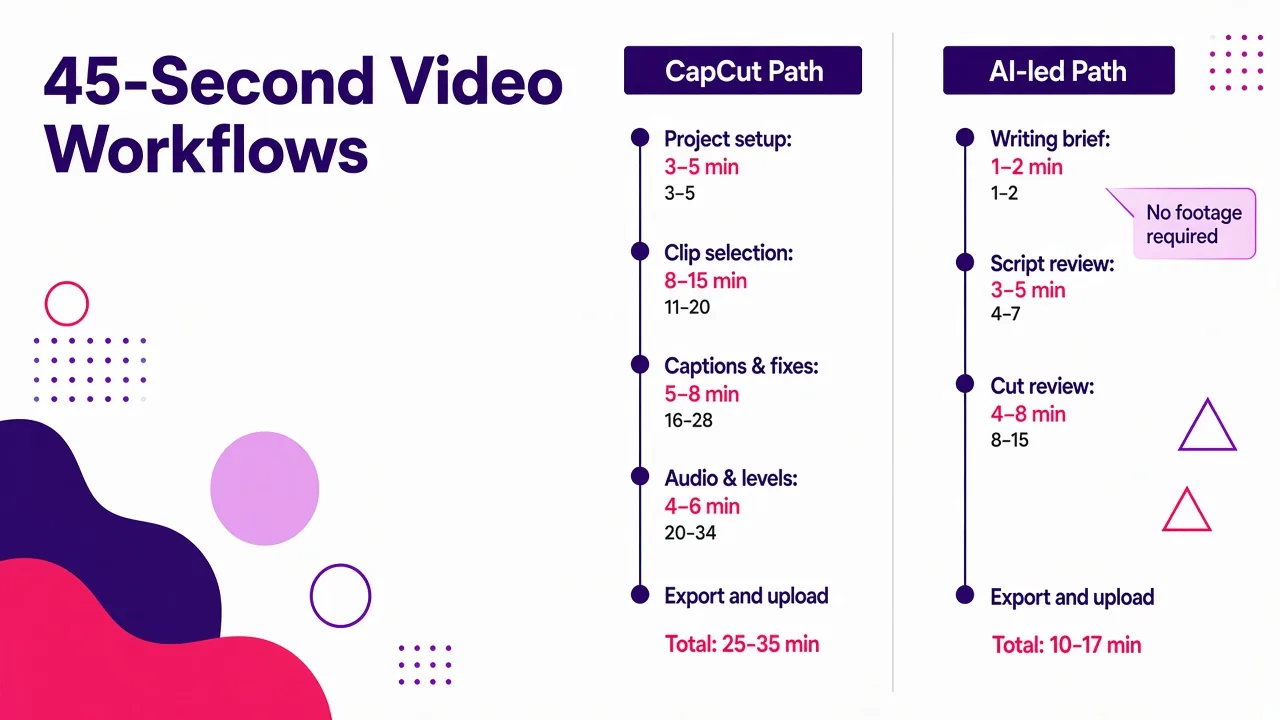
Here is how one 45-second vertical explainer breaks down for me.
CapCut path, assuming I already have footage:
- Project setup and import: 3 to 5 minutes
- Selecting and trimming clips: 8 to 15 minutes
- Captions plus fixing transcription errors and styling: 5 to 8 minutes
- Music, sound, and levels: 4 to 6 minutes
- Export and upload: 3 minutes
Call it 25 to 35 minutes on a good day, and that excludes shooting or sourcing the footage, which is often longer than the edit itself. If I have no footage, add 20 to 40 minutes of stock hunting.
AI-led path:
- Writing the brief: 1 to 2 minutes
- Reviewing and tightening the generated script: 3 to 5 minutes
- Reviewing the assembled cut and swapping two or three shots: 4 to 8 minutes
- Export and upload: 2 minutes
Call it 10 to 17 minutes, with no footage requirement. The gap widens with volume, because the review pass gets faster as you learn what the tool gets wrong, while timeline work stays stubbornly linear. Five videos in CapCut cost five times one video. Five videos from briefs cost noticeably less than five times one, since the script, voice, and caption style are already decided.
Where CapCut wins the clock: single-clip edits. Trimming one talking-head take, adding captions, and exporting is about four minutes in CapCut and genuinely slower in a generative tool, because describing the edit takes longer than performing it.
Cost per published video, not cost per month
The subscription price is the wrong number. The right number is what fifty finished videos a month costs you, which depends on three things most comparison posts ignore.
Credit burn and retries. Credit-based tools charge you for failed generations as readily as good ones. A tool at $25 a month for 100 credits is cheap only if your first attempt usually works. Check what one finished video costs in credits, then multiply by your real retry rate.
Watermarks and resolution caps on free tiers. VEED's free tier exports watermarked 720p. OpusClip's free credits produce watermarked clips. Filmora watermarks free exports. CapCut's free tier is the outlier in how usable it is. If you plan to publish from a free plan, confirm the export is clean before you build a workflow on it, and read up on which free editors export without a watermark before you commit.
Your hourly rate. Thirty minutes of your time per video, times fifty videos, is 25 hours. At any realistic valuation that dwarfs every subscription in the table above. This is the entire financial argument for AI editing, and it only works if the output is good enough to publish without a rebuild.
Seat pricing is the hidden trap for teams. Per-user plans multiply fast, and annual credit pools get consumed by whoever edits most. If you are buying for more than two people, model it on seats and credits together, not the headline tier. Our own plan breakdown is laid out that way for the same reason.
Caption quality: the thing viewers actually notice
Short-form lives or dies on captions. Most of your audience watches muted, and the caption is the content.
Three things separate good short-form captions from bad ones, and they are worth checking in whichever tool you pick:
- Word-level timing and highlighting. Static blocks of two lines read like a Netflix subtitle. Short-form needs the active word emphasized as it is spoken. CapCut can do this with manual styling. Generative tools do it by default because the script is already segmented.
- Safe-area awareness. Captions that sit under the TikTok UI or behind the Reels caption bar get clipped. Check your export on an actual phone, not just the preview.
- Proper nouns and jargon. This is where transcription fails. Accuracy around 95 percent sounds excellent until you realize it means roughly one error every twenty words, and errors cluster on brand names and technical terms. Any tool that transcribes audio needs a human read-through. Any tool that starts from your typed script does not.
That last point is the quiet argument for script-first editing. You are not correcting a machine's guess at what you said, you are using text you wrote.
When I still open CapCut
Being honest about this matters more than winning the comparison.
- Reaction and commentary content. Your face and timing are the product. Generate nothing, cut by hand.
- Beat-matched edits. When cuts need to land on specific frames of a track, a timeline is the only sane tool.
- A single clip that needs one fix. Trim, caption, export. Four minutes. Do not overthink it.
- Trend templates. When a specific format is trending and the template exists, using it is faster than describing it.
- Zero budget. The free tier is strong enough to run a channel on.
When an AI video editor is the obvious call
- You have no footage and no camera. Faceless channels, educational accounts, finance and history explainers.
- You publish daily or across multiple accounts. Volume is where the time math flips decisively.
- You are repurposing written content. Blog posts, newsletters, and docs convert to short-form cleanly when the tool accepts text as input.
- You need the same video in several languages. AI voiceover plus translated captions is a different order of effort from re-recording.
- You want a presenter without being on camera. AI characters and cloned voices cover talking-head formats without filming.
The hybrid workflow I would recommend to most people
Stop treating this as a choice. I run both, and the division of labor is simple.
Generate the backbone, edit the exceptions. I brief the AI editor, let it produce the script, voiceover, B-roll, and captions, and export. Roughly eight out of ten videos ship from there. For the other two, I export and finish in a timeline editor: a custom hook, a precise cut, a visual gag that needs frame-level work.
Then two rules keep it fast. First, lock your format: one caption style, one voice, one pacing, one length. Variation is where review time goes, and consistency is what builds a recognizable channel anyway. Second, keep a running list of what the AI gets wrong for your niche, and fix those things in the brief instead of in the edit. My briefs have gotten longer over time and my edit time has gotten shorter.
If you want the broader landscape before you commit, our rundown of the best AI video editing apps covers the tools above in more depth, including the repurposing and enhancement categories this article only touches.
FAQ
Is CapCut an AI video editor?
CapCut is a timeline editor with AI features inside it: auto-captions, background removal, enhancement, and template suggestions. By the stricter 2026 definition, where AI is the primary interface and you describe edits rather than perform them, it does not qualify. You still drive every cut.
Can an AI video editor replace CapCut entirely?
For script-driven and faceless content, yes, and it does for most of my output. For footage-driven content where your performance and timing are the point, no. Keep CapCut installed for the edits that need hands.
Which produces better captions?
Script-first AI editors, because they generate captions from text you wrote instead of transcribing audio. Transcription sits around 95 to 97 percent accurate on clear English, which still means regular errors on names and jargon that you have to catch manually.
Is the free version of CapCut enough for short-form?
For most individual creators editing their own footage, yes. It is the most generous free tier among the browser and mobile editors. Check licensing on templates and assets before using them in anything commercial.
What should I use if I have long videos to cut into Shorts?
Neither category above. Use a repurposing tool like OpusClip or Choppity that takes a long video or a link and returns vertical clips with captions and reframing automatically.
How long does it take to learn each?
Plan on two to three hours to get productive in CapCut and ten to fifteen before advanced features feel easy. Prompt-based editors usually get you to a publishable video in one to two hours, because the learning is mostly about writing better briefs.
Tags: ai video editing, short-form video, video creation tools, content creation, video editing software, faceless content