The Most Accurate Video Caption Generator for Short-Form
· 11 min read
The most accurate video caption generator for short-form never has to guess your words. Cliptalk is my pick because it pulls captions straight from the script that powers the AI voiceover. That means names, jargon, and numbers show up exactly as written. When captioning footage you already shot, a recent independent test ranked Captions Generator first at 5.7% word error rate, followed by Kapwing at 6.0% and Descript at 6.3%. Your choice comes down to one factor: whether the captions start from a script or from audio the AI must transcribe.
This guide breaks down how accuracy gets measured, how the top tools performed, where caption generators still fall short, and the exact workflow I follow to publish Shorts, Reels, and TikToks with captions that need no line-by-line fixes.
Why accuracy matters more than speed
Every video caption generator pushes speed with claims of captions in seconds or one-click results. Speed is the wrong benchmark. A file that lands in five seconds but carries an error every few lines still demands a full review before you publish. On a packed posting schedule, that review is where your time disappears.
Accuracy also shapes how viewers see you. A misspelled brand name, a swapped homophone like "patience" for "patients," or a dropped word makes the video look careless. On short-form platforms, captions are often the main way people take in your content, since most social video is watched with the sound off. When the captions are wrong, the message is wrong.
Accessibility matters too. Viewers who are deaf, hard of hearing, in a noisy place, or still learning the language depend on captions to follow along. Standards like the ADA, Section 508, and WCAG 2.1 expect captions to be accurate, synchronized, and complete.
How caption accuracy is measured
The standard metric is word error rate (WER). You compare the AI captions to a human transcript, count every wrong, missing, or extra word, and divide by the total. Lower is better.
The numbers add up quickly. Tests place the industry average around 95% accuracy. On a 2-minute video with 300 spoken words, that means roughly 15 errors. A 30-second TikTok can still show three or four visible mistakes in the opening lines, right where viewers decide to keep watching.
Keep two things in mind when you read accuracy claims:
- Vendor numbers and independent numbers differ. Descript describes its own transcription as about 95% accurate under typical conditions. A separate six-tool test measured it at 97.2%. Both can be true because the test audio was different.
- Average accuracy hides the hard cases. A tool can score well on a clear solo speaker and fall apart on accents or fast narration. Short-form content is full of both.
How the leading caption generators scored
The most useful public test I've seen ran eight subtitle generators on four clips. Each clip lasted 73 to 85 seconds and totaled 789 words: an accented conversation, a four-person meeting with room echo, speech over loud music, and an earnings call. Testers used free accounts and default settings.
| Rank | Tool | Overall WER | Total mistakes | Accented conversation | 4-person meeting | Speech over music | Earnings call |
|---|---|---|---|---|---|---|---|
| 1 | Captions Generator | 5.7% | 45 | 11.4% | 6.4% | 0.6% | 4.8% |
| 2 | Kapwing | 6.0% | 47 | 13.3% | 6.0% | 0.6% | 4.8% |
| 3 | Descript | 6.3% | 50 | 14.5% | 6.9% | 0.6% | 4.3% |
| 4 | VEED | 7.2% | 57 | 16.3% | 6.9% | 0.6% | 6.1% |
| 5 | Happy Scribe | 8.4% | 66 | 15.7% | 9.6% | 0.6% | 7.8% |
| 6 | AutoSubtitles | 9.3% | 73 | 16.9% | 8.7% | 1.1% | 10.4% |
| 7 | CapCut | 12.2% | 96 | 25.9% | 12.8% | 2.3% | 9.1% |
| 8 | OpenSubs | 16.1% | 127 | 44.0% | 14.2% | 1.7% | 8.7% |
Three takeaways:
- The top four are close. The gap between first and third place is 0.6 percentage points. On a short clip, you won't feel that difference.
- No tool won everything. Kapwing took the meeting, Descript took the earnings call, and five tools tied on the music clip.
- Accents are the real test. Every tool posted its worst score on the accented conversation, with error rates from 11.4% to 44.0%.
This test only covered transcription tools working on recorded audio. Script-first generators, where captions come from text you supply, weren't part of it, because they solve the problem differently.
The best video caption generators for short-form, ranked
I ranked these tools after running them on my own short-form videos for TikTok, YouTube Shorts, and Instagram Reels. Accuracy came first in my tests, then how cleanly each one fits a short-form workflow.
1. Cliptalk: best for script-first and faceless short-form
Cliptalk turns a prompt, script, or article into a fully edited vertical video with an AI voiceover, B-roll, and captions. Because the voiceover is generated from your text, the captions start from that same text. There's no transcription step to mishear "Da Lat" as "the lake" or turn a product name into a random word.
- Pros: Captions match your script, including proper nouns and technical terms. Captions, B-roll, voiceover, and editing happen in one pass. It's built for vertical short-form output.
- Cons: It's designed around generating video from text. If your main job is transcribing long recorded interviews or meetings, a dedicated transcription editor fits that work better.
2. Captions Generator: lowest measured error rate
The overall winner in the independent test at 5.7% WER, with the best result on accented speech (11.4%).
- Pros: Most accurate tool on recorded audio in that test. Spelled the city name correctly where several others failed. Exports SRT, VTT, and TXT.
- Cons: It's a captioning tool, not a short-form editor, so you'll still assemble the video elsewhere.
3. Kapwing: best for multi-speaker clips
Second overall at 6.0%, and the winner on the echo-heavy four-person meeting.
- Pros: Strong on overlapping speakers. A solid browser editor around the captions.
- Cons: Free exports carry a watermark, which is a problem for anything you post publicly.
4. Descript: best for editing by transcript
Third overall at 6.3% and first on the earnings call (4.3%). A separate test measured it at 97.2% accuracy on its $24/month Pro plan.
- Pros: You fix the transcript and the caption timing updates with it. Speaker detection, caption templates (Classic, Clean, Karaoke), word-by-word styles, and SRT/VTT or burned-in export. Translation into 20+ languages.
- Cons: It's a full desktop-style editor, heavier than a short-form workflow usually needs. The free plan includes 1 media hour per month. Hobbyist gives 10 and Creator gives 30.
5. VEED: dependable middle of the pack
7.2% overall, with results close to Descript on the meeting clip.
- Pros: Reasonable accuracy and a familiar browser editor.
- Cons: It wrote "Dalai" for "Da Lat," and free exports are watermarked.
6. ElevenLabs Subtitle Generator: best for many languages
Runs on the company's Scribe speech-to-text model. I don't have a head-to-head WER figure for it from the test above.
- Pros: 99 languages, speaker labels, word-level timestamps, and audio event tagging for things like laughter and music. Exports SRT, VTT, TXT, DOCX, PDF, and JSON.
- Cons: Uploads are limited to 10 minutes or 50MB, and it's a subtitle tool rather than a short-form editor.
7. CapCut: best free all-in-one editor, weaker accuracy
12.2% overall, and 25.9% on accented speech, where it turned "Da Lat" into "the leg."
- Pros: Free, full-featured editor with captioning built in.
- Cons: Roughly double the error rate of the top tools. Plan on a careful proofread.
8. Submagic: best for animated caption styles
Often named the leader for animated, word-by-word short-form captions. It's paid, and I have no measured accuracy data for it from the test above.
- Pros: Caption styling built specifically for short-form.
- Cons: Paid only, and its accuracy hasn't been verified in the head-to-head test above.
Where every caption generator still fails
These issues show up in every tool I tested. Short-form videos expose them the most.
Accented speech. Accuracy dropped 4.7% on average for accented speakers. The accented clip ranked as the hardest for all eight tools.
Proper nouns. Names of people, places, and products produce the most obvious mistakes. One city name came out as "Dalai," "the leg," "that life," or "the lake" depending on the tool.
Technical jargon. Programming, medical, and legal terms trip up general models. A caption that says "use the fetch A-P-I" instead of "use the fetch API" makes a tutorial look sloppy.
Fast narration. Short-form scripts pack in the words. Narration above 180 words per minute stresses accuracy tests, and it matches normal TikTok pacing.
Overlapping speakers and room echo. A single microphone in a room with people talking over each other raised error rates for every tool in the meeting clip.
Whole-phrase rewrites. The worst failures go beyond single words. In the accented clip, OpenSubs replaced "I think I was like eight, I think, eight years old" with "a lot of things I was like, I ate, I think, I ate this whole." Errors like that change meaning, and they slip past if you only skim the captions.
Music proved easier than expected. Five tools tied at 0.6% error on speech over loud music, so a backing track on a clear voiceover rarely hurts accuracy.
How I get near-perfect captions on Shorts, Reels, and TikTok
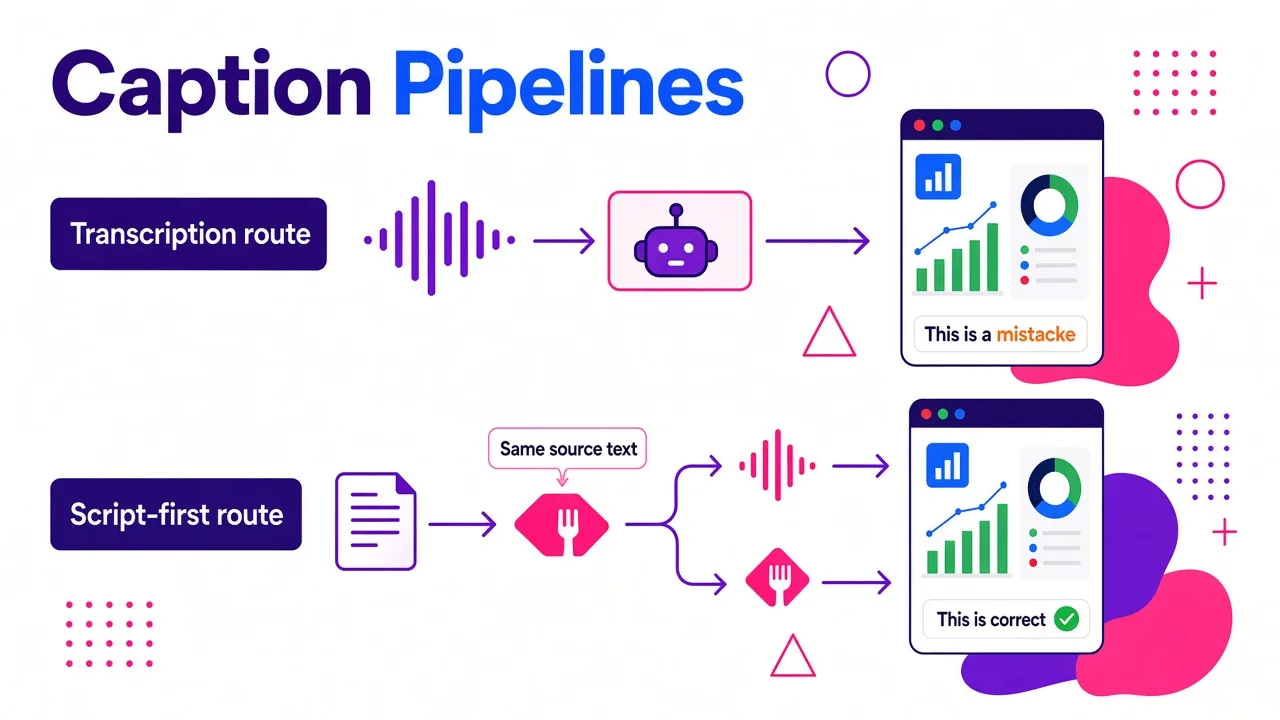
I used to cycle through transcription tools until I changed my approach. For faceless and script-driven videos, I now write the script first and generate both the voiceover and captions from that text. The shift cut most caption errors because the model no longer has to guess what was said.
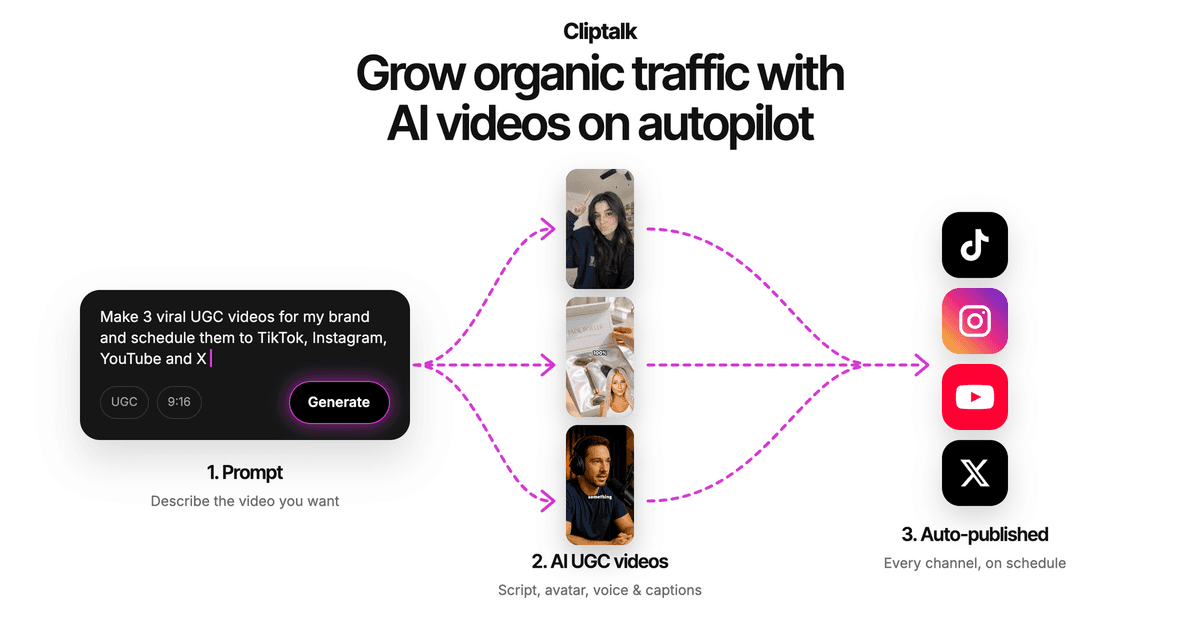
My workflow in Cliptalk looks like this:
- Write or generate the script. For YouTube-style content I start with the free YouTube script generator, which produces the full spoken script from hook to call to action, then I refine the wording.
- Spell tricky words the way you want them shown. Brand names, place names, and acronyms go in exactly as I want them displayed. Since captions come from the text, what I type is what viewers read.
- Pick the voice. A stock AI voice works, or a cloned version of my own. If you go the cloning route on YouTube, read up on how to use voice cloning for YouTube videos and stay monetized before you publish.
- Render, then watch once with sound off. I check line breaks, pacing, and whether the captions read well at a glance instead of hunting for transcription mistakes.
For videos where I'm on camera talking off the cuff, I still use a transcription tool from the list above and follow the cleanup steps below.
Fixing captions after generation
When captions come from recorded audio, these habits cut review time in half.
- Record clean audio first. Cleaner input produces better transcription, especially with multiple speakers or background noise. A close mic beats any post-processing.
- Search for proper nouns before anything else. Names and places fail most often. Check every one before you read the rest.
- Proofread with the sound on, then off. Sound on catches mishearings. Sound off catches captions that make no sense on their own, which is how most viewers see them.
- Watch for whole-phrase rewrites. If a line reads oddly smooth but does not match what you remember saying, play it back. The worst errors are fluent nonsense.
- Use word-level editing when available. Tools with word-level timestamps let you click a word and fix it without breaking the timing.
- Keep a running list of words your tool misses. The same names and terms fail every week. Fix them in your script or check them first.
If you want to see a full captioning pass in action, this walkthrough is worth a few minutes:
Burned-in captions vs. subtitle files for short-form
Most caption generators offer two export choices:
- Burned-in (open) captions become part of the video image itself. They show up every time, preserve your exact styling, and appear identical across platforms. For TikTok, Reels, and Shorts, this option is usually the safer bet.
- Subtitle files (SRT or VTT) live next to the video file so viewers can turn them on or off. They work well for long-form YouTube videos, translations, and SEO, though your custom styling won't transfer.
For short-form content, I always burn the captions in. I make them large, high-contrast, and position them away from any on-screen buttons. Word-by-word or karaoke-style highlights boost retention during fast voiceovers, provided each line is short enough to read in a single beat.
FAQ
Which video caption generator is most accurate for short-form?
For script-driven and faceless videos, a script-first generator is the most accurate option, because captions come from your text instead of a transcription guess. For recorded footage, Captions Generator, Kapwing, and Descript led an independent test at 5.7%, 6.0%, and 6.3% word error rate.
How accurate are AI captions in general?
On typical audio, expect roughly 95% accuracy. The best tools reach 94% to 97% depending on the test. That still leaves several errors per minute of speech, so review every caption before you publish.
Does background music hurt caption accuracy?
Less than you might think. In the eight-tool test, five tools scored 0.6% WER on speech over loud music. Accents, proper nouns, and overlapping speakers cause far more errors.
Are free caption generators accurate enough?
Some are. The test pulled its accuracy numbers from free accounts at default settings. The bigger issue is watermarks: VEED and Kapwing add them to free exports, which shows on public posts.
Should I use SRT files or burned-in captions on TikTok and Reels?
Burned-in captions. They always display, keep your styling, and look consistent across platforms.
The bottom line
Caption accuracy hinges on the source of the words. Tools that transcribe audio call for the top options from independent benchmarks, plus a quick proofread for names, jargon, and accents. When creating faceless or script-driven short-form videos, cut out the guesswork. Write the script, generate the voiceover from it, and let the captions follow. That's the workflow I use with Cliptalk, and it's the closest I've come to publishing captions I don't have to fix.
Tags: video captions, short-form video, ai subtitles, tiktok, youtube shorts, faceless channels