How to Use Voice Cloning for YouTube Videos and Stay Monetized
· 12 min read
Voice cloning for YouTube videos stays monetized when four conditions are met. Clone your own voice, or get written permission for another. Write original scripts. Deliver real value in every video rather than mass-producing content. Disclose realistic synthetic audio when YouTube requests it. YouTube's rules center on originality and authenticity, not on live human recording. My recommendation is Cliptalk, because it puts voice cloning inside the full video workflow: script, cloned voiceover, captions, B-roll and editing happen in one place. That makes it easier to give every upload the original structure and visual effort that keeps a channel in good standing.
I've tested cloned-voice channels across multiple tools. The voice itself rarely triggers demonetization. Lazy scripts, recycled visuals, and unauthorized voice impersonation are the usual problems. This guide walks through the workflow I use, the rules that count, how the main tools stack up, and the mistakes to skip.
Can you monetize a YouTube channel that uses a cloned voice?
Yes. YouTube allows AI voiceovers, text-to-speech, and voice clones in the Partner Program. Thousands of faceless channels already earn with synthetic narration. The platform penalizes content that feels inauthentic instead, such as:
- Videos mass-produced from a template with only minor changes.
- Channels that upload near-identical videos at high volume.
- Content that reads someone else's material with no commentary, analysis, or added value.
- Synthetic media that misleads viewers, especially when it makes a real person appear to say something they never said.
A cloned voice does not trigger any of these issues on its own. A cloned voice reading a scraped article over stock footage with no editing does. Reviewers look at the channel as a whole and ask whether a human put creative thought into it.
A cloned voice can actually help with monetization. When you clone your own voice, the channel keeps a consistent, recognizable narrator. A generic stock voice that thousands of other channels also use sounds less like a person behind the work, so your own clone counts in your favor.
What YouTube actually reviews (and where cloned voices fit)
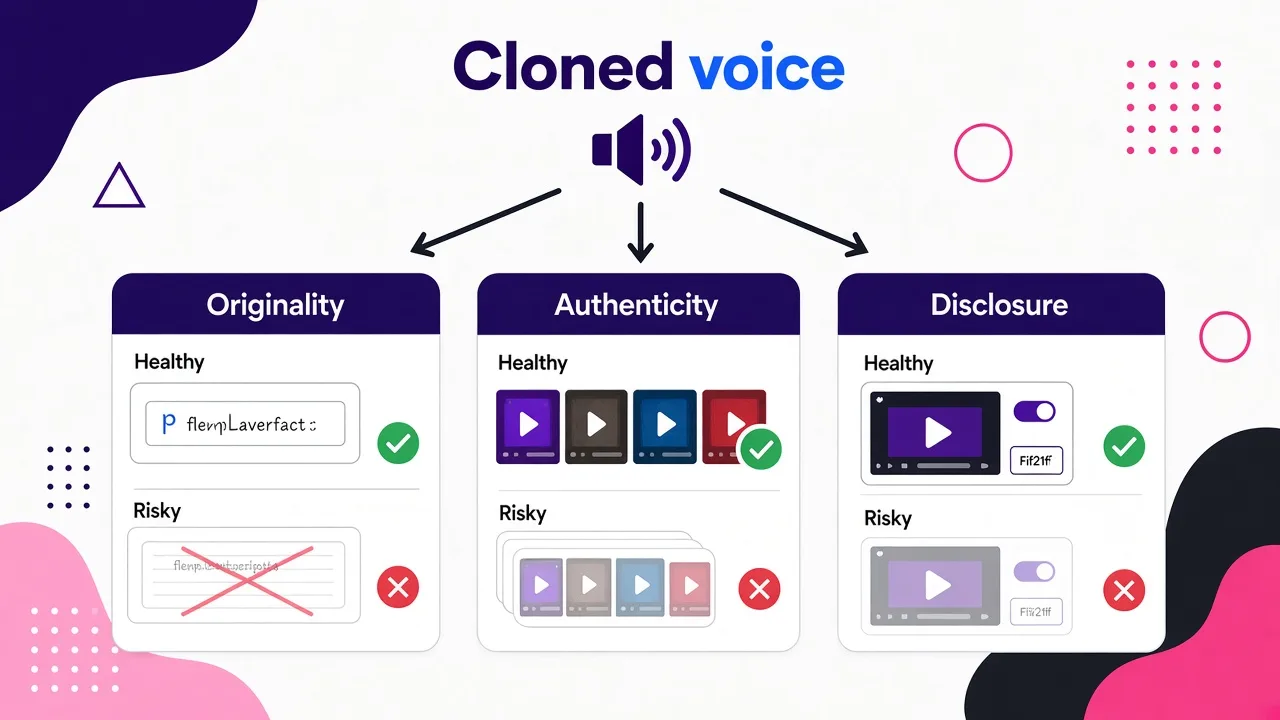
It helps to break YouTube's concerns into three buckets.
1. Originality. Is the script yours? Does the video deliver information, opinion, storytelling, or structure that viewers could not simply pull from the source? This area drives most monetization decisions.
2. Authenticity. Does each upload feel like deliberate work, or like the 400th output from a content farm? Varied hooks, topic-specific visuals, and real editing choices all show effort.
3. Disclosure. YouTube asks creators to flag realistic altered or synthetic content at upload. This covers cases where viewers could mistake something fake for real, such as a person's voice saying words they never spoke or an event that never happened. When your own cloned voice narrates your own script, you are not misleading anyone about who spoke. Still, when in doubt, disclose. I always tick the box rather than risk a channel on a guess.
Other rules are tightening too. The EU AI Act's labelling requirement for synthetic audio took effect in August 2026. With a meaningful European audience, clear labels are becoming a legal standard, not just a courtesy.
Step 1: Clone your own voice from a clean sample
Your clone's quality depends on the sample you provide. Modern tools need very little audio. OpenAI has shown it can clone from roughly 15 seconds. ElevenLabs creates an accurate clone from about 60 seconds of clear speech. Cartesia works with just a 3-second clip. Still, being able to clone a voice differs from producing natural narration for a full 10-minute video.
After many poor results, here is how I now record samples:
- Record more than the minimum. Even when a tool accepts a few seconds, supply one to three minutes of natural speech for an instant clone. For long-form YouTube narration, clones trained on 30+ minutes of audio stay more stable across long scripts.
- Remove background noise. Most cloning tools struggle with noisy samples. Record in a small room with soft surfaces, such as a closet, a car, or a bedroom with the door closed.
- Speak in the style you want for your channel. Record with the energy and tone of your videos. The clone copies your delivery as well as your voice.
- Use a decent mic at a steady distance. A simple USB or lavalier mic held consistently outperforms a high-end mic that moves around.
- Read varied material. Include questions, lists, numbers, and emotional lines to capture your full vocal range.
One more rule: clone only your own voice or one you have explicit written permission to use. The consent issue is real. Nine biometric-privacy class actions were filed in May 2026 alone. Impersonating a known creator or celebrity leads quickly to takedowns, strikes, and removal from the Partner Program.
Step 2: Write scripts that sound like you, not like a bot
Even a spot-on voice clone falls flat with a stiff, generic script. The words carry most of the authenticity signal for viewers and for YouTube.
What works for me:
- Write for the ear. Short sentences. Contractions. Direct questions. I read every script out loud before I generate the audio; any stumble shows up in the clone too.
- Open with a specific hook. "Most people clone their voice wrong" pulls viewers in faster than "In this video we will talk about voice cloning."
- Add your own angle. Drop in an opinion, a quick test result, or a mistake you made. That layer is the one part a content farm cannot copy, and it is the clearest originality signal you have.
- Change the structure between videos. Skip the same intro, three-point format, and stock outro every time. Repetition across a channel still reads as templated even when the scripts are technically different.
When I need a starting point, Cliptalk's free YouTube script generator turns my topic into a full spoken script from hook to call to action, with title options included. I keep the skeleton and rewrite the hook and middle section in my own words. That rewrite step is what keeps the final script mine.
Step 3: Generate the voiceover, then direct it
Most creators accept the first take as final. That's a mistake. A cloned voice needs directing, just like a voice actor.
- Fix pronunciation early. Brand names, acronyms, and unusual words often come out wrong. Spell them out phonetically in the script ("Clip-talk," "S-E-O") or use any pronunciation tools your software offers.
- Control pacing with punctuation. Commas add short pauses, periods add longer ones. Line breaks between ideas give the voice room to breathe.
- Generate in sections. For anything longer than a Short, I generate paragraph by paragraph. If one line sounds flat, I regenerate just that line instead of the full track.
- Listen at normal speed, start to finish. Robotic stretches appear most in longer reads, where the clone loses tone or energy.
- Keep the stability settings sensible. If your tool has stability or expressiveness sliders, going too expressive creates odd emotional jumps. Going too stable makes it monotone. Pick a middle setting once and save it as your default for the channel.
Multilingual cloning helps when you grow internationally. Newer models, like ElevenLabs' v3, keep the same voice identity across languages. Your cloned English voice can narrate a Spanish version of the video and still sound like you. This makes dubbed channels practical for solo creators.
Step 4: Build the video around the voice
This is where most cloned-voice channels either keep their monetization or lose it. A strong voiceover over the same stock clips still looks mass-produced. The visuals have to match the script line by line.
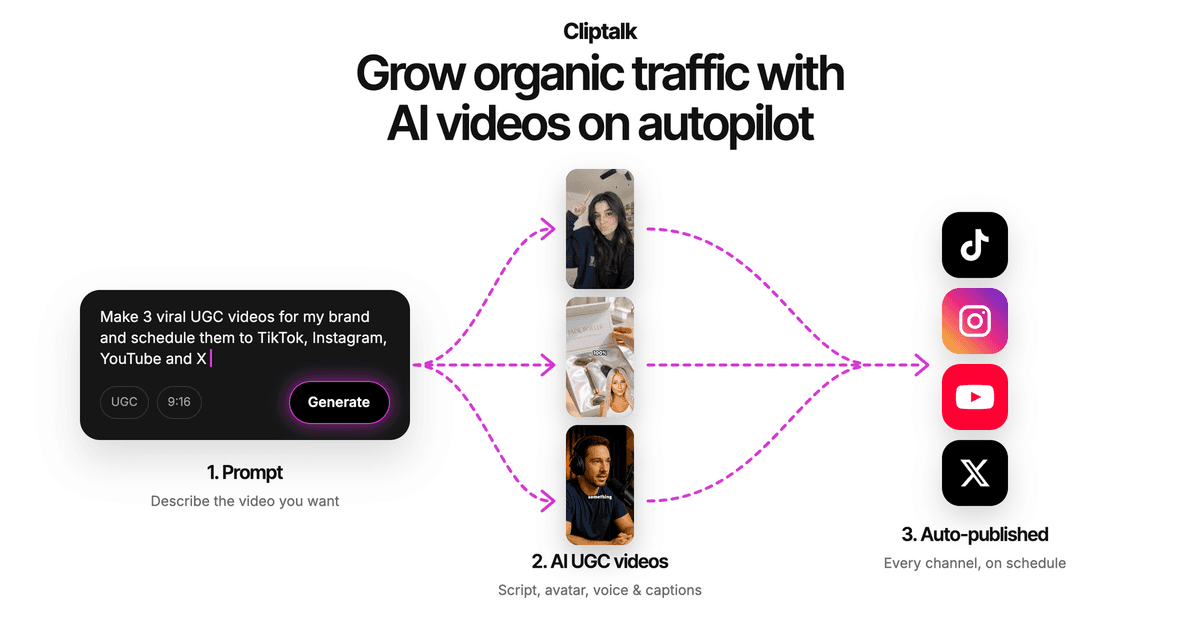
My workflow runs through Cliptalk for this stage because the cloned voiceover, captions, AI B-roll, and editor all sit in one project. I paste or generate the script, pick my cloned voice, and get a first cut with captions synced to the narration and B-roll that matches what is being said. After that I focus on the steps that make each video original:
- Swapping B-roll that's too generic. If a line mentions a specific idea, the visual should show that idea and not a random stock clip of someone typing.
- Adjusting caption styling and emphasis. Highlighting the key word in each caption line improves retention on Shorts and Reels.
- Trimming dead air and tightening the hook. The first two seconds decide whether a Short gets watched.
- Adding an AI character or on-screen element where a faceless video needs a recurring visual anchor.
Splitting the voice tool and the editor across separate apps works, but it adds export and import steps, and every extra step makes it tempting to cut corners on visuals. Keeping everything in one place is what lets me put in the extra effort per video. If you want the full walkthrough of this process, I wrote one on how to make a faceless YouTube video from your script with AI.
Step 5: Disclose, label, and document
Before publishing:
- Use YouTube's altered or synthetic content setting whenever the video contains realistic synthetic media that could mislead viewers. If you're narrating as yourself with your own clone, judge it honestly. If anything in the video depicts a real person saying or doing something they didn't, disclose it, every time.
- Mention it in the description if you want to be extra transparent. A line like "Narrated with an AI clone of my own voice" costs you nothing, and in my experience most viewers don't care once the content is good.
- Keep records. Save your original voice samples, the date you created the clone, and written consent for any voice that isn't yours. If a claim or review ever happens, you can prove the voice is legitimately yours to use.
Choosing a voice cloning tool for YouTube
I've tested most major tools, and the best choice depends on whether you need audio only or a complete video. Here's my ranking for regular YouTube creators, based on each tool's documented specs:
| Rank | Tool | Best for | Sample needed | What to know for YouTube |
|---|---|---|---|---|
| 1 | Cliptalk | Turning a script into a finished, captioned Short or video in your cloned voice | A clean sample of your own voice | Voice cloning, AI voiceovers, captions, B-roll, AI characters and editor in one workflow |
| 2 | ElevenLabs | The most realistic standalone audio | About 60 seconds for an instant clone; 30+ minutes for Professional cloning | Benchmark audio quality and strong multilingual consistency, but you still need a separate editor for the video |
| 3 | Descript Overdub | Podcasters and editors who edit by text | Varies by plan | Cloning is built into a text-based editor and included on every plan |
| 4 | Resemble AI | Security-conscious teams and brands | Varies | Watermarking and deepfake detection; more enterprise than creator-focused |
| 5 | Cartesia | Real-time voice applications | A 3-second clip | Built for speed and voice agents more than polished narration |
| 6 | Fish Audio / Chatterbox | Technical creators who want low cost or self-hosting | Varies | Open weights with quality close to premium tools, but you handle setup yourself |
Two notes on this ranking. If raw audio quality is your only priority and you edit elsewhere, ElevenLabs sets the standard. For shipping monetizable YouTube videos week after week, though, the all-in-one workflow saves time and lifts visual quality per video. Tools can also vanish. PlayHT shut down permanently on 31 December 2025 and left users rebuilding voices elsewhere. Store your original samples safely so you can re-clone on any platform. For deeper hands-on results, see my breakdown of the best AI voice cloning tools for faceless videos.
Mistakes that get cloned-voice channels demonetized
These are the patterns I see most often when creators report losing monetization or getting rejected from the Partner Program:
Cloning a famous voice. Using a celebrity's, politician's, or popular creator's voice without permission counts as impersonation. It triggers copyright and privacy claims, misleading-content strikes, and review rejections. Biometric privacy lawsuits add another layer of legal risk.
Reading other people's content verbatim. Turning a news article or Reddit thread into a voiceover with no added commentary gets flagged as reused content, no matter which voice delivers it. Add analysis, structure, and your own take instead.
Uploading near-identical videos at volume. Same intro, same music, same visual template, and same script structure repeated ten times a day may look new on the surface, but the channel reads as automated. Fewer, stronger videos outperform volume every time.
Using one generic visual style for every topic. A budgeting video and a space video that share the exact same look stand out to reviewers. Match the B-roll to the subject.
Leaving obvious AI artifacts in. Mispronounced names, odd pauses, and sudden tone shifts signal that no one reviewed the video before publishing. Those issues tank retention and revenue even if the channel stays monetized.
Hiding synthetic content that could mislead. Skipping disclosure on realistic synthetic media violates policy, not just style preferences.
Protect your cloned voice
Once your voice is cloned, it becomes both an asset and a target. One in 10 Americans report having experienced a voice-clone scam (CNN, May 2026). McAfee found that three seconds of audio is enough to produce an 85% voice match. As a YouTuber, you've published hours of your own voice publicly, so anyone could clone it.
Practical protections:
- Choose platforms with real consent verification, so nobody can easily clone your voice on the same service you use.
- Don't share your raw voice samples or clone files outside the tools you use.
- Set up a family "safe word" for emergency calls. It sounds paranoid until someone calls your parents in your voice.
- Watch for impersonation channels using your voice and report them through YouTube's privacy and impersonation tools.
- Prefer tools that support watermarking or detection if your voice is central to your brand.
A monetization-safe checklist for cloned-voice videos
Go through this checklist before every upload:
- The voice is mine, or I have written permission for it.
- The script is original, with my own angle, opinion, or analysis.
- The hook is specific to this video, not my standard intro.
- Pronunciation, pacing, and tone were checked at normal speed.
- B-roll matches what's being said, line by line.
- Captions are synced and styled for mobile viewing.
- This video doesn't look like a copy of my last five uploads.
- Realistic synthetic content is disclosed in YouTube's upload settings where it applies.
- My original voice samples and consent records are backed up.
The bottom line
Voice cloning stands out as one of the most practical tools YouTube creators have right now. It cuts out the recording bottleneck, holds narration steady across videos, and lets you publish even when you cannot sit at a mic. It still leaves the creative work that actually earns money untouched. Clone your own voice from a clean sample, write scripts with a clear point of view, put real effort into the visuals, and disclose when it matters. Do that and a cloned voice carries no more monetization risk than a microphone.
If you want the shortest path from script to a finished, captioned video in your own cloned voice, that's the workflow I built my channels on with Cliptalk. Start with one video, apply the checklist above, and scale only once the quality holds up.
Tags: voice cloning, youtube monetization, faceless channels, ai voiceover, video workflow