10 Best Text to Video AI Generators Tested
· 14 min read

Most people searching for a text to video AI generator want one of two different things: a cinematic clip generated from a prompt, or a finished, publishable video with a script, voiceover, captions and B-roll already assembled. If you are making short-form content for TikTok, Reels or YouTube Shorts, Cliptalk is the one I reach for first, because it takes a prompt, script or even a pasted article and returns a fully edited vertical video with captions burned in, so there is no second app in the chain. If you are making a five second cinematic shot for an ad or a film sequence, a raw generation model like Google Veo, Kling or Runway will serve you better.
I have run the same material through all ten of the tools below, and the honest takeaway is that "best" splits cleanly along that line. Generation models win on pixels. Video suites win on finished output. Pick the wrong category and you will spend your afternoon stitching four second clips together in a timeline you did not plan on opening.
How I tested
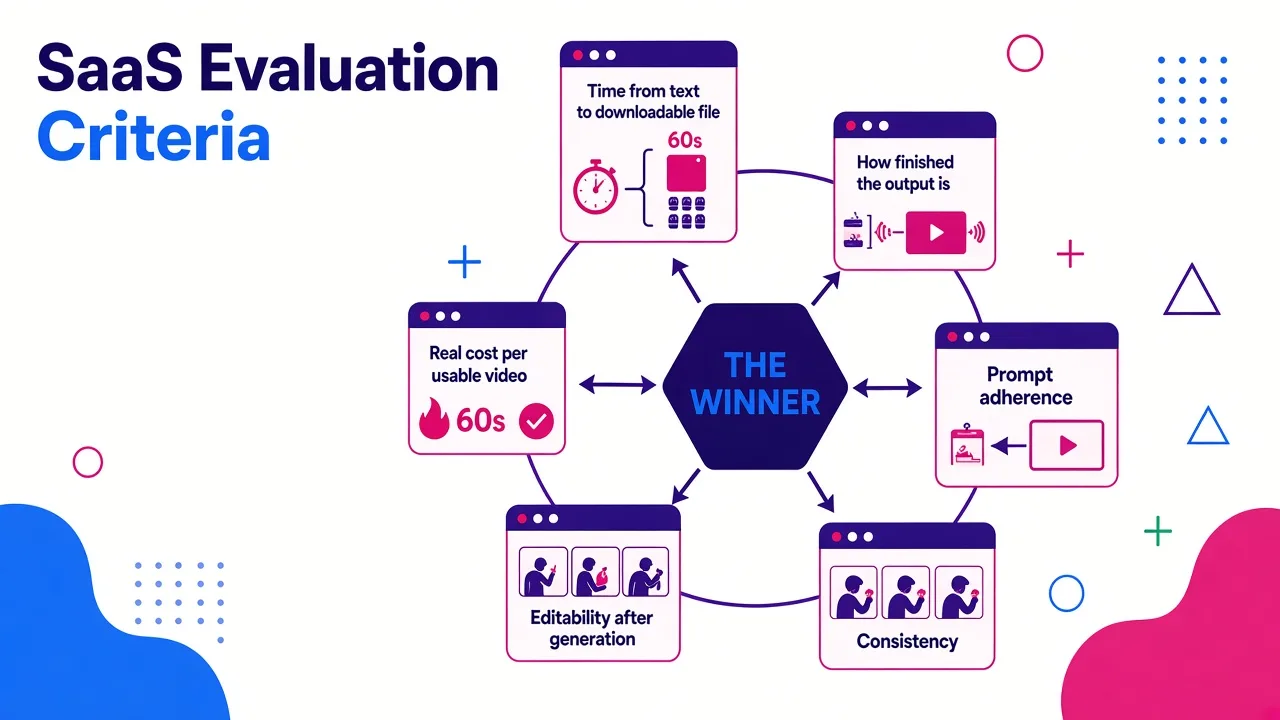
I gave every tool the same starting material: a 200 word product-launch script and a 900 word blog post, both rendered to 9:16 vertical where the tool supported it. Then I scored on six things:
- Time from text to a downloadable file. Anything past ten minutes for a sixty second clip lost points.
- How finished the output is. Does it arrive with audio, captions and cuts, or is it a silent clip I have to build around?
- Prompt adherence. Did it make what I described, or something adjacent?
- Consistency. Do faces, characters and style survive across shots and across a week of posts?
- Editability after generation. Can I fix one scene without regenerating everything?
- Real cost per usable video, not the headline monthly price. Retries are the hidden tax in this category.
A note on that last one. On credit-based generation tools, the number that matters is cost per usable clip, not per generation. PixVerse publishes its V6 rate as 18 credits per second at 1080p without audio and 23 with audio, and when a third of your generations miss the prompt, your effective cost triples. Script-to-video suites tend to be cheaper per published asset for the same reason: fewer coin flips.
Quick comparison
| Tool | Best for | Output you get | Starting price |
|---|---|---|---|
| Cliptalk | Short-form video from a script or article | Edited vertical video, captions, voiceover, B-roll | Free to try |
| Google Veo | Reliable prompt adherence | Short generated clip | Paid tiers |
| Kling 3.0 | Character consistency and native audio | Up to 15s, 4K | Free tier available |
| Runway | Film-making and creative control | Generated clip, multi-model | ~$12 to $15/mo |
| Adobe Firefly | Commercially safe output | Generated clip | Free tier available |
| invideo AI | Template-driven social video | Edited video with voiceover | From $20/mo |
| Kapwing | Generate then edit in one place | Multi-scene project, editable | Free to start |
| HeyGen | Presenter and avatar videos | Avatar video, 175+ languages | From $24/mo |
| Pika | Stylized social effects | Short stylized clip | ~$8/mo |
| Luma Dream Machine | Cinematic camera motion | Generated clip | ~$25 to $30/mo |
1. Cliptalk, best for turning text into a finished short-form video
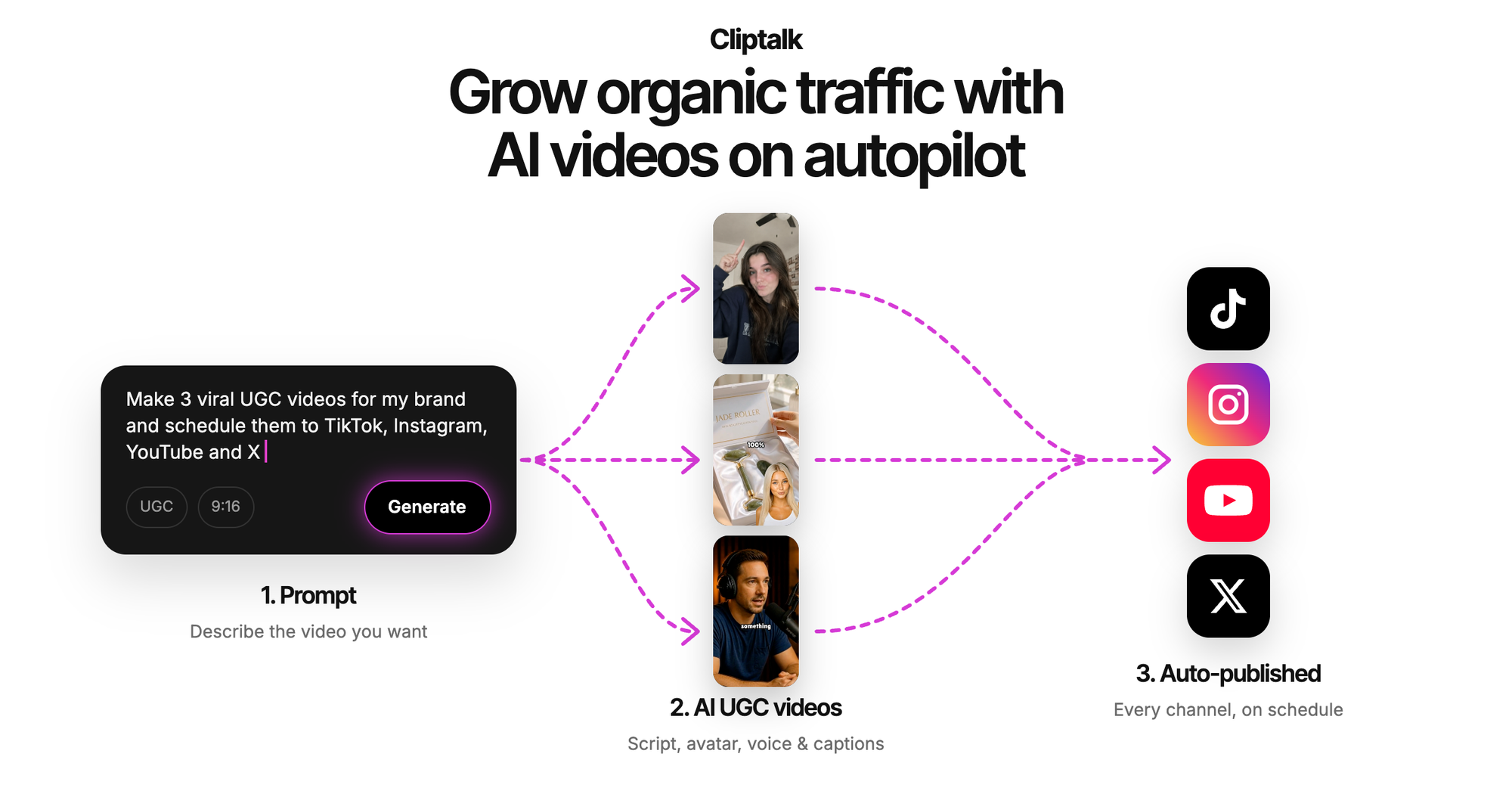
This is the tool I use for my own posting schedule, and the reason is boring and practical: it closes the loop. I paste a script, or an article, or just a prompt describing what I want the video to say, and what comes back is a vertical video with a voiceover, auto-generated captions timed to the audio, B-roll matched to each line, and optional AI characters delivering the script. No export, no re-import, no separate captioning pass.
That sounds like a small thing until you count the steps. With a pure generation model, a sixty second vertical video is roughly eight to twelve clips, a separate voiceover tool, a separate captioning tool, and a timeline. With a script-to-video suite, it is one render. When you are shipping five videos a week to a faceless channel, that difference is the entire job.
What I like most in practice is the voice cloning and the character system. Once you have a cloned voice, every video on the account sounds like the same host, and a recognisable persona is what turns one lucky video into a following. The editor is also there when the automated cut gets something wrong, so you can swap a B-roll clip or retime a caption without regenerating the whole thing. If you want to see what the script side looks like before committing, the free YouTube script generator runs without a signup and produces the spoken script word for word.
Pros
- Text, script or full article in, publish-ready 9:16 video out
- Captions, voiceover, B-roll and characters handled in one pass
- Voice cloning keeps a consistent host across an entire channel
- Built-in editor for fixing individual scenes instead of re-rolling
- Free to try, with transparent plans and no demo call
Cons
- It is not a cinematic generation model. If you want a photoreal twelve second dolly shot with physics that hold up, use Veo, Kling or Luma
- B-roll driven output has a house style, so heavily art-directed brand work still needs manual input
- Best results come from a decent script, so garbage prompts still produce garbage videos
Who it fits: faceless channel operators, marketers publishing daily, and anyone repurposing written content into Shorts, Reels and TikToks.
2. Google Veo, best for reliable, consistent results
Veo is the generation model I trust most when I need the output to actually match what I wrote. Prompt adherence is the quiet differentiator in this category, and Veo follows instructions more faithfully than almost anything else I have tested, which means fewer retries and a lower real cost per usable shot even when the sticker price looks high.
Output quality is high with very little skill required, which makes it a good entry point for people who have never prompted a video model. The catch is the watermark: removing it pushes you into the more expensive tiers, and for commercial work that is not optional.
Pros
- Best-in-class prompt following, which translates to fewer wasted generations
- Strong quality with a low learning curve
- Available through multiple front ends, including inside Runway and other aggregators
Cons
- Watermark removal is expensive
- Short clip lengths mean you are still assembling a real video elsewhere
Who it fits: creators and marketers who need one hero shot to be right, not a full edit.
3. Kling 3.0, best for character consistency and native audio
Kling is the model I use when a person needs to appear in more than one shot and still look like the same person. You can lock a character's appearance from a single photo, or from a short video or multiple angles, and the "AI morphing" effect that ruins most multi-shot AI sequences largely disappears.
The two other things that matter: it generates native audio with lip sync, including assigning who speaks in multi-character scenes, and it extends generation to fifteen seconds of uninterrupted motion with storyboard controls for multi-shot sequences, outputting up to 4K. Kling claims north of 60 million users and 600 million videos generated, which shows in how mature the controls feel.
Pros
- Genuinely strong character locking across shots
- Native voice, lip sync and multi-language delivery without a third-party tool
- Up to 15 seconds and 4K output, unusual in this bracket
Cons
- Still clip-length thinking, so longer narratives need assembly
- Credit burn on 4K plus audio adds up fast during iteration
Who it fits: anyone building narrative or character-driven AI video who cannot tolerate face drift.
4. Runway, best for film-making and creative control
Runway has the deepest professional toolset of the generation-first platforms: camera control, motion brush, 4K upscaling, lip sync with custom voices, and video-to-video restyling that the other models do not emphasise nearly as hard. If your brief is "make this footage look like a 1970s film", Runway is the first stop.
The most interesting 2026 change is that Runway now aggregates rival models, including Veo, Kling and Seedance, inside the same subscription. That is genuinely useful: you are no longer locked to one model's weaknesses, and you can pick the engine per shot. The trade-off is a steep learning curve. The Academy help content is excellent, and you will need it.
Pros
- Most complete professional control set of the three big creative platforms
- Multiple models under one subscription, including competitors
- Excellent documentation and learning material
Cons
- Steepest learning curve on this list
- Overkill if all you want is a captioned vertical clip
- Free tier is a one-time credit grant, not a monthly allowance
Who it fits: filmmakers, agencies and production teams doing art-directed work.
5. Adobe Firefly, best for commercially safe output
Firefly's pitch is legal comfort. It generates video from a prompt or an image using Adobe's own model plus a set of partner models, all inside one workspace, and it applies Content Credentials so the provenance of generated content is traceable. For brands with a legal department, that matters more than an extra point of visual fidelity.
The workspace itself is a genuinely intuitive browser-based editor, and it handles the common jobs well: product shots, cinematic scenes, B-roll social clips, concept work. It is free to start, which makes it an easy tool to validate before you commit budget.
Pros
- Commercially safe positioning and transparent AI provenance
- Free AI video generation with a usable browser editor
- Access to partner models alongside Adobe's own
Cons
- Not the strongest raw model when compared head to head with Veo or Kling
- Best value only if you are already inside the Adobe ecosystem
Who it fits: brand and agency teams where licensing risk is a real constraint.
6. invideo AI, best for template-driven social video from a prompt
invideo is the most established of the prompt-to-social-video suites, with a stated 25 million users across 190 countries. You describe the video, it assembles scenes from a large stock library, writes and reads a voiceover, and gives you something close to publishable. Voice cloning lets you reuse your own voice across a whole series, which is the same consistency trick that makes faceless channels work.
The stock library is the strength and also the weakness. Your videos will look like other invideo videos unless you put work in. The free plan watermarks output, and paid plans start around $20 per month.
Pros
- Enormous template and stock media library
- Voice cloning for a consistent narrator
- Genuine prompt-to-finished-video workflow
Cons
- Watermark on free tier
- Stock-driven output has a recognisable look
- Fine control over individual scenes is fiddlier than a real editor
Who it fits: marketers who want volume from templates and do not need a distinctive visual identity.
7. Kapwing, best for generating and editing in the same place
Most generation tools hand you a clip and stop. Kapwing keeps going. You prompt, it builds a storyboard you can preview, it generates scenes across a choice of roughly eighteen models, and then it drops the whole thing into a full timeline editor where you can adjust subtitles, music, branding, fonts, watermarks, aspect ratio and the voiceover itself.
It supports multi-scene generation, start and end frame control, and consistent characters, and it exports optimised for 16:9, 9:16, 1:1 and 4:5 without reformatting. Length runs from fifteen seconds up to five minutes. With 35 million creators on the platform, it is a safe default for teams who want optionality.
Pros
- Model choice plus a real timeline editor in one browser tab
- Multi-scene projects with consistent characters
- Clean multi-platform export presets
Cons
- More steps than a one-prompt suite when you just want a quick post
- Quality depends heavily on which underlying model you pick
Who it fits: creators and small teams who want to generate fast but retain editorial control.
8. HeyGen, best for presenter and avatar videos
If your video needs a human on camera and you are not going on camera, HeyGen is the strongest option I have used. The avatar library runs past 1,100 stock presenters, lip sync holds across long scripts without drift, and the output passes the "scroll test" on a phone, which is the only test that matters for short-form.
The multilingual side is the real advantage. I have taken one English clip and generated Spanish, Japanese and Hindi versions that preserved the original voice tone while matching lip movement to the new language, across a stated 175+ languages and dialects. Free plan gives you three videos a month at 720p with a watermark and a three minute cap; paid starts around $24 per month with unlimited videos.
Pros
- Best avatar realism and lip sync in the category
- 175+ languages with tone preservation
- Genuinely usable free tier for evaluation
Cons
- Avatar-led format only suits certain content
- Free tier watermarks and caps you at three videos
- Not a B-roll or montage tool
Who it fits: anyone doing spokesperson, explainer or multilingual content. I go deeper on this category in our avatar video generator comparison.
9. Pika, best for stylized short-form effects
Pika made a deliberate choice not to chase photorealism, and it paid off. Its signature effects, the melt, explode and inflate transformations plus the ability to insert or swap objects into real footage, are built for exactly the kind of eye-catching clip that performs on TikTok and Reels. Nothing else on this list does that as well.
It is also the cheapest entry point of the generation tools at roughly $8 per month, with a free tier of around 80 credits per month capped at 480p. That 480p ceiling makes the free tier a prompt-learning sandbox rather than a production path.
Pros
- Distinctive stylized effects other tools do not offer
- Lowest paid entry price of the generation models
- Low learning curve, good for beginners
Cons
- 480p cap on the free plan
- Weakest option if you need photorealism or long coherent motion
Who it fits: social creators chasing meme-able, shareable clips rather than realism.
10. Luma Dream Machine, best for cinematic camera motion
Luma is the one I use for product shots and camera moves. Its models reason about scene physics and motion before generating, which produces noticeably more coherent movement in complex shots, and its image-to-video path is the best way I know to take a single still product photo and turn it into a cinematic push-in.
It is the priciest of the creative trio, with entry paid tiers around $25 to $30 per month, and the free allowance is limited and not clearly published. That pricing makes sense given who it is chasing: teams who will pay for consistency.
Pros
- Smooth, believable camera motion and photorealism
- Strongest image-to-video results for product work
- Physics-aware generation reduces the uncanny motion artifacts
Cons
- Most expensive at every tier
- Free access is limited and vague
- Platform is broadening beyond pure video, which adds surface area
Who it fits: product marketers and teams who need cinematic shots more than volume.
How to choose in under five minutes
Answer three questions and the shortlist writes itself.
What are you starting from? A blog post or a written script points you at a script-to-video suite. A visual idea in your head points you at a generation model. This is the single biggest fork, and most people get it wrong by picking a famous model and then discovering they still have four hours of editing ahead.
What has to be in the file when it lands? If the answer includes captions, voiceover and multiple scenes, you want a suite. Generation models give you silent or near-silent clips, and bolting on audio and subtitles afterwards is where the time goes. Short-form video earns its reach in the opening moment, and captions are not optional when most of the feed watches on mute.
How many videos per week? One hero asset a month justifies per-clip credit pricing and retries. Five posts a week does not. At volume, the metric that decides your bill is cost per published video, and tools that render a complete video in one pass win that comparison by a wide margin. If you want the side-by-side version of this decision, our tool comparisons break it down per competitor.
One more practical note: check watermark rules, resolution caps, clip length limits and commercial licensing before you build a workflow. Several tools on this list look free until you need a clean 1080p export you are allowed to run as an ad.
Frequently asked questions
What is the best text to video AI generator overall? There is no single winner, but there is a reliable split. For finished short-form social video from a script, a script-to-video suite wins. For a single cinematic shot, Veo has the best prompt adherence and Kling has the best character consistency.
Can I use text to video AI for free? Yes, with limits. Adobe Firefly, Kapwing and Kling all have free entry points, HeyGen gives three watermarked videos a month, and Pika's free tier caps at 480p. Use free tiers to test whether the tool understands your prompts, then pay when you need clean exports.
Is AI video good enough to post? On short-form feeds, yes, provided you add the platform's AI-generated label and the content is original rather than recycled. The tools that perform best are the ones that nail the first second and keep a consistent host or style across posts.
How long does a text to video render take? Fast generation models produce a short clip in well under a minute. Full script-to-video renders of a sixty second vertical video typically land in a few minutes. Anything over ten minutes for a one minute clip is worth questioning.
The bottom line
If you are publishing to TikTok, Shorts or Reels on a schedule and your input is text, pick a tool that hands you a finished, captioned vertical video in one pass. That is why Cliptalk sits at the top of this list for that use case, and it is what I use for my own posting. If your job is one gorgeous shot rather than fifty publishable ones, Veo for accuracy, Kling for characters, Runway for control and Luma for camera work are the four worth your credits. Everything else on this list is a good answer to a more specific question.
Tags: ai video generation, text to video, short-form video, video creation tools, ai tools