What Free AI Shorts Generators Can and Can't Do
· 12 min read
Free AI shorts generators can turn a prompt, script, or long video into a vertical clip with captions in minutes. They usually can't give you unlimited, watermark-free, monetization-safe output at scale. Every free tier holds something back: watermarks on export, one-time trials, small credit allowances, stock-only visuals, limited editing, or terms that affect who owns your content. If you're starting from text rather than existing footage, I recommend Cliptalk. Its 50 free credits need no card and produce a complete short with AI voiceover, B-roll, and captions, not a watermarked draft or a single-use trial. Below is how I separate what free tools can actually do from what they only promise, based on running my own short-form workflow across most of the tools that rank for this search.
There are two different products called "free AI shorts generator"
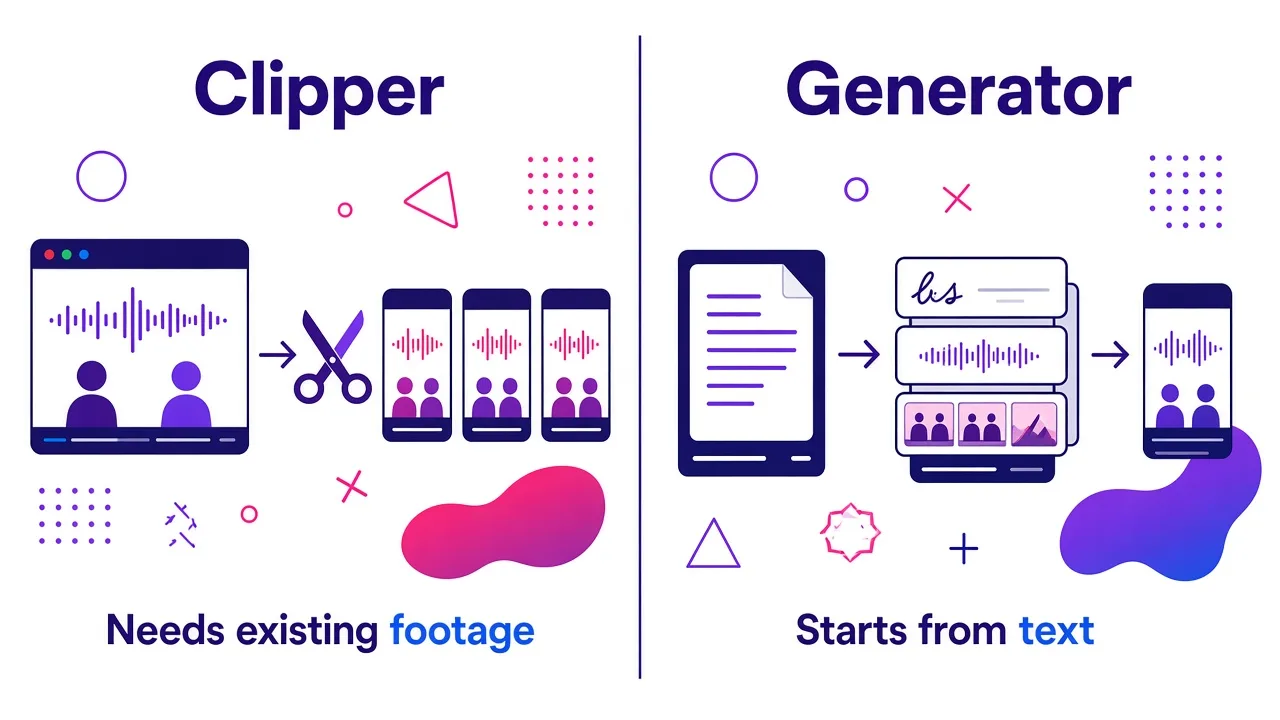
Most confusion starts here. When you search "ai shorts video generator free," the results mix two tools that do very different jobs.
Clippers take a long video you already have, such as a podcast, webinar, or interview, and cut it into short vertical clips. Recast, Riverside, Klap, VEED's AI Clips, CapCut's long-video-to-shorts tool, and Adobe Express's clip maker all work this way. They find "hook" moments in your speech, reframe to 9:16, and add captions.
Generators start from nothing but text. You give them a prompt, a script, or an article, and they build the video: script, voiceover, visuals, captions, and music. Fliki, InVideo AI, Pixlr's text-to-video, MakeShort's Reddit-story tool, and Cliptalk fall on this side.
Before you judge whether a free tier is generous, check that you're on the right side of that line:
- No footage yet, or running a faceless channel? A clipper is useless to you, however good its free plan looks.
- Hours of recorded podcasts? A clipper is probably the faster route.
Clippers have hard input requirements. VEED's clips tool needs at least 1 minute and at most 3 hours of speech in the uploaded file. Adobe Express asks for a video at least 1 minute long. If your channel is faceless, neither tool can start your video for you.
What free generators genuinely do well
Free tiers get criticized a lot, so here's where they earn their place.
- Scripting. This is where free is closest to unlimited. Script generators cost the provider very little to run, so many offer them with no signup. For hooks, structure, and a call to action, a free script tool is often all you need.
- Testing a format. One or two free renders tell you whether a niche works visually. Examples include a Reddit-story short, a talking-character skit, or a listicle with B-roll. That's worth knowing before you pay for anything.
- Auto-captions. Captions are now a commodity. Nearly every tool on the first page of Google adds styled, word-synced captions on the free plan, and accuracy for English is generally good.
- Vertical formatting. Exporting in 9:16 for Shorts, Reels, and TikTok is standard everywhere. You shouldn't pay extra for aspect ratio.
- Single-clip AI visuals. Pixlr, for example, generates short HD clips from a prompt using Seedance Lite, Kling V2, or Google Veo, and exports them without a watermark. These are useful as B-roll inserts even if you assemble the short elsewhere.
If your goal is one good short a week and you're willing to do some assembly yourself, a stack of free tools can carry you surprisingly far.
Limit 1: Watermarks and export restrictions
The watermark is the oldest free-tier restriction, and it still matters:
- It signals recycled content. A visible logo makes a short look reposted.
- It hurts reach. Platforms and viewers both treat reposted-looking content worse.
- It undercuts paid work. You can't put it on a client video.
The policies vary a lot:
- InVideo AI watermarks every free export, which makes the free plan unsuitable for anything you plan to monetize.
- Pixlr exports clean HD MP4s with no watermark, but you're generating individual clips, not a finished short with voiceover and captions.
- Some tools let you export without a logo but cap the resolution or the number of downloads.
Resolution is the quieter version of the same problem. A short exported below 1080x1920 looks soft on modern phones, and you can't fix that after the fact. Before committing to any free tool, export one test video and check two things:
- Is there a watermark?
- Does the export hold up at full screen?
If you're unsure what settings to target, I wrote up the details on exporting YouTube Shorts in the right resolution.
Limit 2: Credits, quotas, and one-time trials
This is the limit that surprises people most. "Free" often means free once.
| Plan type | What it means in practice | Example |
|---|---|---|
| One-time trial | You get one use per account, total | VEED's AI Clips on the free plan |
| No free plan | You pay before your first video | Crayo |
| No standing free plan | A trial at most, then a paid tier to keep using it | Vadoo AI |
| Credit-based | Each generation spends credits | Pixlr's three model tiers, with the faster model costing less |
Credit systems are the most common model now, and they're fair in principle. In practice, three things drain them faster than you expect.
- Failed generations. Some tools charge credits for jobs that error out. Reviewers of Revid.ai, for instance, report recurring complaints about credits lost on failed generations. A tool that refunds failed jobs is worth a lot more than its headline credit count suggests.
- Previews and re-renders. If every small edit triggers a full re-render that costs credits, a 10-credit video can turn into a 40-credit video.
- Premium model surcharges. The most cinematic generative models cost more per clip. Generating every scene on the top-tier model burns a free allowance in a handful of shots.
My rule: before generating anything, find out what one finished short costs in credits. Divide your free allowance by that number, and you know how many real videos you get.
Limit 3: Generic visuals and templated output
Free generators lean heavily on the cheapest visual sources available. Your shorts will draw on one of these:
- Stock footage. Pictory and Fliki are built almost entirely on stock matching rather than generative models. Stock is fine for broad topics like money, travel, and fitness. For specific claims, it falls apart because the footage only loosely matches what the voiceover is saying.
- Templates. Reddit-story tools pair narration with parkour or gameplay backgrounds. That format works, but thousands of channels use the same backgrounds. Fully automated tools like AutoShorts.ai are known for output that can feel repetitive, with limited fine editing after generation.
- Generative clips. These look the most original, but they're also the most expensive per second, so free tiers ration them hardest.
This connects directly to monetization. YouTube's own guidance says reused or repetitious content can be ineligible for monetization when it lacks meaningful differences or original value. A free tool that produces the same template as everyone else won't get your channel demonetized on its own. It does make "original value" harder to prove.
The fix isn't necessarily a paid plan. It's adding something the template can't: your own script angle, a consistent character, a specific voice, or B-roll that actually matches each sentence.
Limit 4: Voice, captions, and editing control
Here's how free tiers typically trim the parts that make a short sound and feel like yours:
- Voices. Free plans often restrict you to a smaller voice library or lock voice cloning entirely. Narration that sounds like a GPS kills retention in the first three seconds.
- Captions. Basic captions are free nearly everywhere. Custom brand styles, fonts, and placement presets are often paid. Riverside, for example, advertises caption accuracy of 99% across 100+ languages, but brand presets are part of what you pay for.
- Scene-level editing. This is the big one. Some free generators give you a finished video and very little ability to change it. You can't swap one bad B-roll shot or retime a single caption without regenerating the whole thing. That burns credits and produces a different video.
The workflow comparison between CapCut and InVideo AI shows this trade-off well:
| Tool | Starting point | How you refine it |
|---|---|---|
| CapCut | An AI-assisted draft | Hands-on edits in a full editor |
| InVideo AI | A more automated first cut from a prompt | Instructions describing the changes you want |
Neither is wrong. You just need to know which one you're getting before you spend your free credits.
What I look for: after generation, can I open an editor and fix individual scenes, captions, and voice lines without starting over? If not, the free tier is a demo, not a tool.
Limit 5: Rights, terms, and platform availability
These are the limits nobody reads until they cause trouble.
Content rights. Read the terms of service before uploading anything sensitive or client-owned. CapCut's June 2025 terms drew criticism for granting ByteDance perpetual, royalty-free rights to uploaded content, including private drafts. Whatever you think of that, check whether a free tool claims rights over what you upload or generate.
Retention policies. Some generators delete certain content after a set period. Pixlr, for example, automatically deletes mature content after 30 days. Download your finished files and don't treat any free tool as storage.
Availability. Free tools can disappear or change overnight:
- CapCut was pulled from US app stores following the January 2025 ban, with existing users unable to get updates or security patches.
- CapCut's Pro subscription price reportedly doubled from $89.99 a year to $179.99 a year.
A workflow built on a single free app is a workflow with a single point of failure.
Licensing of assets. Stock footage, music, and AI voices on free plans may carry different usage terms than on paid plans, especially for commercial use. If you're making shorts for a business, confirm that free-tier output is cleared for commercial use.
Free tiers compared
Here's how the free offerings stack up, using what each tool publicly states about its free access. I've ordered it by how close each free tier gets you to a finished, postable short starting from text.
| Tool | Type | What the free tier gives you | The main catch |
|---|---|---|---|
| Cliptalk | Text-to-video generator | Free script generators with no signup, then 50 free credits (no card) to render full shorts with AI voiceover, B-roll, captions, and music | Credits are finite, so heavy volume eventually means a paid plan |
| Pixlr | Text/image-to-clip generator | Watermark-free HD clips in 9:16 or 16:9 from Veo, Kling, or Seedance | Clips only: no script, voiceover, or caption assembly |
| CapCut | Clipper plus editor | Advertises unlimited AI-generated shorts from long videos | Needs your own footage; US app store availability and content terms are concerns |
| Canva | Template editor | Enough free video features to publish content | No prompt-to-video automation; you build every video by hand |
| Adobe Express | Template editor plus clipper | Templates and a clip maker | Clip maker needs a video at least 1 minute long |
| VEED AI Clips | Clipper | One AI Clips run per account | Single use; needs 1 minute to 3 hours of speech |
| InVideo AI | Prompt-to-video generator | Full AI-generated first cut | Watermark on every free export |
| Vadoo AI | Prompt-to-video generator | Broad model access | No standing free plan |
| Crayo | Template generator (Reddit, fake-text) | Nothing | No free plan |
If you already have long-form recordings, slide the clippers up this list, since they're built for that job. For faceless or text-first creators, the order above is how I'd rank them.
How I get the most out of a free tier
These habits stretch any free allowance further, whatever tool you pick.
- Write the script before you touch a generator. Scripting is the cheapest step, so use free script tools for it. I draft the hook, the body, and the call to action in a free YouTube script generator, revise it until it reads well out loud, and only then render. Rendering a weak script wastes credits on a video you'll throw away.
- Keep shorts short. Credits usually scale with length. A tight 30 to 40 second short costs less and often retains better than a padded 60-second one.
- Test one format, not five. Pick one niche format and render two or three variations. Spreading free credits across many formats leaves you with no clear signal.
- Export one test before committing. Check watermark, resolution, caption accuracy, and audio sync on a phone at full screen.
- Fix in the editor, don't regenerate. If a tool lets you swap a single scene or caption, do that instead of re-rendering the whole video.
- Download everything. Never rely on a free account to keep your files.
- Add an original layer. A consistent character, voice, or point of view is what separates your channel from the template and helps on the "original value" question.
Where Cliptalk fits in a free workflow
I use Cliptalk as the center of my own text-first workflow because it covers the full job free tools usually split apart. A prompt, script, or article becomes a finished vertical short with AI voiceover, matching B-roll, captions, and music. When something is off, I fix the specific scene or caption in the built-in editor instead of regenerating the whole video.
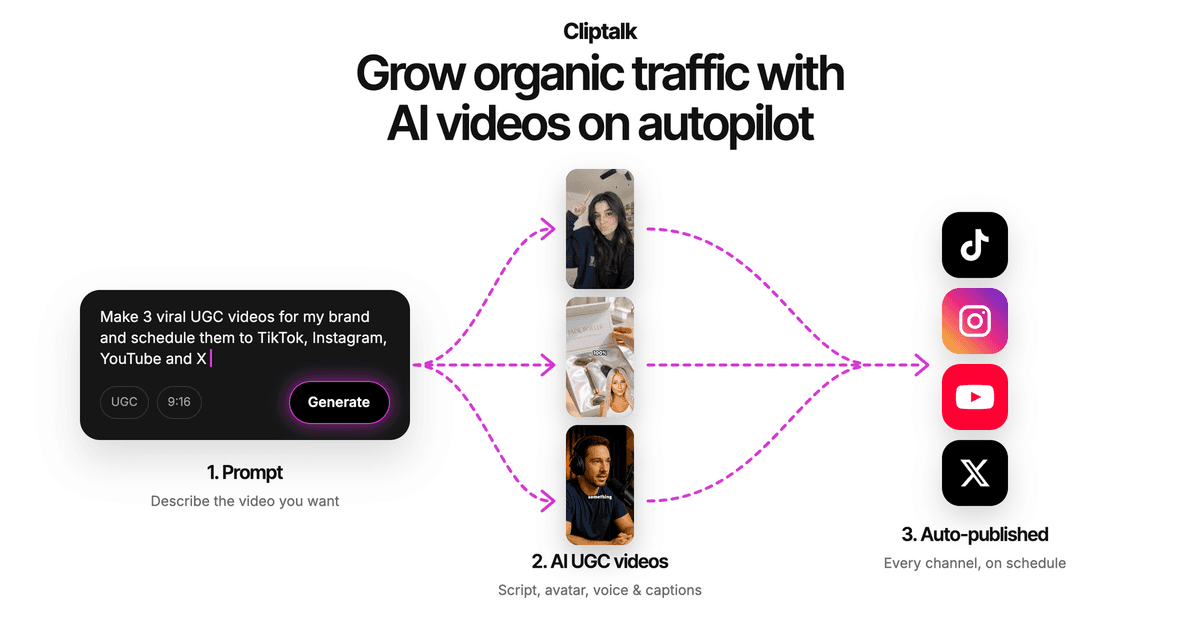
The free side is structured the way I wish more tools were:
- Free planning tools. Script and idea tools work with no signup, and the influencer designer allows unlimited re-rolls before you spend anything.
- Free renders. When you're ready, the free credits render real, postable videos rather than one locked trial.
- Character-led formats. Talking characters, AI influencers, and talking-cat videos give you a recurring personality, which addresses the "generic template" problem.
- Voice range. There are 140+ AI voices to choose from, so you aren't stuck with one stiff narrator.
You can browse the full set of free AI video tools and see which ones need credits and which don't.
It isn't a clipper, though. If your entire workflow is cutting hour-long podcasts into highlights, a dedicated clipper is the better fit for that job.
When it's time to pay
Free tiers stop making sense at a predictable point. Upgrade when any of these is true:
- You're posting on a schedule. Several shorts a week will outrun any free credit allowance, and your time costs more than a subscription.
- You need watermark-free output from a tool that watermarks its free plan. There's no workaround that's worth the reach you lose.
- You need voice cloning, brand caption styles, or commercial licensing for client or business work.
- You keep losing credits to failed or repeated renders. At that point, a plan with refunds on failed jobs and a real editor pays for itself.
Until then, use free tools for what they do well: scripting, testing a format, and producing your first handful of shorts. Treat the free tier as a way to prove a format works. Pay only once you know what you're scaling.
Tags: ai video, youtube shorts, faceless channels, short-form video, free tools