9 Best Free Reel Editing Apps for Creators
· 12 min read
If you want the short answer: the best free reel editing app depends on whether you already have footage. If you do, CapCut is still the strongest free timeline editor on phone and desktop. If you do not have footage and you are writing scripts instead of shooting, Cliptalk is the one I reach for, because it turns a script or an article into a finished vertical video with captions, B-roll, and an AI voiceover in one pass, and you can test it free without booking a demo.
I publish short-form video for a living, which means I have installed, used, and deleted a lot of editors. Most "best free reel app" lists are written by people who opened the App Store page and copied the feature bullets. This one is not. Below are nine apps I have actually pushed reels through, with the honest limits of each free tier, because free almost never means unlimited.
What actually matters in a free reel editor
Four things separate a usable free app from a trial in disguise:
- Captions that are accurate. Around 85% of social video is watched with the sound off, so auto-captions are not a nice extra. If the transcription is sloppy and you cannot restyle it, the app is costing you watch time.
- Watermark and export rules on the free plan. A watermark on a Reel reads as low effort and gets scrolled past. Check this before you invest an hour in a project file.
- Speed per video, not features per app. I care about how many reels I can finish in an hour. A tool with 400 effects and a slow timeline loses to a tool with 20 effects and a fast one.
- 9:16 as a first-class format. Vertical should be the default, with safe margins for the Instagram UI, not something you crop into at the end.
I judged all nine apps on those four, plus how well they held up when I was publishing daily instead of once a week.
The 9 best free reel editing apps
1. Cliptalk: best free option if you write more than you film
This is the tool that changed my output volume. Instead of opening a blank timeline, I paste a script, an article, or even a one-line prompt, and it builds the whole reel: scene-by-scene B-roll matched to the words, an AI voiceover, burned-in captions, and an editable timeline if I want to change anything. Voice cloning and AI characters are there when I want a consistent on-screen presence for a faceless channel, which is what most of my accounts are.
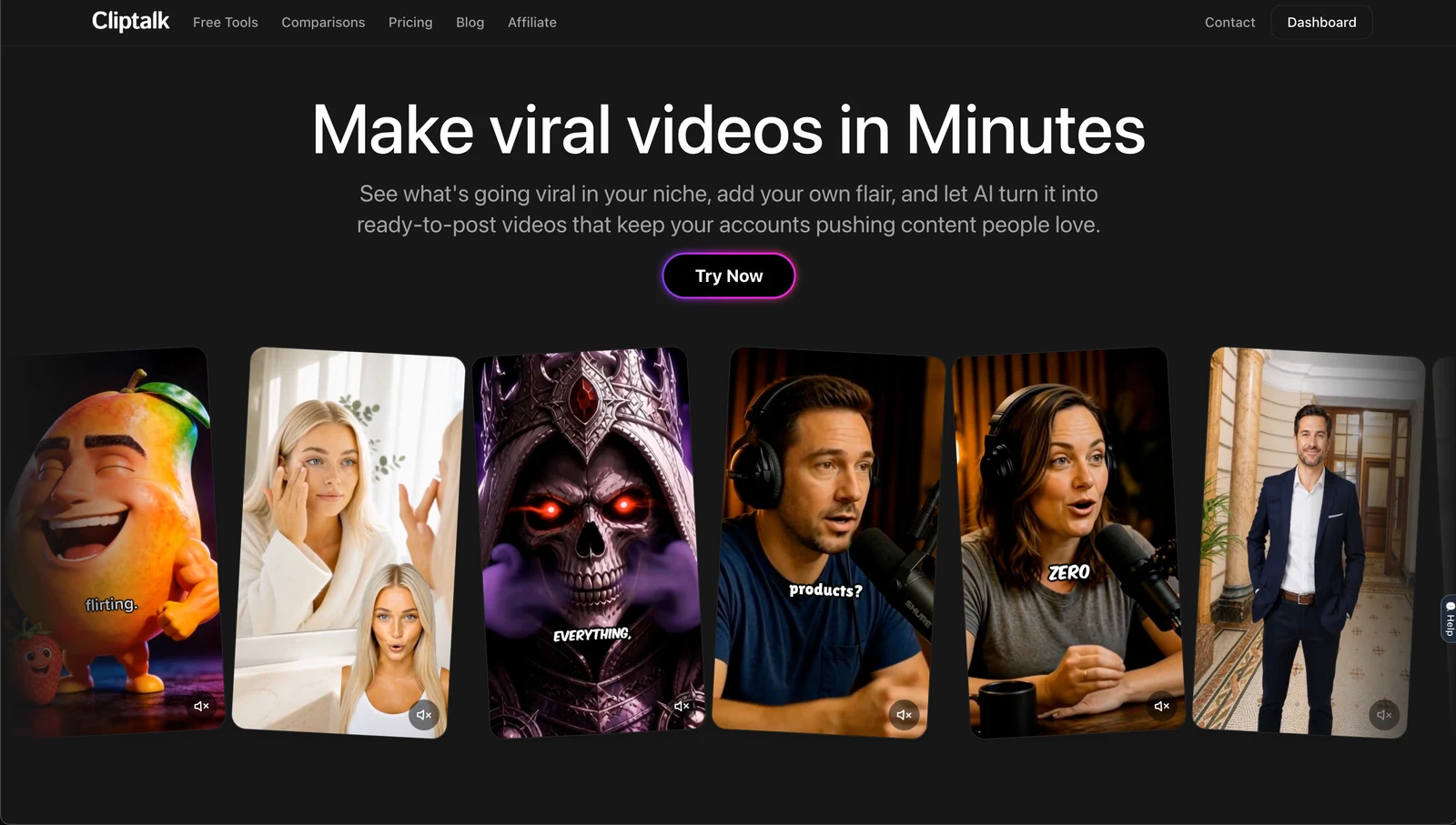
What I like most is that the editing decisions I would normally make by hand, cut timing, clip selection, caption pacing, are already made when the draft appears. I spend my time rewriting hooks instead of dragging clips. You can start from the free plan on cliptalk.pro and see whether the generated draft is close enough to your taste before paying anything.
Pros: script or article to finished reel in one step, auto-captions that are already styled for vertical, AI B-roll so you do not need stock footage skills, voice cloning and AI characters, full editor if you want manual control.
Cons: generation credits on the free tier run out if you are batching ten videos a day, and if your content is your own filmed footage with your own face, most of the AI features are not what you are paying for.
Best for: faceless channel operators, marketers repurposing blog posts, and creators who hate timelines.
2. CapCut: best free manual editor
CapCut is the default for a reason. The free tier gives you a real multi-track timeline, auto-captions, smart cropping to 9:16, keyframe animation, transitions, a big sticker and effects library, and trend templates you can drop clips into. It runs on phone, desktop, and in the browser, and projects sync between them.
Pros: genuinely free for the features most creators need, trend templates that match what is currently working, keyframes for animated text, strong auto-caption quality, no watermark on most standard exports.
Cons: the learning curve is real if you have never edited before, some effects and premium assets are paywalled behind Pro, and it is not available in India because of government policy, so a large chunk of creators cannot use it natively. Daily posting in CapCut is also slower than it looks, because everything is a manual decision.
Best for: creators with existing footage who want control and do not mind spending 20 to 40 minutes per reel.
3. VN Video Editor: best free app for color and manual precision
VN is the one I recommend to people who came from desktop editing and find CapCut limiting creatively. It is free and has features that used to be Premiere territory: HSL color adjustment, masking, overlays, picture-in-picture, keyframes, speed curves, reverse, and support for custom LUTs so you can import the exact color look other creators use. Export is customizable up to 4K and 60fps with high bitrate options.
Pros: the deepest free feature set on mobile, real color grading, LUT import, custom export settings so your uploads do not get crushed by compression.
Cons: occasional ads, and the interface assumes you know editing vocabulary. Captions and templates are weaker than CapCut, so it is not the fast-publishing choice.
Best for: creators who care about how their footage looks more than how fast it ships.
4. InShot: best free app for fast, simple cuts
InShot is what I use when I have one clip, 90 seconds, and a phone. Trim, speed, text, music, canvas ratio, done. No project structure to learn, no timeline stack to manage. It has been around long enough that it is stable and predictable, which matters more than it sounds.
Pros: fastest path from raw clip to posted reel, clean vertical presets, easy speed ramps and text, low friction on older phones.
Cons: ads and upgrade prompts in the free version, limited layering compared to CapCut or VN, and the effects library feels dated next to newer apps.
Best for: phone-only creators who shoot and post the same day.
5. Instagram's built-in Reels editor and Edits: best free native option
Instagram's own tools got much better once Edits arrived as a standalone app with AI features. Editing inside the ecosystem gives you two advantages you cannot buy elsewhere: full access to the trending audio library with correct licensing, and no export or re-upload step that can degrade quality.
Pros: free with no tiers, trending audio you can legally use, native captions, direct publish, no compression loss from importing an external file.
Cons: thin editing features compared to a real editor, no serious color or multi-layer work, and you cannot batch. It also encourages editing on the phone at the moment of posting, which is the enemy of consistency.
Best for: trend-driven creators who lean on audio and want zero friction.
6. Clipchamp: best free browser editor
Clipchamp is the option I point Windows users and anyone on a locked-down work laptop toward. It runs entirely in the browser, has an Instagram Reels preset, stock assets, auto-captions, and a straightforward timeline. Nothing to install, and projects live in the cloud.
Pros: no install, works on any machine, decent auto-captions, clean 9:16 templates, easy for complete beginners.
Cons: browser editing gets sluggish with long timelines or 4K source files, the stock library and premium filters are mostly gated, and it is not built for phone-first workflows.
Best for: desktop creators, marketers on managed laptops, and teams who need something with a five-minute learning curve.
7. Canva: best free app for branded, text-heavy reels
Canva keeps showing up in creator threads for a reason. It is not really a video editor, it is a design tool that exports video, and for carousel-style reels, quote reels, and anything driven by typography, that is the right tool. Brand kits keep fonts and colors consistent across a whole account, which is worth more than effects when you are posting five times a week.
Pros: the best template and typography library of anything on this list, brand kit consistency, animations, team collaboration, works in browser and on mobile.
Cons: premium elements are watermarked until you upgrade, timeline audio and frame-accurate trimming are clumsy, and it is not the tool for footage-driven storytelling.
Best for: brands, educators, and anyone whose reels are mostly text on screen.
8. OpusClip: best free tool for cutting long video into reels
If you already publish podcasts, webinars, or long YouTube videos, clipping is a different job from editing. OpusClip finds the segments likely to perform, reframes them to vertical, adds captions, and keeps brand styling consistent across the batch. I have used it to get a week of reels out of one hour-long recording.
Pros: real time savings on repurposing, automatic vertical reframing that tracks the speaker, captions included, batch output.
Cons: the free allowance is small, so the moment you rely on it you are on a paid plan. It also only works if you have long footage to begin with, and its picks still need a human to reject the flat ones.
Best for: podcasters, YouTubers, and anyone sitting on a library of long-form video.
9. Reel Maker: best free template app on iPhone
This iOS app is aimed squarely at reels and stories, and it has held a 4.7 rating across more than 8,000 reviews, which is unusually high for this category. The standout feature is AI Beat Sync: pick a song, choose a pace, and it cuts every clip to the beat automatically, then re-cuts on demand. It also bundles text-to-video, photo-to-video, and a talking avatar tool, plus a music library of over 250,000 tracks and 4K export with no watermark.
Pros: beat-synced cuts in seconds, large template and music library, AI generation tools built in, no sign-up required to start.
Cons: full usage needs a subscription, AI generations consume tokens that run down quickly, and there is no Android version.
Best for: iPhone creators making music-driven montage reels.
Free reel editing apps compared
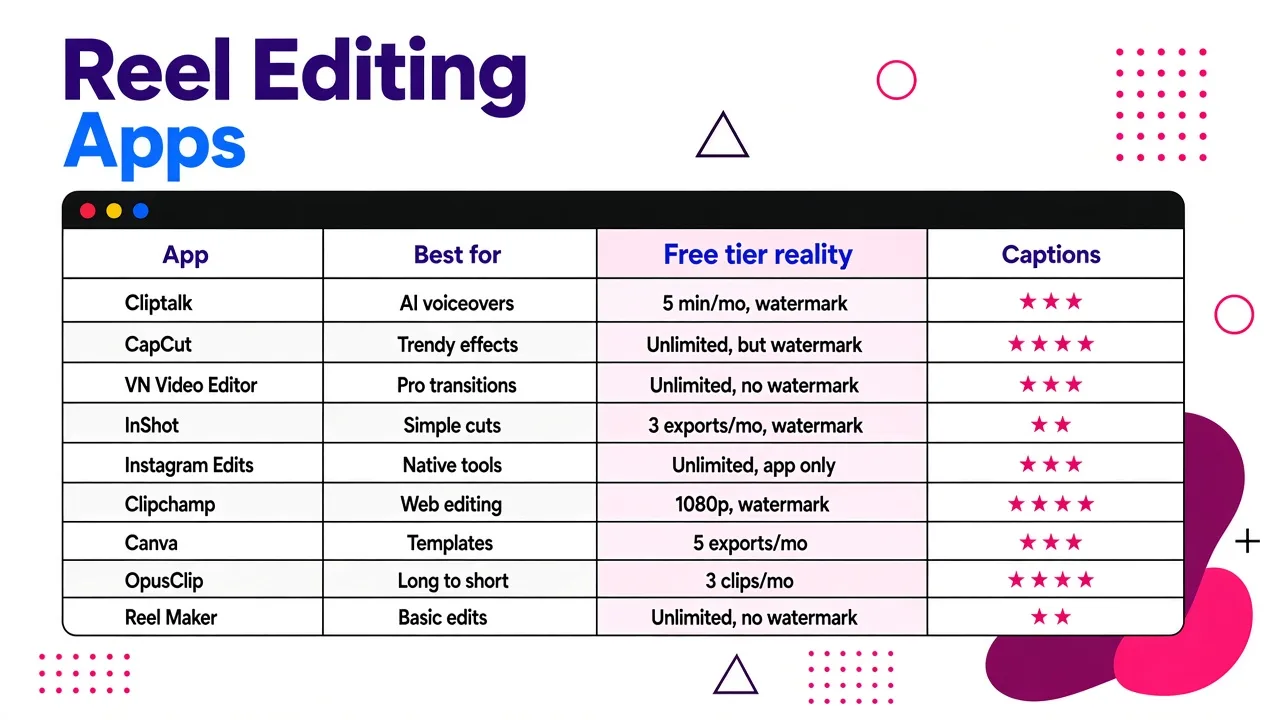
| App | Best for | Free tier reality | Captions |
|---|---|---|---|
| Cliptalk | Script or article to finished reel | Free to start, credit-limited | Auto, styled for vertical |
| CapCut | Manual editing with footage | Generous, some assets paywalled | Auto, strong |
| VN Video Editor | Color and precision | Free with occasional ads | Basic |
| InShot | Fast single-clip edits | Free with ads and upsells | Basic |
| Instagram Edits | Trending audio, native publish | Fully free | Native |
| Clipchamp | Browser editing on any laptop | Free, premium assets gated | Auto, decent |
| Canva | Text and brand-driven reels | Free, watermarked premium elements | Manual or auto |
| OpusClip | Clipping long video into reels | Small free allowance | Auto |
| Reel Maker | Beat-synced montages on iPhone | Free app, subscription for full use | Auto |
How to pick in 30 seconds
- You shoot your own footage and enjoy editing: CapCut, and VN when the look matters.
- You write scripts and do not want to appear on camera: an AI-first tool that assembles B-roll, voiceover, and captions for you. This is the category where my output went from two reels a week to daily.
- You have long videos already: OpusClip.
- Your reels are words on screen: Canva.
- You are chasing a trending sound today: Instagram's own editor.
- You need to edit on a work laptop: Clipchamp.
If you are mostly working from a phone, I compared the mobile-first options in more depth in our roundup of free AI video generator apps for phones, including which ones actually export clean on Android.
Free tier traps I have walked into
Watermarks that appear at export, not in preview. Always run one 10-second test export before you build a real project. I lost an evening to this on a template app whose watermark only showed in the rendered file.
Premium assets inside free templates. Canva and CapCut both do this. You pick a template, spend 15 minutes customizing, then discover two elements are locked. Swap them early.
Music licensing. A track being inside an app's library does not mean Instagram will not mute your reel. Native Instagram audio is the only fully safe route for trending music. For anything else, use the app's own licensed library rather than ripping audio.
Resolution and bitrate defaults. Several free editors export at a bitrate low enough that fast motion turns to mush after Instagram re-encodes it. If an app lets you set export settings, as VN does, push the bitrate up.
Credit cliffs on AI tools. Every AI editor, including the one I use daily, meters generations. The honest way to evaluate one is to check the plan limits against your posting volume before you build a workflow on top of it, not after.
The workflow I actually run
Batch on Sunday, publish daily. I write five scripts in one sitting, generate five drafts in an AI editor, then spend the remaining time only on hooks and captions, because the first two seconds and the on-screen text are what move retention. Anything that needs real filmed footage goes through CapCut separately, usually one hero reel per week rather than five.
The mistake I made for a year was treating every reel as a craft project. Two-thirds of your posts are volume, and volume needs automation. The remaining third is where manual editing earns its time.
Honorable mentions
Pictory for turning scripts into 9:16 videos with auto subtitles and AI voiceovers, useful if you are repurposing written content and want template-driven output. VideoGen for AI B-roll selection, which reads a script sentence by sentence and pulls matching clips from a library of more than four million, then assembles them with your voiceover. Templify for beat-synced template reels and AI captions on iOS. Prequel if stylized filters are your whole aesthetic, though at $12.99 a month with only a partial free version it is barely a free app. HeyGen if you specifically need talking avatars and want a real free tier to test with.
FAQ
What is the best completely free reel editing app? CapCut, if you have footage. Instagram's own editor if you want zero cost and zero friction. Neither will watermark a standard export, and both handle captions.
Can I make reels without filming anything? Yes, and this is now the most common workflow I see among people posting daily. A text-to-video tool generates B-roll, voiceover, and captions from a script, and you edit the draft rather than building from scratch. I broke down the options in our comparison of text-to-video AI generators.
Do free apps put watermarks on Instagram Reels? Some do, usually tied to premium templates or effects rather than the export itself. Test with a short render before committing to a project.
How long should editing a reel take? Once your workflow is set, 10 to 20 minutes for a footage-based reel and under 5 for a script-based one. If a single reel is taking you an hour every time, the tool is wrong for your volume, not your skill.
Tags: reel editing, video editing apps, free tools, short-form video, content creation